
Tax professionals 4.7/5(124 reviews)Trusted by 10,000+ finance teams
Get through tax season without the bottlenecks
Automatically extract and organize data from W-2s, 1099s, and financial documents so you can prepare returns faster and with fewer errors.
4.7/5(124 reviews)Trusted by 10,000+ finance teams14-day free trialNo credit card required
Tax season workflow
Stack of tax forms
Structured fields
Exported to workflow
W-2, 1099, 1040
and all major IRS form types supported
5s
Average extraction time per tax form
10K+
Tax professionals using DocuClipper
Used by tax preparers and accounting teams handling high-volume filings
Process hundreds of returns faster during peak season, with consistent, review-ready data from every client upload.
Tax resolution firms
Organize client financial records fast: bank and card statements, income documentation, and supporting PDFs turned into structured data for analysis, offers, and case work, without retyping every page.
The problem we solve
Tax season means too much manual work
- •W-2s and multiple 1099 forms for every client
- •Bank statements and supporting records to reconcile
- •Client-uploaded PDFs and scans in inconsistent formats
- •Manual data entry across forms and worksheets
- •Higher error risk, slower turnaround, and overwhelming workloads during peak months
Automate tax document data extraction
- Extract key fields from W-2s and 1099s automatically
- Standardize client data across documents
- Reduce repetitive data entry so staff can focus on review
- Prepare returns faster and more efficiently
- Spend time on accuracy and client service instead of typing
Core use cases for tax preparation teams
From individual W-2s to full client packets, structure everything you need for fast, accurate filings.
Extract W-2 data automatically
- Employee and employer information
- Wages and tax amounts
- State and federal details
Process 1099 forms at scale
- 1099-NEC, MISC, INT, DIV
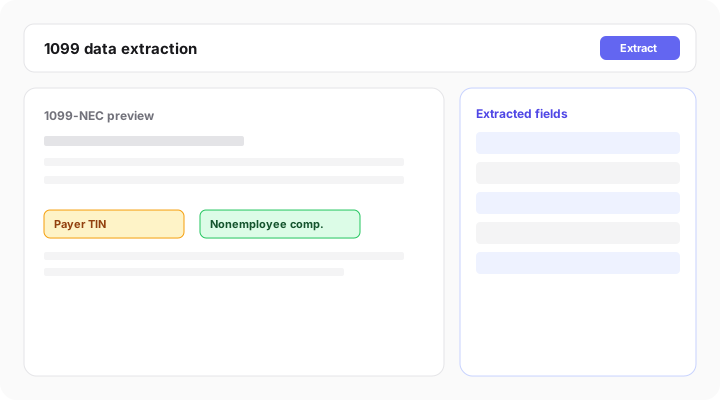
- Extract payer and income data
- Handle multiple forms per client
Organize client documents
- Standardize messy uploads
- Structure data consistently
- Reduce back-and-forth with clients
Handle high-volume workloads
- Batch process hundreds of documents
- Speed up peak season workflows
- Reduce turnaround time
Supporting docs like bank statements? Extract transactions and balances in the same workflow.
Built for tax document automation and OCR
No templates, batch throughput, and exports that match how preparers work.
No templates required
Works across different IRS forms automatically, no fragile layouts per form type.
Batch processing
Upload and process large volumes of tax documents when filings spike.
High accuracy extraction
Designed for financial and tax documents, not generic OCR that misses fields.
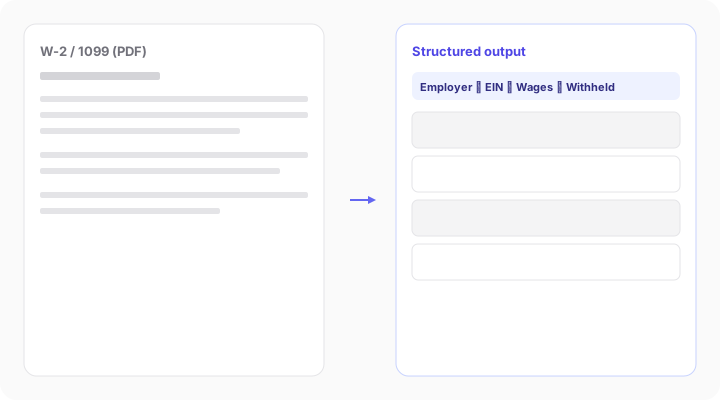
Structured data output
Clean, review-ready fields you can validate before they hit your return workflow.
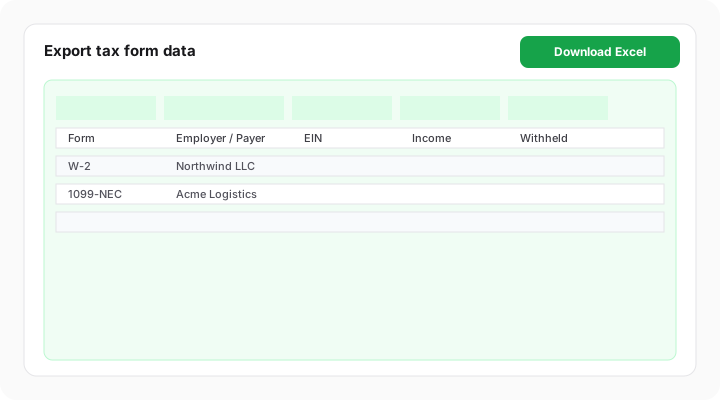
Export anywhere
Excel, CSV, QuickBooks, Xero, API, and webhooks, fit DocuClipper into your stack.
Export anywhere
How it works
From client PDFs to structured, export-ready tax data, without the spreadsheet grind.
1
Upload tax documents
Upload W-2s, 1099s, and supporting documents in bulk.
2
Extract data automatically
DocuClipper converts documents into structured data.
3
Review and validate
Quickly verify extracted fields before they enter your return workflow.
4
Export or use in your workflow
Send data to your tax software, spreadsheets, or systems via integrations.
Benefits during peak season
More throughput, fewer errors, and less burnout for your preparers.
Handle more returns
Increase capacity during tax season without proportionally increasing workload.
Reduce manual data entry
Eliminate repetitive typing from W-2s, 1099s, and supporting PDFs.
Improve accuracy
Minimize transcription errors that slow reviews and create filing risk.
Speed up turnaround time
Deliver completed returns faster when clients send documents in bulk.
Reduce stress during tax season
Work more efficiently under peak demand so your team avoids burnout.
From forms to structured output
W-2 and 1099 extraction, batch processing, and export-ready data, aligned with high-volume tax preparation.

Import client documents into any accounting platform
Push prior-year statements, supplier invoices, and receipts into the platform your client already uses.
What Tax Professionals Say
Trusted by tax preparers and CPAs handling high volumes during filing season.
“Docuclipper is a lifesaver every tax season. Time is limited, deadlines are looming, and clients keep sending documents late. DocuClipper to the rescue — upload the bank statements and literally hours of work are saved into a quickly usable format.”
JU
Julia J.
Accountant
“I love that I can just upload a year's worth of bank statements and be ready to file a client's tax return with a profit and loss in just a few hours instead of weeks!”
BE
Bethany R.
CEO
“I love that it takes seconds to upload bank and credit card statements for bookkeeping catch-up work that QBO does not sync for months behind the current period. Fantastic product!”
NA
Natasha B.
CPA
Why tax professionals choose DocuClipper
Versus manual entry and basic OCR that was not built for IRS forms.
| Feature | DocuClipper | Manual entry | Basic OCR |
|---|---|---|---|
| Extract W-2 & 1099 data | Limited | ||
| Handle multiple documents per client | Limited | ||
| Batch processing | Limited | ||
| Structured data output | |||
| Export-ready data | Limited |
Extract tax documents and organize client data automatically. Start your free 14-day trial.
Start free trialFrequently asked questions
Yes. DocuClipper extracts all key W-2 fields: employer name and EIN, employee name and SSN (last four digits), wages in boxes 1-20, federal and state withholdings, and Social Security and Medicare taxes. Output is structured per-field, not raw text.
Yes, including 1099-NEC, 1099-MISC, 1099-INT, 1099-DIV, 1099-R, 1099-G, and other common variants in client tax packets. DocuClipper identifies the form type automatically and extracts the relevant boxes.
Yes. Batch processing is fully supported so you can queue large uploads during peak season. Upload a ZIP of W-2 and 1099 PDFs and DocuClipper returns structured data for each form in a single pass.
Yes. Both scanned and digitally generated PDFs are supported. Built-in OCR handles low-quality scans, hand-annotated forms, and multi-column layouts common in older tax documents.
Yes. Many tax preparers use DocuClipper to extract bank and credit card transactions for clients who need income/expense summaries for Schedule C or business returns. The transaction data exports to Excel or QuickBooks for categorization.
Yes. Export extracted form data as Excel or CSV for import into your tax software. QuickBooks and Xero integrations are also available for clients whose books run through those platforms. The API supports automated ingestion for high-volume practices.