
Check Image OCR 4.7/5(120+ reviews)Trusted by 10,000+ finance teams
Check Image OCR Software
DocuClipper reads scanned check images and extracts every field, MICR routing number, account number, check number, payee name, amount, and date, automatically. Export structured check data to Excel, CSV, or downstream systems. No manual keying, no templates.
4.7/5(120+ reviews)Trusted by 10,000+ finance teams14-day free trialNo credit card required
Last updated:
Trusted by 10,000+ Accounting, Lending, and Finance Professionals













What check image OCR extracts
- MICR line: routing number, account number, and check number from the bottom of every check.
- Payee name from the 'Pay to the order of' line.
- Written and numeric dollar amounts, cross-validated for consistency.
- Check date and memo field.
- Bank name and payer name where present on the check face.
- Works on front-of-check scans, front+back, and mobile check photos.
- Auto-fills payee and memo onto matching 'Check #N' rows when checks are processed alongside a bank statement in the same project.
How check image OCR works
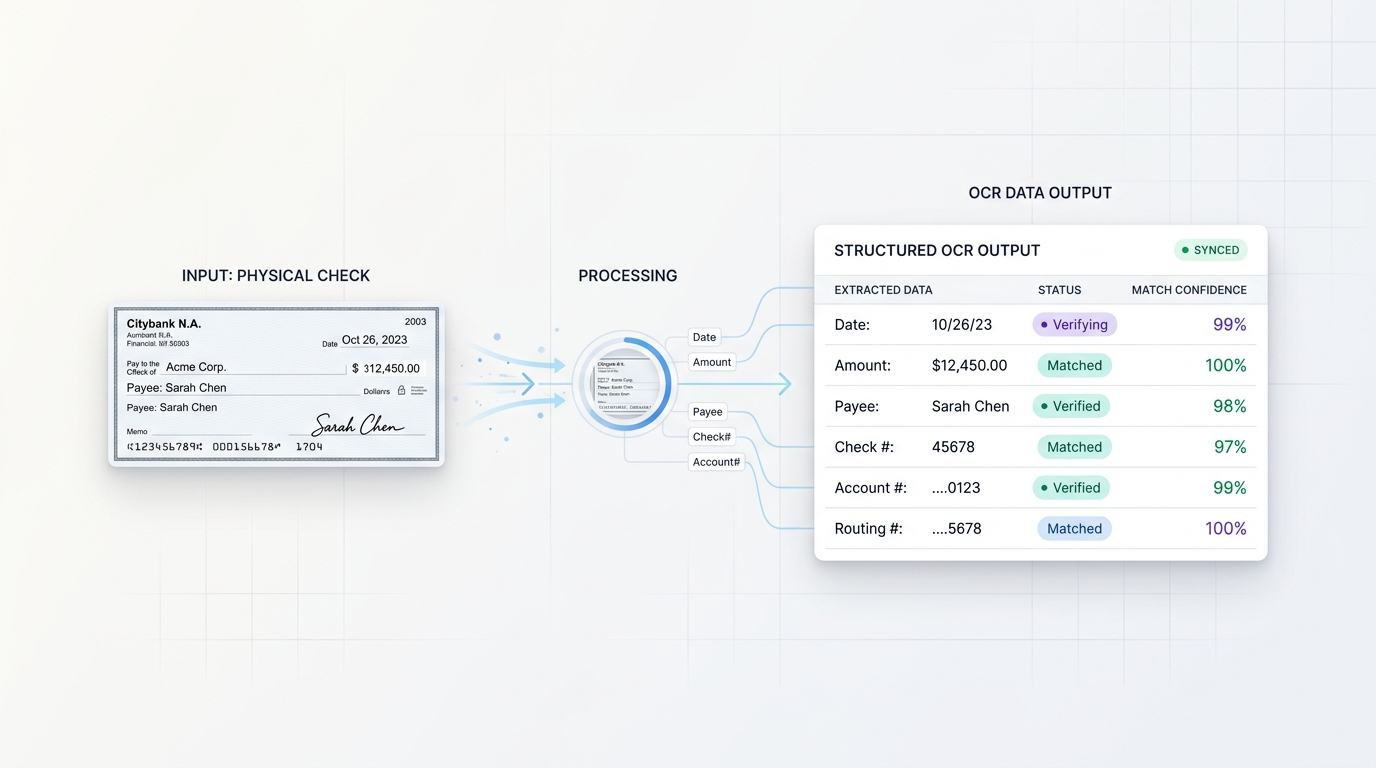
Upload images, extract all fields, export structured data.
→
Upload check images
Upload JPG, PNG, TIFF, or PDF check scans, single checks or bulk batches. Front-only or front+back supported.
→
OCR reads every field
AI reads the MICR line, payee, amount, date, and check number. Numeric and written amounts are cross-validated automatically.
→
Validate & review
Extracted fields are validated in-app. Amount discrepancies, unreadable MICR lines, and missing fields are flagged for review.
Export structured data
Download extracted check data to Excel or CSV, or push to your accounting system or payment platform via API.
Why DocuClipper for check image OCR
Purpose-built for financial check processing, not generic document OCR.
Full MICR line extraction
Reads the MICR line at the bottom of every check: routing number (9 digits), account number, and check number, the three fields lockbox and payment processing workflows need.
Amount cross-validation
Compares the written dollar amount against the numeric figure and flags any discrepancy before export, catching data entry errors automatically.
Bulk check processing
Process hundreds or thousands of check images in a single batch. Useful for lockbox processing, check clearing backlogs, and AP payment verification.
Any image quality
AI-powered OCR handles faded ink, skewed scans, low-resolution mobile photos, and aged checks, not just perfect flatbed scans.
Works without templates
No per-bank or per-check-type templates required. DocuClipper reads check images from any issuing bank automatically.
Auto-fill bank-statement check rows
When check images are processed alongside a bank statement in the same project, DocuClipper matches each parsed check to its 'Check #N' row primarily by check number and amount. Because it keys on check number plus amount, it still matches when the check's handwritten written date differs from the bank's clearing date by weeks; if several rows share the same check number and amount, the statement date and account disambiguate. Payee and memo from the check image are written onto the matching transaction row, so reconciliation and categorization downstream see the enriched description automatically — no manual relabeling.
SOC 2 & secure processing
AES-256 encryption and SOC 2 compliance. Check images and extracted data are processed and stored securely, critical for financial institutions.
Every field extracted from every check
DocuClipper outputs a clean, structured record for each check image processed.
| Field | Source on check | Extracted value (example) |
|---|---|---|
| Routing number | MICR line | 021000021 |
| Account number | MICR line | 4012345678 |
| Check number | MICR line + top right | 1042 |
| Payee name | 'Pay to the order of' line | Acme Supplies Inc. |
| Amount (numeric) | Numeric box | $1,250.00 |
| Amount (written) | Written line | One thousand two hundred fifty and 00/100 |
| Date | Date field | 04/15/2025 |
| Memo | Memo line | Invoice #4501 |
| Payer name | Top left of check | John Smith |
All fields export to Excel or CSV columns, or route via API to downstream payment and accounting systems.
Who uses check image OCR
Lenders & mortgage companies
- Extract MICR routing and account numbers from borrower-submitted check images during loan origination.
- Verify payee and amounts on checks submitted as down payment or earnest money proof.
- Process large volumes of checks without manual data keying.
Accountants & bookkeepers
- Extract check data from client check copies and post to QuickBooks or Xero.
- Build a digital record of paper check payments from check images.
- Process AP payment checks in bulk for monthly reconciliation.
Finance & AP teams
- Digitize paper check archives: extract all fields and store structured records.
- Verify check amounts match AP payment records before clearing.
- Route extracted check data into payment processing or ERP systems via API.
What Customers Say
Real reviews from accountants, bookkeepers, and finance teams.
“DocuClipper has helped us eliminate several manual data entry processes, saving us a lot of time.”
KR
Kristin Mitchell
Accounting, United States
“It's a complete game-changer. Instead of spending hours combing through statements, we get the data we need almost instantly.”
MA
Matt
Lending, United Kingdom
“DocuClipper allowed us to enhance our advisory services, directly impacting our bottom line.”
SA
Sarah Winship
Accounting, United Kingdom
Ready to try it? Start your free 14-day trial, no credit card required.
Start free trialRelated document and extraction tools
Bank statement OCR
Extract transactions from bank statement PDFs, date, description, amount.
Learn moreBank statement converter
Convert PDF bank statements to Excel, CSV, QuickBooks, or Xero.
Learn moreInvoice OCR
Extract vendor, line items, and totals from PDF and scanned invoices.
Learn moreReceipt OCR
Extract merchant, total, tax, and line items from receipts.
Learn moreAI document parser
Custom field extraction for non-standard financial document formats.
Learn moreIntelligent document processing
Full IDP platform for bank statements, invoices, receipts, checks, and tax forms.
Learn moreCheck Image OCR FAQs
Check image OCR software reads scanned check images and extracts structured data from them, including the MICR line (routing number, account number, check number), payee name, dollar amount, date, and memo. The extracted data can be exported to Excel, CSV, or routed to downstream payment or accounting systems.
Yes. DocuClipper extracts the full MICR line from check images: the 9-digit routing number (transit number), the account number, and the check number. These are the core fields needed for payment processing and lockbox workflows.
DocuClipper processes JPG, PNG, TIFF, and PDF check images. Both front-only and front+back check scans are supported. Mobile check photos are also supported, though higher-resolution scans yield more accurate MICR extraction.
Yes. DocuClipper cross-validates the numeric dollar amount against the written dollar amount on each check and flags any discrepancy for review before export.
Yes. Bulk image uploads are supported so you can process dozens or hundreds of check images in one session. API ingestion is also available for automated check processing pipelines.
Extracted check data exports to Excel (.xlsx) or CSV. API integration is available to route structured check data directly to your payment platform, accounting system, or loan origination system.
Yes. When you upload check images alongside a bank statement in the same project, DocuClipper matches each parsed check to its corresponding 'Check #N' row on the statement primarily by check number and amount. When that pair uniquely identifies one row, it matches even if the check's handwritten written date differs from the bank's clearing date by weeks; if multiple rows share the same check number and amount, the statement date and account are used to disambiguate. Payee and memo from the check image are then written onto the matching row, so reconciliation and categorization see the enrichment automatically.
No. When a bank-statement PDF contains check-image pages (scanned pictures of cleared checks), DocuClipper automatically detects those pages and excludes them from the transaction ledger, so they never add duplicate or overstated rows — you do not have to split the PDF or manually deselect pages. The check detail is extracted separately and matched back to the existing 'Check #N' line on the statement, so each check enriches one ledger row rather than creating a new one.
Lenders and mortgage companies use it to extract MICR data from borrower-submitted check images. Accountants use it to digitize paper check records. Finance and AP teams use it to build structured records from check archives and verify payment amounts before reconciliation.