
Document Fraud Detection Software 4.7/5(124 reviews)Trusted by 10,000+ finance teams
Document Fraud Detection Software for Financial Documents
Detect fake or altered bank statements, invoices, and pay stubs. DocuClipper checks math consistency, visual anomalies, and PDF metadata in parallel, then returns a fraud confidence score with per-signal documentation. Used by lenders, forensic accountants, and AP compliance teams.
4.7/5(124 reviews)Trusted by 10,000+ finance teams14-day free trialNo credit card required
Trusted by 10,000+ Accounting, Lending, and Finance Professionals













What fraud detection analyzes
- Scans bank statements for transaction manipulation: altered amounts, inserted or deleted rows, balance inconsistencies.
- Detects document-level fraud signals: font inconsistencies, metadata anomalies, pixel-level alterations.
- Verifies mathematical consistency: transaction totals against opening and closing balances.
- Identifies suspicious transaction patterns: round-number clustering, unusual timing, recurring anomalies.
- Flags fake or altered invoices: mismatched vendor details, altered line items, inconsistent totals.
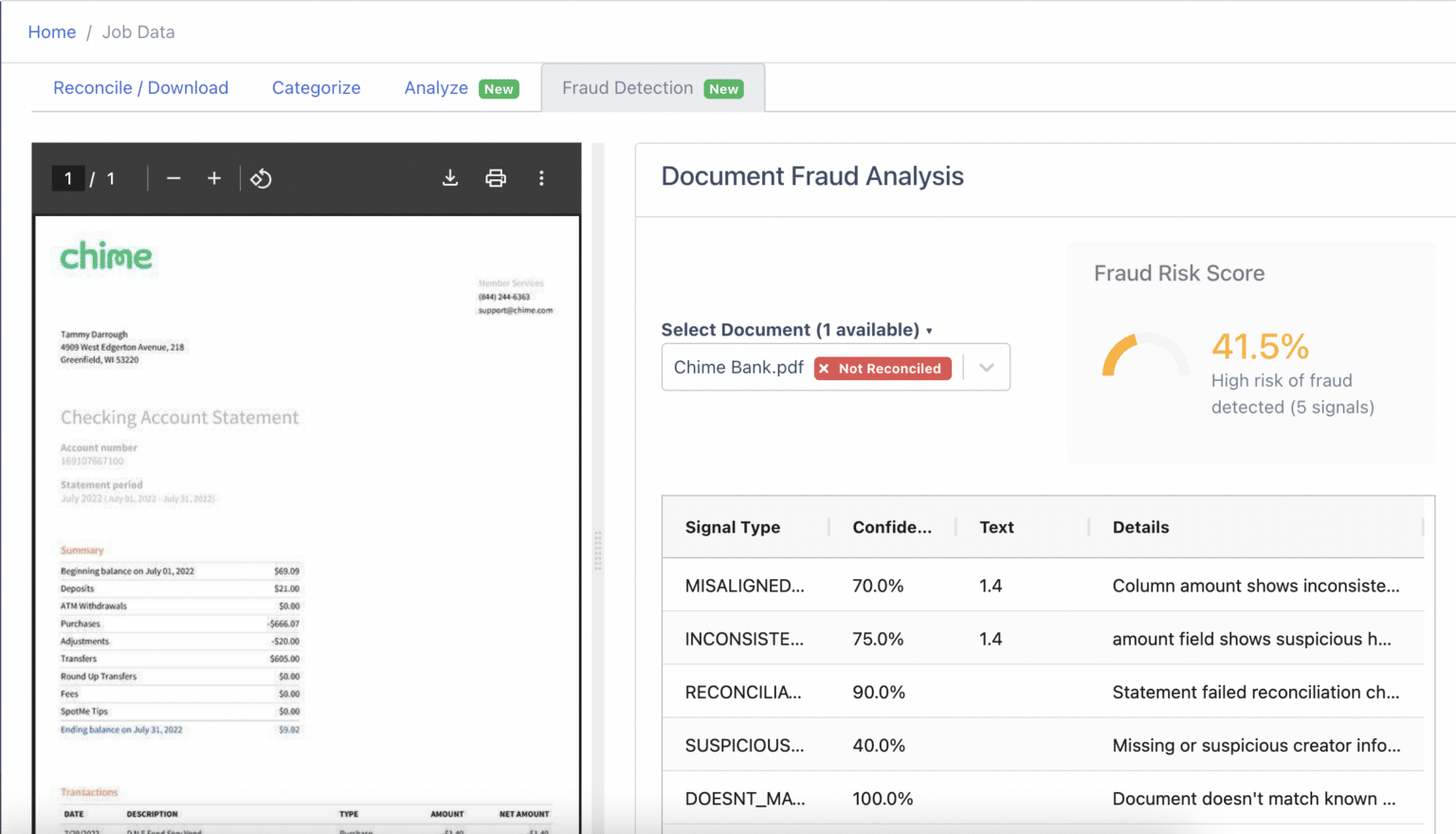
- Produces a structured fraud score and signal report for each analyzed document.
How document fraud detection works
Upload, analyze, and get a structured fraud report.
→
Upload financial documents
Upload bank statements, invoices, or other financial documents, PDF or image format, single or batch.
→
Extract & parse
OCR extracts all transactions, fields, and document metadata. Balances, dates, and amounts are fully parsed.
→
Multi-layer fraud analysis
Checks mathematical consistency, transaction patterns, font uniformity, and metadata, multiple independent fraud signal layers.
Fraud score & report
Receive a fraud confidence score, itemized signal list, and flagged locations within the document for review.
What DocuClipper fraud detection covers
Multiple fraud signal layers, not just a single check.
Balance consistency checks
Verifies that every transaction adds up correctly from opening to closing balance. Any gap flags a potential alteration.
Visual anomaly detection
Detects font inconsistencies, character spacing irregularities, and pixel-level alterations that indicate document tampering.
Pattern-based signals
Identifies suspicious transaction patterns: round-number clustering, unusual timing, outlier amounts, and artificially clean periods.
Metadata analysis
Analyzes PDF metadata, creation software, modification dates, author fields, for signs of third-party editing tools.
Fraud confidence score
Each document receives a fraud confidence score with an itemized breakdown of signals found, ranked by severity.
Audit-ready reports
Structured fraud reports exportable to PDF or Excel, ready for compliance review, underwriting files, or legal proceedings.
Who uses fraud detection software
Lenders & mortgage teams
- Verify bank statements submitted by loan applicants before underwriting.
- Detect income inflation, balance manipulation, and transaction insertion.
- Reduce fraud-related loan losses with automated pre-screening.
Forensic accountants
- Analyze financial documents submitted in litigation or investigations.
- Identify altered invoices, falsified statements, and fabricated transactions.
- Produce court-ready fraud reports with itemized signal documentation.
AP & finance compliance teams
- Screen vendor invoices for falsification before payment approval.
- Detect duplicate invoice fraud and altered amount schemes.
- Maintain a documented fraud screening audit trail for compliance.
What Customers Say
Real reviews from accountants, bookkeepers, and finance teams.
“DocuClipper has helped us eliminate several manual data entry processes, saving us a lot of time.”
KR
Kristin Mitchell
Accounting, United States
“It's a complete game-changer. Instead of spending hours combing through statements, we get the data we need almost instantly.”
MA
Matt
Lending, United Kingdom
“DocuClipper allowed us to enhance our advisory services, directly impacting our bottom line.”
SA
Sarah Winship
Accounting, United Kingdom
Ready to try it? Start your free 14-day trial, no credit card required.
Start free trialRelated fraud and analysis tools
Bank statement analyzer
Deep analysis of bank statement data, cash flow, income, fraud signals.
Learn moreBank statement OCR software
Pull transactions and balances out of any bank statement PDF before running fraud checks.
Learn moreIncome verification
Verify income and cash flow from bank statement data.
Learn moreForensic accounting software
Transaction tracing and flow-of-funds analysis for investigations.
Learn moreFinancial investigations
Full investigative toolkit for financial document analysis.
Learn moreBank statement OCR
Extract transaction data from any bank statement PDF.
Learn moreDocument fraud detection
Document Fraud Detection
Document fraud is rarely caught by a single check. Tampered amounts may pass a visual review but break the math; doctored PDFs may reconcile but leave a metadata trail. DocuClipper runs all three layers — math, visual, metadata — on every upload.
- Tampered text detection: pixel-level analysis flags fonts, kerning, or characters that don't match the rest of the document.
- Balance manipulation detection: every transaction must reconcile from opening to closing balance, broken math = fraud signal.
- Metadata anomaly checks: PDF creation software, modification dates, and author fields are inspected for editing-tool fingerprints.
- Layered approach: a tampered document usually fools one check, not five — DocuClipper runs them all in parallel.
- Works on PDFs and scans: image-based PDFs go through OCR first, then through the fraud signal pipeline.
Three layers, every document
Math layer
Transaction sums must reconcile from opening to closing balance.
Visual layer
Fonts, kerning, and pixel-level spacing checked across the whole page.
Metadata layer
PDF producer, modification date, and editing-tool fingerprints inspected.
Fake document checker
Fake Document Checker
The most common fraud document types — fabricated bank statements, altered invoices, fake pay stubs — share patterns the model has been trained to catch. Upload one document or batch-screen hundreds.
- Fake bank statements: detects fabricated balances, inserted transactions, and statements built from blank templates.
- Fake invoices: catches altered amounts, mismatched vendor / bank details, and round-number patterns typical of fabricated invoices.
- Fake pay stubs: checks gross/net math, withholding ratios, and YTD totals against pay period.
- Confidence-scored output: 0–100 fraud risk score per document, with each contributing signal listed by severity.
- Bulk screening: upload a batch of applicant documents, get a triage list back ranked by risk in minutes.
Sample fraud signal report
⚠ Balance reconciliation failed
Transactions sum to $12,847.32; closing balance shows $13,200.00. Gap: $352.68.
⚠ Font inconsistency detected
Page 2, transaction row 7: amount field uses Arial; rest of statement uses Helvetica.
⚠ PDF metadata anomaly
Modified 3 days after creation; producer field references “Adobe Acrobat Pro DC”.
Fraud confidence score
87 / 100
OCR fraud detection
OCR Fraud Detection: Beyond Extraction
Generic OCR converts a document to text. That tells you what's on the page, not whether it's honest. DocuClipper combines OCR with fraud-signal analysis so the same upload that gives you data also gives you a risk verdict.
OCR isn't enough on its own — extracting text doesn't tell you if the text was honest. Fraud detection lives on top of the OCR layer.
After extraction, DocuClipper validates the data internally (totals tie, balances reconcile) and visually (fonts, spacing, colors).
Every flagged document includes the specific page region triggering the alert so a human reviewer knows where to look.
Designed to be auditable: every check, signal, and score is logged for compliance and legal proceedings.
Available via API for integration into existing underwriting, KYC, and fraud-ops pipelines.
Fraud Detection Software FAQs
DocuClipper analyzes bank statements and financial documents for fraud signals including balance manipulation, transaction alteration, font inconsistencies, metadata anomalies, and suspicious transaction patterns. It produces a fraud confidence score and an itemized signal report for each document.
Yes. DocuClipper checks for mathematical inconsistencies (transactions that don't add up to the stated balance), visual anomalies (font changes, pixel alterations), metadata signs of document editing, and suspicious transaction patterns. Multiple independent checks make it harder to fool than single-method detection.
Yes. Lenders commonly use DocuClipper to verify bank statements submitted by loan applicants before underwriting. It screens for income inflation, balance manipulation, and artificially inserted transactions, reducing fraud-related loan losses.
Yes. DocuClipper can analyze invoices for falsification signals, altered amounts, mismatched vendor details, inconsistent line-item totals, and metadata anomalies, in addition to bank statement fraud analysis.
The fraud confidence score is a 0–100 rating that indicates the likelihood that a document has been tampered with. A higher score means more fraud signals were detected. The score is accompanied by an itemized list of specific signals found, each with a severity rating.
The fraud reports are structured and exportable to PDF or Excel, with itemized signal documentation. They are designed to be auditable and can support legal proceedings, underwriting file documentation, and regulatory compliance reviews.
Basic OCR converts a document to text or structured data. Fraud detection goes further: it validates the data for internal consistency, compares it against expected patterns, analyzes the document visually and at the metadata level, and produces a fraud risk assessment, not just extracted data.