
Fidelity statement converter 4.7/5(120+ reviews)Trusted by 10,000+ finance teams
Convert Fidelity Statements to Excel
Brokerage, IRA, 401(k), and CMA statements turned into structured Excel or CSV. Holdings and activity cleanly separated, cost basis preserved, household statements split per account.
4.7/5(120+ reviews)Trusted by 10,000+ finance teams14-day free trialNo credit card required
Quick answer
To extract holdings and transactions from a Fidelity statement: upload the Fidelity PDF to DocuClipper, which auto-detects Fidelity and reads the Holdings, Activity, Investment Income, and Account Summary sections into separate Excel sheets. Each holding row carries symbol, security name, quantity, price, cost basis (where Fidelity prints it), and market value; each activity row carries date, type, security, quantity, and amount. Brokerage, Traditional and Roth IRA, Rollover, 401(k), and Cash Management Account (CMA) statements are all supported, with combined household statements split per account. Scanned and digital PDFs both work, and period totals are reconciled against the printed Account Summary before export to Excel, CSV, or JSON.
Trusted by accountants, advisors, and finance teams













Used by Fidelity-account professionals
Wealth AdvisorsTax PreparersForensic AccountantsFamily Offices
All Fidelity formats
Brokerage, IRA, 401(k), CMA, household
Holdings + Activity + Income
Three structured tables per statement
Excel, CSV, JSON
Export formats
Every Fidelity Statement Format
A single converter for every Fidelity statement type. Auto-detection picks the right extractor; you don't pick anything.
Brokerage
Standard taxable brokerage account: holdings with cost basis, activity, dividends, and period summary.
Retirement (IRA, Roth IRA, Rollover IRA, SEP)
Same blocks as brokerage, with cost basis often blank. Distributions and contributions land in Activity.
Fidelity 401(k) / 403(b) / 457
Workplace retirement statements with contributions, employer match, and per-fund position lines.
Cash Management Account (CMA)
Banking + brokerage hybrid. CMA debits and credits are tagged distinctly so they don't get conflated with trades.
Mutual Fund Only
Held-direct accounts (FundsNetwork, FBS) with per-fund holdings and reinvested-dividend handling.
Combined Household Statement
Multi-account households (joint brokerage + IRAs + custodial) split per account with the source account number on every row.
What Gets Extracted From a Fidelity Statement
The four blocks Fidelity prints, mapped to four structured tables.
Holdings
Per-position rows: symbol, security name, quantity, price, cost basis (when printed), market value, unrealized gain/loss, and asset class.
Activity
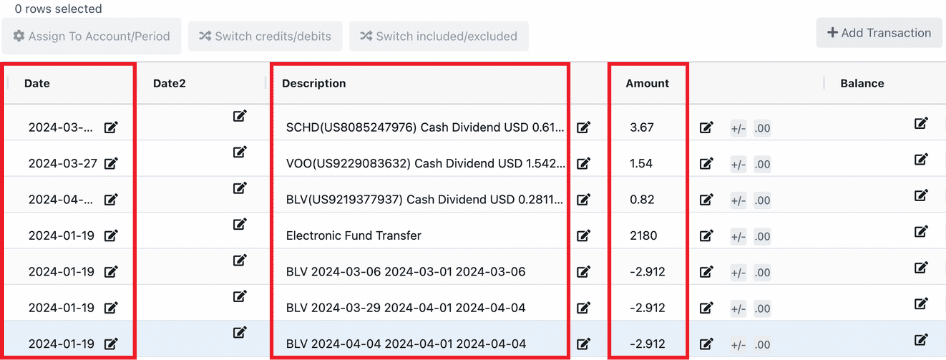
Buys, sells, dividends, interest, transfers, distributions, contributions, fees, and CMA cash movements with date, type, security, quantity, and amount.
Investment Income
Dividend, interest, and capital-gains distributions broken out per security, separated from reinvested-purchase rows so totals don't double-count.
Account Summary
Period start, period end, starting value, ending value, net change, total deposits, and total withdrawals reconciled against the Activity sheet.
Fidelity-Specific Edge Cases We Handle
The patterns that trip up generic OCR tools but are normal on a Fidelity statement.
“Journaled” shares between accounts
Internal transfers between your own Fidelity accounts (common when a position moves from a taxable brokerage to an IRA) appear as Journaled in the statement. DocuClipper tags these as type `transfer` so they don't get counted as buys or sells.
Reinvested dividends
Mutual fund and ETF dividend reinvestment prints as two lines on a Fidelity statement: the Income row (the dividend) and the Activity row (the reinvested purchase). Both are extracted, with a flag so you can avoid double-counting in cash-flow analysis.
Cash Management Account (CMA) lines
CMA debits and credits land in the Activity sheet as type `cma_debit` / `cma_credit`. Filter them out for a trading-only view, or keep them in for full cash reconciliation.
Margin interest and fees
Margin interest charges, account fees, and 12b-1 fees are extracted into Activity with type `interest_charge` or `fee` so they're not conflated with investment income.
Combined household statements
Every row carries the source account number, so a single household statement with joint brokerage + two IRAs + a custodial account splits cleanly into per-account workbooks.
Cost basis on retirement accounts
Fidelity prints cost basis on most taxable brokerage holdings. Retirement accounts (IRA, 401k) often omit it. The Holdings column will be blank in those cases rather than guessed.
How It Works
- 1
Upload the Fidelity PDF
Drop a digital download from Fidelity.com or a scanned/photographed mailed statement onto the upload area. Password-protected statements are supported.
- 2
Auto-detect and extract
DocuClipper detects Fidelity, identifies whether it's brokerage / IRA / CMA / household, and extracts each block into a separate structured table.
- 3
Reconcile
Activity sums are cross-checked against the printed Account Summary. Any discrepancy is flagged before export.
- 4
Export to Excel or CSV
Download an .xlsx workbook with one sheet per block, or pull each sheet as CSV. JSON is available via the API for programmatic workflows.
What Finance Teams Say
Real reviews from accountants and advisors using DocuClipper.
“DocuClipper has helped us eliminate several manual data entry processes, saving us a lot of time.”
KR
Kristin Mitchell
Accounting, United States
“It's a complete game-changer. Instead of spending hours combing through statements, we get the data we need almost instantly.”
MA
Matt
Lending, United Kingdom
“DocuClipper allowed us to enhance our advisory services, directly impacting our bottom line.”
SA
Sarah Winship
Accounting, United Kingdom
Frequently asked questions
Yes. Auto-detection covers Fidelity brokerage, Traditional and Roth IRA, Rollover IRA, SEP, 401(k), 403(b), and 457 statements. The same Holdings / Activity / Income / Summary structure is extracted from each, with cost basis populated where Fidelity prints it (typical for taxable brokerage; often blank for retirement accounts).
CMA statements are handled. CMA-specific cash movements (debits, credits, bill pay, ATM withdrawals) are extracted into the Activity sheet with type `cma_debit` or `cma_credit`, so you can keep them in for cash reconciliation or filter them out for a trading-only view.
Yes. Fidelity household statements that combine joint brokerage + IRAs + custodial + 401(k) are supported. Every extracted row carries the source `account_number`, so you can pivot per account or split into separate workbooks.
Yes. Mailed statements and scanned copies run through OCR before extraction. Image quality matters at the edges (dim or skewed scans extract less cleanly), but a flat scan or a sharp phone photo of each page works.
Yes, when Fidelity prints cost basis on the Holdings page, which is typical for taxable brokerage accounts. Retirement accounts (IRA, 401(k)) often omit cost basis on the statement, in which case the column is left blank rather than guessed.
Fidelity.com lets you export current Holdings and recent Activity to CSV from inside the portal, but only for the live account view, only the period the portal exposes, and only one account at a time. DocuClipper works on the PDF statement itself, so it covers any historical period for which you still have the PDF, runs across multiple accounts in one upload, and produces a consistent schema across brokers if you also hold accounts at Schwab, Vanguard, or Merrill.
Yes. Drop twelve monthly Fidelity PDFs in one batch. DocuClipper produces one workbook per statement, or you can merge them into an annual workbook for portfolio-review and tax-prep work. For recurring uploads, the watched Google Drive folder is the cleanest path.
No. A Fidelity brokerage statement is the monthly or quarterly account statement (holdings + activity). The 1099-B is a year-end tax form covering realized sales. DocuClipper extracts the brokerage statement here; tax-form extraction is a separate product.
Those use slightly different statement templates. Standard Fidelity brokerage and retirement formats are auto-detected; less-common Fidelity entities may fall back to a generic extraction. If you hit one, contact us and we'll add the template.
Convert other broker statements: All brokers · Schwab · Vanguard · Merrill Lynch · Edward Jones · How to read a brokerage statement