
Invoice Scanning 4.7/5(117+ reviews)Trusted by 10,000+ finance teams
Invoice Scanning Software for Accountants and AP Teams
Scan invoices in seconds. DocuClipper reads any PDF, photo, or email-forwarded invoice and extracts vendor, dates, totals, tax, and full line items. Export to QuickBooks, Xero, Excel, or CSV. 99.9% accurate, no per-vendor templates, trusted by 10,000+ teams (4.7 stars on G2).
4.7/5(117+ reviews)Trusted by 10,000+ finance teams14-day free trialNo credit card required
Last updated:
Trusted by 10,000+ Accounting, Lending, and Finance Professionals













What invoice scanning software does
- Reads digital PDFs, scanned PDFs, photos, and email-forwarded invoices.
- Extracts vendor, invoice number, issue date, due date, subtotal, tax, and grand total.
- Captures every line item: description, quantity, unit price, line total, and tax.
- Posts directly to QuickBooks Online or Xero as bills with full line-item detail.
- Exports structured data to Excel, CSV, Google Sheets, or JSON via API.
- Handles bulk uploads, scan a month of invoices in one session.
How invoice scanning works
Upload, extract, review, export, in seconds per invoice.
→
Upload or forward invoices
Drag in PDFs or photos, forward invoices by email, or pull from Google Drive. Bulk uploads supported.
→
Extract every field
OCR plus AI captures vendor, dates, totals, tax, and line items with 99.9% field-level accuracy.
→
Review and approve in batch
Side-by-side review screen with confidence scores. Fix outliers, approve the rest in one pass.
Export to your accounting system
Push to QuickBooks Online or Xero as bills, or export to Excel, CSV, Google Sheets, or JSON.
What makes DocuClipper invoice scanning better
No per-vendor templates
Adapts to every invoice layout automatically. Build nothing, maintain nothing.
Full line-item capture
Every line: description, quantity, unit price, line total, tax. Not just headers.
Native QuickBooks and Xero
Scanned invoices post directly as bills with vendor mapping and account codes.
Email-in invoice scanning
Forward invoices to a unique address and they appear in DocuClipper, scanned and ready.
Auto-categorization rules
Tag invoices by vendor or keyword, route by amount, auto-approve recurring bills.
SOC 2 compliant
AES-256 encryption at rest and in transit. Your invoice data stays protected.
Who uses invoice scanning software
Accounting firms
- Scan client invoices in bulk across every client.
- Post to each client's QuickBooks or Xero with no per-client setup.
- Standardize extraction quality across the practice.
Accounts payable teams
- Eliminate manual invoice keying across hundreds of suppliers.
- Built-in approval routing with role-based access.
- Match scanned invoices to POs and bank transactions.
Bookkeepers
- Process invoices for multiple SMB clients from one dashboard.
- Email-in or Drive-watch ingestion per client.
- Consistent extraction quality without per-vendor templates.
Finance and ops teams
- Pull structured invoice data into ERPs via API.
- Scheduled exports to BI tools and warehouses.
- Webhook events on every new scanned invoice.
What Customers Say
Real reviews from accountants, bookkeepers, and finance teams.
“DocuClipper has helped us eliminate several manual data entry processes, saving us a lot of time.”
KR
Kristin Mitchell
Accounting, United States
“It's a complete game-changer. Instead of spending hours combing through statements, we get the data we need almost instantly.”
MA
Matt
Lending, United Kingdom
“DocuClipper allowed us to enhance our advisory services, directly impacting our bottom line.”
SA
Sarah Winship
Accounting, United Kingdom
Ready to try it? Start your free 14-day trial, no credit card required.
Start free trialRelated features
Real customer outcomes
Aggregate usage from real DocuClipper invoice customers over the last 180 days. Industries anonymized; numbers are not.
3,000+
invoice pages processed for a single CPA firm in 180 days
99%+
field-level accuracy across real customer invoices
100+ hrs
of manual data entry saved per quarter
QBO · Xero · Excel
direct export — no rebuilding spreadsheets
Customer names withheld pending consent. Time-saved estimates use a conservative 2-minute-per-invoice manual-keying baseline (industry standard). Methodology detailed on each case study page.
DocuClipper vs Manual Entry vs Dext vs Hubdoc
How DocuClipper invoice scanning compares to keying invoices by hand and to the two capture tools accountants weigh most often. The honest summary: Dext and Hubdoc are solid capture tools, but DocuClipper adds prod-measured 99.9% accuracy, line-item math validation, statement extraction, and page-based pricing with no per-user fees.
| Capability | DocuClipper | Manual entry | Dext | Hubdoc |
|---|---|---|---|---|
| Full line-item extraction (qty, unit price, line total, tax) | Yes | Manual typing | Yes (higher tiers) | Limited — header fields |
| No per-vendor templates to build | Yes | n/a | Yes | Yes |
| Field-level accuracy | 99.9% (prod-measured) | 90–95% (human error) | Varies by layout | Varies by layout |
| Math validation (line items → subtotal → total) | Yes — flags mismatches | No | No | No |
| Scan to Excel / CSV | Yes | Re-typing | Limited | No |
| Post to QuickBooks Online + Desktop | Yes — both | Manual entry | Yes | QBO only |
| Post to Xero | Yes | Manual entry | Yes | Yes (Xero-owned) |
| Also extracts bank + credit-card statements | Yes | Manual | Receipts/invoices only | No |
| Email-in, Drive watch, and REST API ingestion | Yes — all three | n/a | Email + fetch | Email + fetch |
| Pricing model | Page-based, unlimited users | Staff time | Per-client subscription | Free with Xero plan |
Competitor capabilities summarized from public product and pricing pages as of 2026. Dext and Hubdoc are trademarks of their respective owners. Accuracy figure is DocuClipper's prod-measured field-level accuracy across real customer invoices.
Invoice OCR software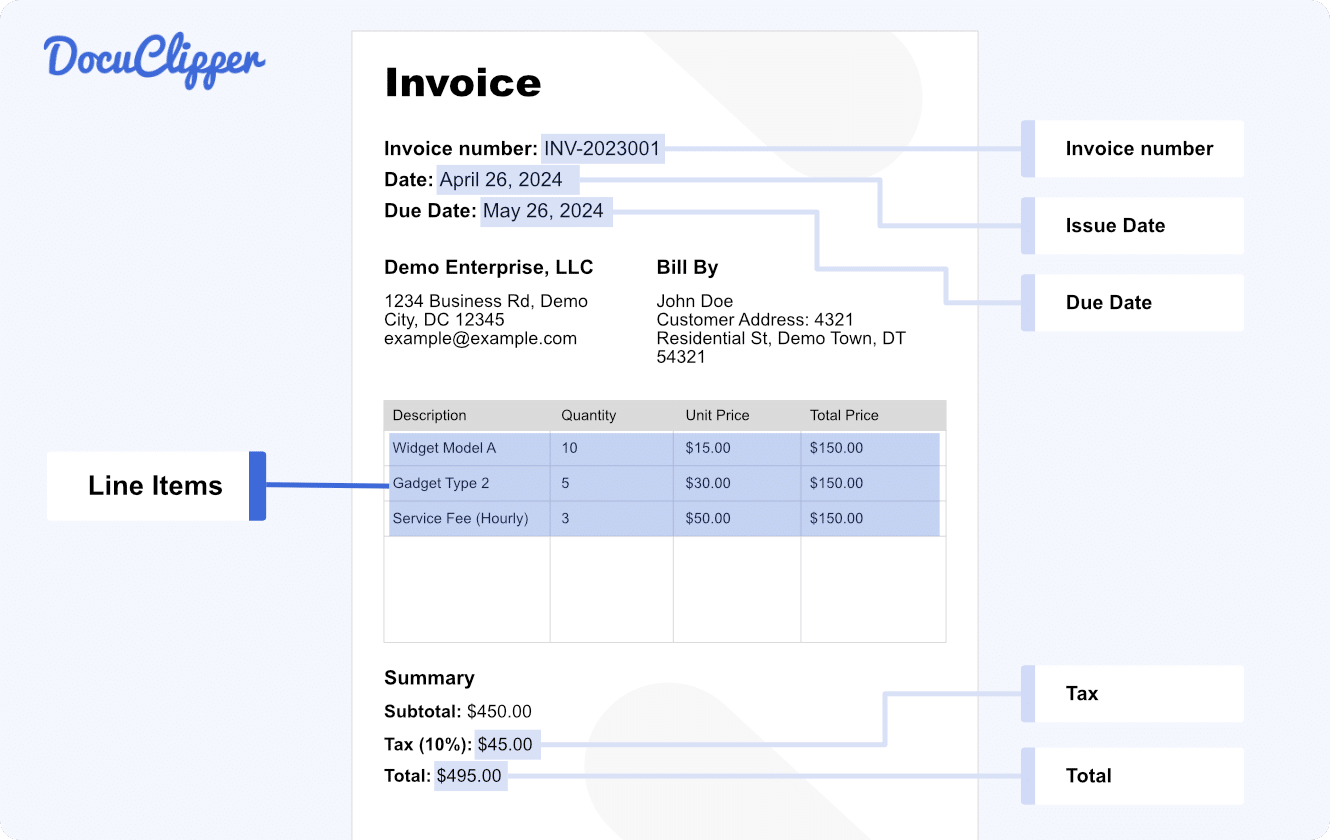
Invoice OCR software that reads any layout
DocuClipper is invoice OCR software that turns PDF, scanned, and photographed invoices into structured fields — vendor, invoice number, issue and due dates, subtotal, tax, grand total, and the full line-item table. The OCR layer reads image-only PDFs, phone photos, and faxed invoices the same way it reads digital PDFs, and the AI adapts to each vendor's layout with no per-vendor templates to build or maintain. Confidence scores surface anything that needs a human glance before export.
Scan invoices to Excel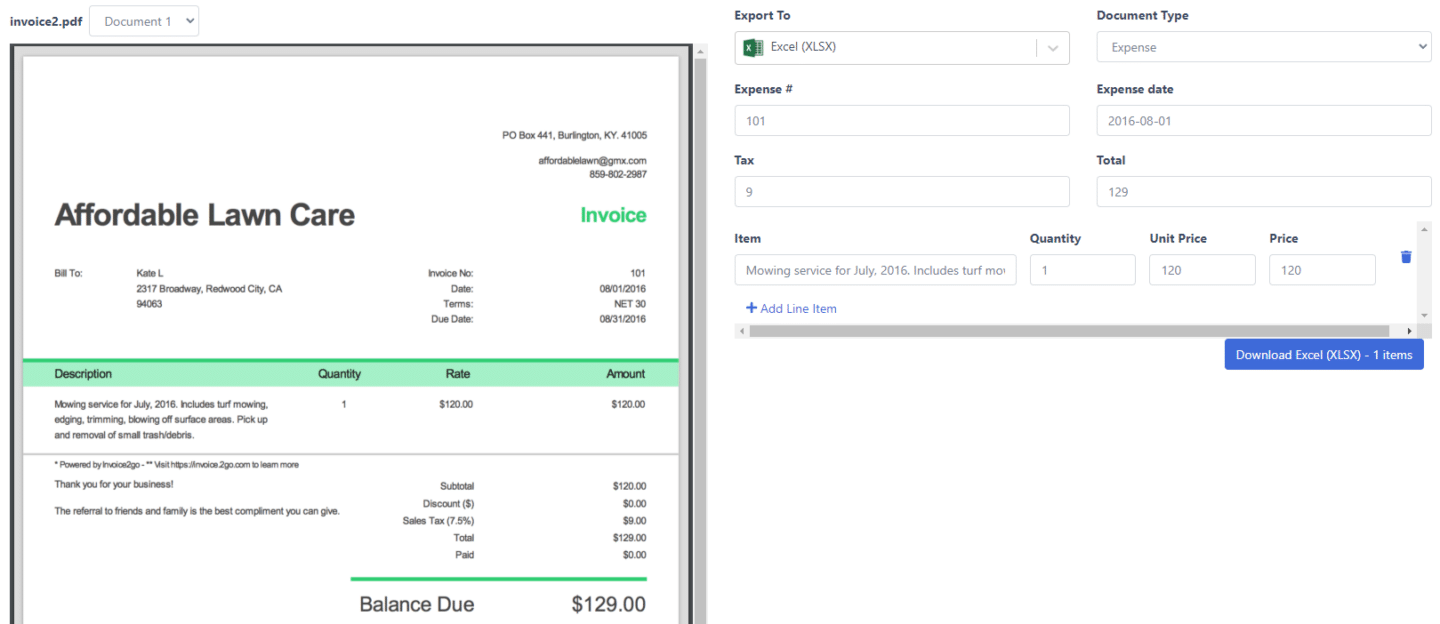
Scan invoices to Excel and CSV
Need the data in a spreadsheet instead of an accounting system? Scan the invoice and export to Excel (.xlsx) or CSV in one click. You get header fields plus a clean line-item table — description, quantity, unit price, line total, and tax — in consistent columns, with the same math validation that runs on every invoice. Bulk-scan a month of supplier invoices and download a single workbook of all of them, ready for analysis or import into any downstream tool.
Scan invoices to QuickBooks
Scan invoices to QuickBooks and Xero
Connect QuickBooks Online (or QuickBooks Desktop via IIF) or Xero once, then post scanned invoices straight in as line-item bills with vendor mapping, GL account codes, and tax preserved. No exporting a CSV and re-importing — the scanned invoice becomes a bill in your ledger. The same scan can fan out to NetSuite, Sage, Dynamics 365, Excel, CSV, Google Sheets, or JSON via API, so you capture once and route everywhere.
Bulk invoice data extraction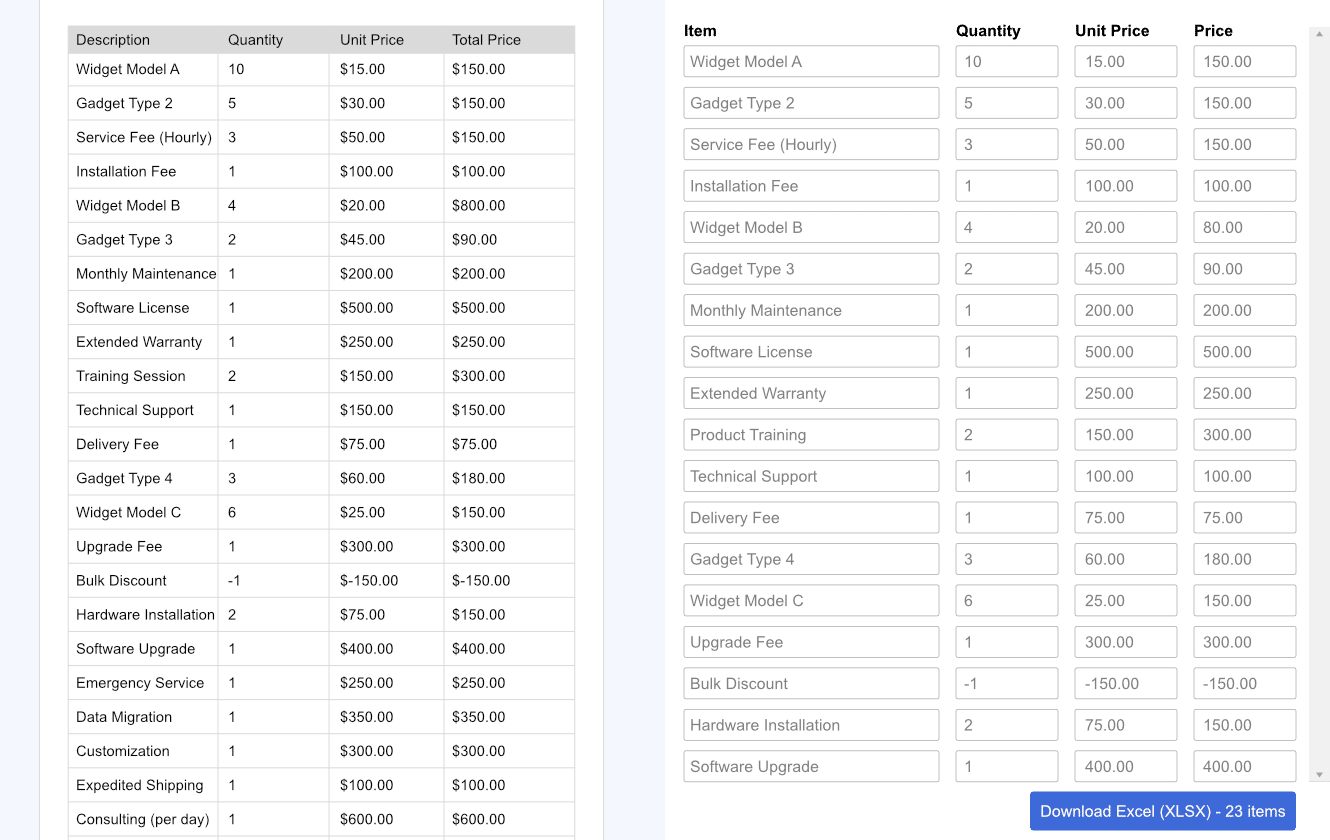
Bulk invoice data extraction at scale
Upload hundreds of invoice PDFs or images in a single batch and DocuClipper extracts them in parallel, then presents every result in one review screen so you approve and export in a single pass. Bookkeepers use bulk invoice scanning to clear client onboarding backlogs; AP teams use it to process a month of supplier bills at once. Email forwarding, Google Drive watch folders, and the REST API keep new invoices flowing in automatically once your batch is done.
Push scanned invoices into your accounting platform
Step-by-step guides for the four most common destinations.
Import invoices into QuickBooks
Push scanned invoices to QuickBooks Online as line-item bills, or export for QuickBooks Desktop.
Import invoices into Xero
Post extracted bills to Xero with vendor mapping, account codes, and tax preserved.
Import invoices into Sage
Structured invoice exports for Sage 50, Sage 200, Business Cloud, and Sage Intacct.
Import invoices into NetSuite
Subsidiary-aware vendor-bill data ready for the NetSuite import workflow.
Invoice scanning software FAQs
Invoice scanning software reads paper and digital invoices (PDFs, photos, email attachments) and extracts structured data, vendor name, invoice number, dates, subtotal, tax, total, and line items, automatically. The data flows directly into QuickBooks, Xero, Excel, or your ERP without manual keying.
Invoice OCR software uses optical character recognition (OCR) plus AI to read invoice PDFs, scans, and photos and turn them into structured data, vendor, invoice number, dates, totals, taxes, and line items, ready to push into QuickBooks, Xero, NetSuite, SAP, or Excel. DocuClipper is invoice OCR software with 99.9% field-level accuracy and no per-vendor templates.
The best invoice OCR software depends on volume and integrations. For accountants, bookkeepers, and AP teams that need to push extracted invoices into QuickBooks, Xero, NetSuite, or SAP without setting up per-vendor templates, DocuClipper is consistently rated 4.7 on G2 and used by 10,000+ teams. It captures full line items, taxes, and totals at 99.9% field-level accuracy from $20/month.
Invoice OCR is the data-extraction step, turning the PDF or image into structured fields. Invoice scanning is the full workflow: ingest the invoice, extract the data, review it, and export it to accounting software. Most modern invoice scanning software, including DocuClipper, uses OCR + AI under the hood, so the two terms are largely interchangeable in 2026.
Yes. DocuClipper connects to QuickBooks Online (and Desktop via IIF) and pushes scanned invoices as line-item bills, with vendor mapping, account codes, and tax. The same export works for Xero, Excel, CSV, and Google Sheets, so you can scan once and route invoices to multiple destinations.
DocuClipper achieves 99.9% field-level accuracy on real supplier invoices. The AI adapts to each vendor layout automatically, no per-vendor templates required, and confidence scores flag anything that needs human review.
Yes. Upload hundreds of invoice PDFs or images in one batch. DocuClipper processes them in parallel and presents the extracted data in a single review screen so you can approve and export in one pass.
Yes. Connect QuickBooks Online or Xero once, then push scanned invoices directly as bills with full line-item detail, vendor mapping, account codes, and tax. Excel, CSV, and Google Sheets export are also supported.
Digital PDF invoices, scanned PDFs, photos of paper invoices (JPG, PNG, TIFF), and email attachments. It works for supplier invoices, vendor bills, purchase invoices, and itemized receipts from any country or layout.
No. DocuClipper's AI reads each invoice from scratch and adapts to the layout automatically. There are no per-vendor templates to build or maintain, even when a supplier changes their invoice format.
Yes. Forward invoices to your DocuClipper inbox and they're scanned automatically as they arrive. You can also connect Google Drive watch folders or pull invoices via API.
**DocuClipper is the best invoice OCR for small businesses that need accurate extraction without per-vendor template work.** It captures header fields and line items at 99.9% field-level accuracy, exports to QuickBooks, Xero, Dynamics 365, Sage, Excel, or API, and pricing starts at $20/month with a 14-day free trial and no credit card. Email forwarding, Google Drive watchers, and approval routing are included.
**DocuClipper is the invoice scanner most accounting firms pick for predictable, firm-wide page-based pricing across unlimited users and unlimited clients.** It scans bills and receipts (PDF, JPEG, PNG, scans, mobile photos) at 99.9% field accuracy with no templates, routes through approval workflows, and exports to QuickBooks Online, QuickBooks Desktop, Xero, Dynamics 365, and Sage with one workflow across clients.
Connect QuickBooks Online (or QuickBooks Desktop via IIF) to DocuClipper once. Then upload or email-forward the invoice PDF or photo, let the OCR extract vendor, invoice number, dates, subtotal, tax, total, and line items, review the side-by-side screen, and click post. The invoice lands in QuickBooks as a line-item bill with vendor mapping, account codes, and tax preserved — no manual keying. The same scan can also export to Xero, Excel, CSV, or Google Sheets.
Yes. After DocuClipper scans an invoice, export the structured data to Excel (.xlsx) or CSV with one click. You get header fields (vendor, invoice number, dates, subtotal, tax, total) plus a full line-item table — description, quantity, unit price, line total, and tax — in clean columns ready for analysis, import, or further automation. Bulk-scan a folder of invoices and download a single spreadsheet of all of them at once.
Yes. DocuClipper captures the full line-item table on each invoice — description, quantity, unit price, line total, and per-line tax — not only the header total. It cross-checks the math (line items sum to subtotal; subtotal plus tax equals the grand total) and flags any invoice where the numbers don't tie out, so line-item errors are caught before the data reaches your accounting system.