
AP Automation Software for Small Business 4.7/5(124 reviews)Trusted by 10,000+ finance teams
Stop Typing Invoices into QuickBooks and Xero
AP automation built for small businesses and accounting firms: OCR-extract every invoice, post straight to QuickBooks or Xero, and add a multi-level approval workflow when you need one. Page-based pricing from $29/mo - no per-user fees, no implementation project. You keep your existing bank for paying vendors.
4.7/5(124 reviews)Trusted by 10,000+ finance teams14-day free trialNo credit card required
1
2
3
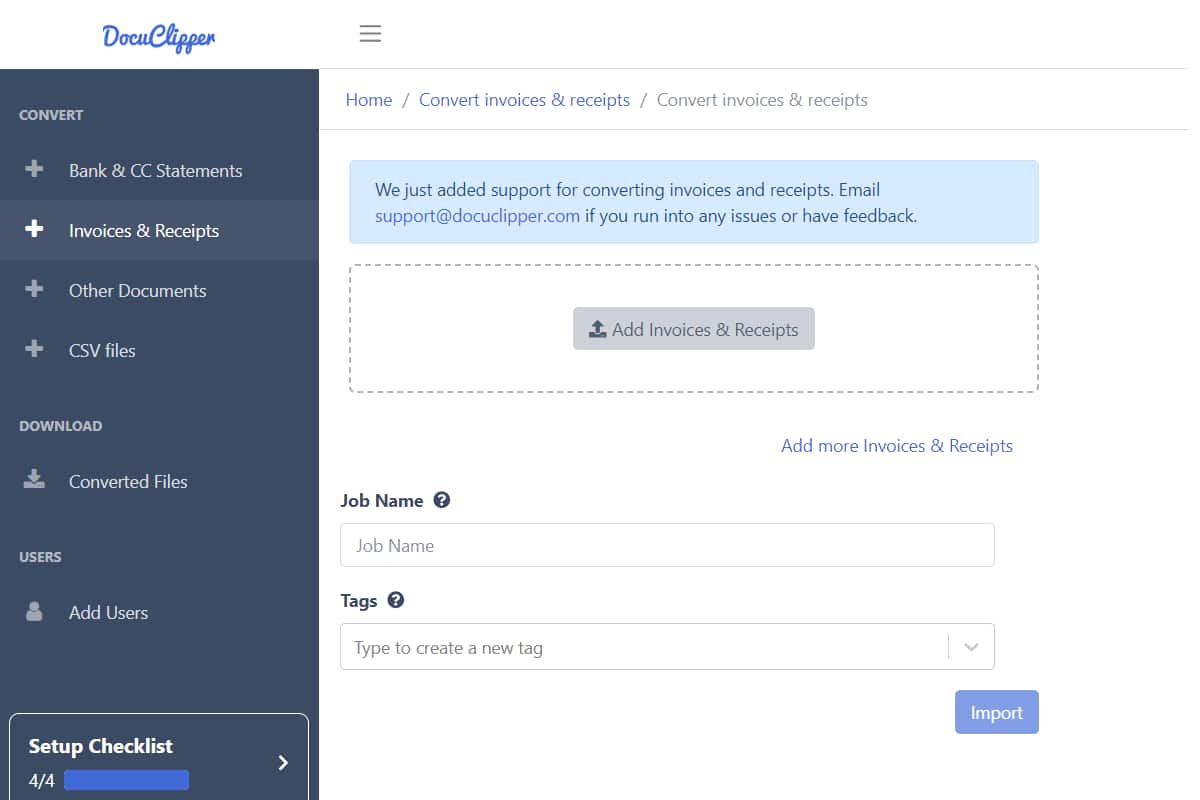
Step 1 of 3Upload invoices
Invoices
Invoice #1042
ACME Industrial Supply
Invoice #1043
Cloud Services LLC
Invoice #1044
Office Depot
Invoice PDFs → DocuClipper AI → QuickBooks in seconds
Last updated:
Trusted by 10,000+ Accounting, Lending, and Finance Professionals













What AP automation handles
- Invoice capture from email forwarding, bulk upload, Google Drive sync, mobile, or REST API.
- OCR extraction of vendor name, invoice number, PO, dates, payment terms, subtotals, taxes, totals, and full line-item tables.
- Total + line-item validation: line items must sum to subtotal, subtotal + tax must equal invoice total, before posting.
- Duplicate-invoice detection: same vendor, amount, and date within a 90-day window are flagged before posting.
- Recurring-vendor detection: vendors that bill across multiple months are flagged so you can auto-approve trusted, repeating invoices.
- Vendor master: a central vendor list with aliases, default approver, payment terms, and YTD spend — incoming invoices match to the right vendor automatically.
- Two-way PO matching: each invoice is matched to its purchase order at the line level, flagging over/underbilling and amount mismatches.
- AP aging report: outstanding payables bucketed by age (current, 1–30, 31–60, 61–90, 90+ days), with a per-vendor breakdown and oldest-invoice tracking.
- AP queue with paid-status sync: pull paid/unpaid status from QuickBooks Online or Xero on demand so settled bills drop off your open queue.
- Approval routing with configurable thresholds, role-based reviewers, and full audit logs.
- Direct posting to QuickBooks, Xero, Dynamics 365 Business Central, and Sage Business Cloud.
How AP automation works
From vendor invoice to posted GL entry, in one pipeline.
→
Capture
Email forwarding, upload, Drive sync, mobile, or API. AP team doesn't manually collect.
→
Extract
OCR pulls vendor, totals, line items, PO number — across any vendor layout, no templates.
→
Validate + match
Totals tie. Line items sum. Duplicates flagged. PO matched (two-way). Mismatches go to the exception queue.
→
Approve
Routed by amount + role + vendor rule. Approvers act from email or in-app.
Post
Approved invoices land in QuickBooks, Xero, NetSuite, Sage, or via API.
What makes AP automation work in practice
The pieces that determine whether AP automation actually saves time vs. just shifts it.
End-to-end pipeline
Capture, OCR, validation, matching, approval, posting — one system. No handoffs between tools.
No vendor templates
AI generalizes across vendor invoice layouts. Zero per-vendor setup. Survives layout changes.
Exception queue
Anything that can't auto-process — total off, PO mismatch, duplicate invoice number, unknown vendor — goes to a review queue.
Threshold-based approval
Configurable per amount band, role, and vendor. Auto-approve recurring; flag the unusual.
Multi-ERP export
QuickBooks Online + Desktop, Xero, NetSuite, Sage, Dynamics 365, SAP, or any custom ERP via API.
Vendor master
A central vendor list with aliases, default approver, payment terms, and running YTD spend. New invoices match to the right vendor automatically; merge duplicates in a click.
AP aging report
See what you owe by age — current, 1–30, 31–60, 61–90, and 90+ days — with a per-vendor breakdown and the oldest unpaid invoice surfaced.
Paid-status sync
Sync paid/unpaid status from QuickBooks Online or Xero on demand, so bills already settled in your accounting system drop off the open AP queue.
SOC 2 + audit logs
SOC 2 Type II certified, encrypted in transit (TLS), role-based access, full audit trail per invoice. Compliance-ready.
Who uses AP automation software
High-volume AP departments
- Process hundreds to thousands of invoices/month without scaling headcount.
- Cut per-invoice processing cost by 80–90% vs manual keying.
- Free AP staff from data entry to focus on exceptions and vendor relationships.
Finance + controllership
- Tighten close cycles: validated, pre-matched invoice data ready at month-end.
- Enforce approval thresholds programmatically — no "just this once" exceptions.
- Audit-ready trail per invoice: who uploaded, who approved, when it posted.
Multi-entity / firms
- One AP automation platform across multiple legal entities or client books.
- Per-entity approval routing, GL coding, and ERP destinations.
- Shared exception queue with role-based access and per-entity reporting.
What Customers Say
Real reviews from accountants, bookkeepers, and finance teams.
“DocuClipper has helped us eliminate several manual data entry processes, saving us a lot of time.”
KR
Kristin Mitchell
Accounting, United States
“It's a complete game-changer. Instead of spending hours combing through statements, we get the data we need almost instantly.”
MA
Matt
Lending, United Kingdom
“DocuClipper allowed us to enhance our advisory services, directly impacting our bottom line.”
SA
Sarah Winship
Accounting, United Kingdom
Ready to try it? Start your free 14-day trial, no credit card required.
Start free trialRelated AP + invoice tools
Invoice approval software
Deep dive on the approval workflow: field-driven rules, user/team approvers, all/any operators, and a per-invoice timeline.
Learn moreInvoice to QuickBooks
Post approved invoices directly to QuickBooks Online or Desktop as bills.
Learn moreInvoice to Xero
Push approved invoices into the Xero Bills workflow with GL coding preserved.
Learn moreInvoice approval workflow guide
How to design a multi-level invoice approval workflow that doesn't bottleneck on your CFO.
Learn moreInvoice approval software
Dedicated multi-level invoice approval routing — the approval owner for AP teams.
Learn moreInvoice OCR
The underlying invoice OCR capability used by every AP automation flow.
Learn moreAP automation for QuickBooks
How the capture-code-approve layer sits in front of QuickBooks Online and Desktop.
Learn moreAP automation for Xero
Automate capture, coding, and approval, then push approved bills into Xero.
Learn moreBuilt for small business
Priced and Packaged for SMBs — Not Enterprise AP Teams
Enterprise AP platforms charge per user and force you onto their payment network. DocuClipper is built differently: pay for the volume you process, invite every approver for free, and pay vendors however you already pay them.
Page-based pricing
Pay for the volume of invoice pages you process. Plans start at $29/mo. Predictable; scales with usage, not headcount.
No per-user fees
Invite every approver, every clerk, every controller — at no extra cost. Bill.com charges $45–$79 per user per month; we charge $0.
No implementation fees
Self-serve onboarding. Connect QuickBooks or Xero in a click. Configure your approval matrix in 10 minutes. No SOW. No consulting hours.
Important boundary: DocuClipper handles invoice capture, OCR, approval workflow, and accounting-system sync. DocuClipper does not issue corporate cards, send ACH, cut checks, or hold funds. You pay vendors through your existing bank — exactly the way you do today. That's deliberate: it keeps DocuClipper cheaper, faster to onboard, and easier to leave if you ever want to.
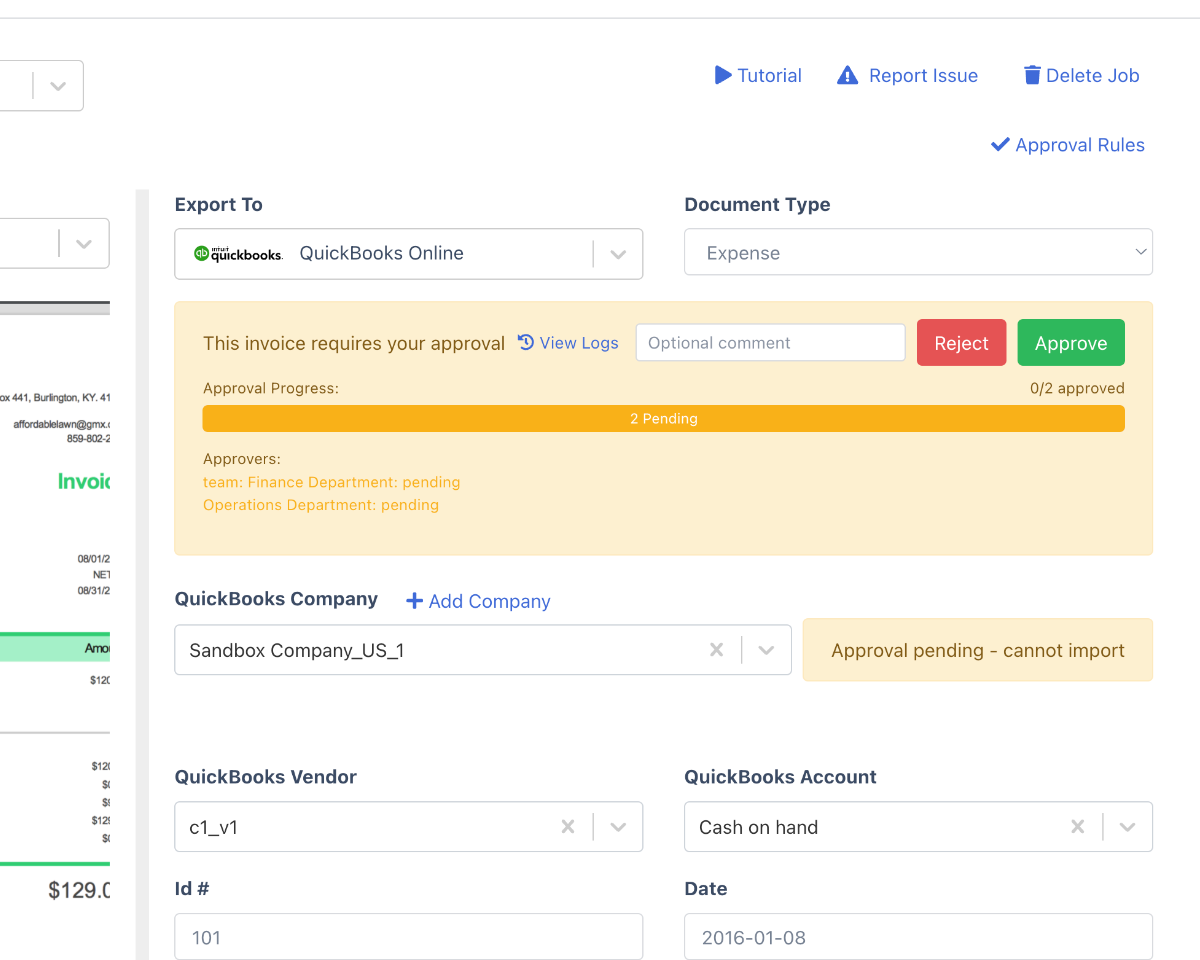
Multi-level approval workflow
Yes — DocuClipper Has a Real Multi-Level Approval Workflow
Most "AP automation" tools for small business are just OCR with no approval engine. DocuClipper's approval workflow is built in: route invoices by amount, vendor, GL category, or department; require single, dual, or sequential approvers; track every action in a per-invoice audit trail.
- Multi-level routing. Chain approvers — AP clerk → manager → controller → CFO — sequentially or in parallel. Stop the workflow until each step approves.
- Approver assignment by amount, vendor, category. Rules engine matches each invoice to the right approver: amount band, vendor allowlist, GL account, project code, or entity.
- Mobile approval. Approvers can approve, reject, or comment from email or any phone browser. No app install. No per-approver license fee.
- Full audit trail. Per-invoice timeline: who uploaded, who approved, who edited what field, when it posted. Exportable for audit and SOC 2 evidence.
- Auto-approve trusted vendors. Recurring invoices from vendors on an allowlist (rent, SaaS, utilities) skip the queue. Anomalies still flag for review.
Sample approval matrix
Under $1,000
Auto-approve
$1,000 – $10,000
AP manager
$10,000 – $50,000
Manager + controller (dual)
Above $50,000
Manager + controller + CFO
Recurring (allowlisted vendor)
Auto-approve
PO mismatch / failed validation
Exception queue → controller
Fully configurable. You can layer vendor, category, project, and entity rules on top of amount bands.
DocuClipper vs Bill.com vs Ramp vs Stampli vs Tipalti
Honest comparison for small-business AP. The right tool depends on whether you want to move payments onto a third-party network or keep them at your bank.
| Capability | DocuClipper | Bill.com | Ramp | Stampli | Tipalti |
|---|---|---|---|---|---|
| Multi-level approval workflow | Yes — by amount, vendor, category, entity | Yes | Yes | Yes | Yes |
| Invoice OCR + line-item extraction | Yes (99.9% field accuracy) | Yes | Yes | Yes | Yes |
| QuickBooks Online + Desktop sync | Yes — both | Yes | Online only | Yes | Yes |
| Xero sync | Yes | Yes | Limited | Yes | Yes |
| Vendor payments (ACH, checks, cards) | No — by design; you pay from your bank | Yes — required | Yes — required | Add-on | Yes — required (global mass payments) |
| Per-user pricing | No — unlimited users | $45–$79 / user / mo | Free (card-funded) | Custom | Custom + platform fee |
| Page-based pricing | Yes - from $29/mo | No | No | No | No |
| Implementation fee | $0 | Varies | $0 (card sign-up required) | Yes | Yes — platform onboarding |
| Built for | SMBs + accounting firms | SMB → mid-market | Card + spend-first SMBs | Mid-market | Enterprise / high-volume global |
| Best fit when | You want approvals + accounting sync without changing how you pay vendors | You want one bundled AP + payment network | You want corporate cards as the primary spend tool | You have a mid-market AP team and complex coding | You pay hundreds of international suppliers across multiple entities |
Pricing and capabilities verified from public competitor pages as of 2026. Bill.com, Ramp, Stampli, and Tipalti are trademarks of their respective owners.
AP automation platform
An AP Automation Platform That Plugs Into Your Stack
Big AP platforms (BILL.com, Tipalti) bundle invoice processing with their own payment network — useful if you want a closed-loop system, expensive if you don't. DocuClipper does the high-leverage AP automation work — capture, extract, validate, approve, post — and hands payments off to your existing banking + ACH stack.
- Email forwarding: vendor sends invoice; it lands in the AP queue automatically.
- Bulk upload: drop a folder of PDFs and process hundreds in one batch.
- Google Drive watch folder: every new invoice gets ingested automatically.
- Mobile capture: photograph paper invoices in the field; OCR handles low-quality scans.
- REST API: POST invoices programmatically from any AP intake system.
01
Capture
Email, upload, Drive, mobile, or API
02
OCR extract
Vendor, totals, PO, line items
03
Validate
Line items must tie to subtotal + tax
04
PO match
Two-way invoice-to-PO matching
05
Approve
Threshold + role + vendor rules
06
Post to GL
QuickBooks, Xero, NetSuite, Sage, ERP
Intake + exception handling
Capture Once. Catch Exceptions Before They Hit the Approver.
The approval workflow only works if clean invoices reach it. DocuClipper validates math, deduplicates, and matches POs before anything enters the approver's queue — so approvers spend time on judgment calls, not data cleanup.
- Configurable thresholds per amount band — auto-approve, single-approver, dual-approver, controller-only.
- Role-based routing for AP clerks, managers, controllers, and CFOs.
- Vendor-based rules: approve recurring invoices from trusted vendors automatically.
- Email + in-app approval requests; mobile-friendly so approvers aren't a bottleneck.
- Full audit trail: every approval, every edit, every post — logged with timestamps and user IDs.
What lands in the exception queue
Line items don't sum to subtotal
Subtotal + tax ≠ invoice total
Duplicate invoice number for vendor
Invoice line doesn't match the PO (over/underbilling)
Unknown / first-time vendor
Amount above approver's authority
AP automation integrations
Plugs Into Your Existing AP + ERP Stack
DocuClipper is the data + workflow layer; it doesn't replace your accounting system or ERP. Approved invoices land in your existing destination of record — exactly where AP, the controller, and audit expect them.
QuickBooks Online + Desktop: direct push of approved invoices as bills, with GL coding preserved.
Xero: drops straight into the standard Bills workflow.
NetSuite, Sage, Dynamics 365: REST API + webhook integration for ERP-managed AP.
Custom export: CSV, JSON, or Excel for any AP system not on the integration list.
Two-way sync where supported: edits to exported invoices re-sync back to QuickBooks/Xero, GL chart import, and on-demand paid-status sync from QuickBooks Online and Xero.
Real customer outcomes
Aggregate usage from real DocuClipper invoice customers over the last 180 days. Industries anonymized; numbers are not.
3,000+
invoice pages processed for a single CPA firm in 180 days
99.9%
field-level accuracy on real customer invoices
100+ hrs
of manual data entry saved per quarter
QBO · Xero · Excel
direct export — no rebuilding spreadsheets
Customer names withheld pending consent. Time-saved estimates use a conservative 2-minute-per-invoice manual-keying baseline (industry standard). Methodology detailed on each case study page.
AP Automation FAQs
DocuClipper is the AP automation pick for QuickBooks teams that want invoices captured, approved, and posted as bills without per-user fees or a new payments platform. It reads vendor, invoice number, dates, line items, tax, and totals from any PDF or scanned invoice, checks the math and flags duplicates, routes each invoice through your approval rules, then posts approved bills to QuickBooks Online matched to your existing vendors, or exports an IIF file for QuickBooks Desktop. Paid status syncs back from QuickBooks Online, so settled bills leave your open AP queue. Plans start at $29/mo with unlimited users. Bill.com, Ramp, Melio, and Tipalti also sync with QuickBooks, but they bundle vendor payments; choose them if you want to move bill pay off your bank. Setup details: invoice to QuickBooks.
DocuClipper is the AP automation pick for Xero teams that want supplier invoices extracted, approved, and posted as bills in one flow. Approved invoices land in Xero as bills to pay with line items, account codes, tax codes, due dates, and the source PDF attached. Suppliers match to your existing Xero contacts, and per-supplier coding is saved once and reused. Paid status syncs back from Xero. DocuClipper is listed on the Xero App Store and prices by page with unlimited users, from $29/mo. Dext and Hubdoc capture bills for Xero but leave multi-level approval routing to an add-on such as ApprovalMax; DocuClipper does capture and approvals in one place. Setup details: invoice to Xero.
Yes. DocuClipper includes a built-in multi-level invoice approval workflow. You can route invoices to specific approvers based on amount thresholds, vendor, GL category, or department; require multiple sequential or parallel approvers; auto-approve recurring trusted vendors; and view a full per-invoice audit trail (who approved, who edited, when it posted). Approvers can act from email or the mobile-friendly web app — no extra license needed.
Yes. DocuClipper supports multi-level approval routing. Configure rules like: invoices under $1,000 auto-approve, $1,000–$10,000 require the AP manager, $10,000–$50,000 require both the manager and the controller (dual approval), and anything above $50,000 routes to the CFO. Rules can chain by amount, vendor, GL category, project, or entity. Approvers can be specific users or role-based groups.
For a small business, AP automation with DocuClipper works in five steps: (1) vendors email invoices to a forwarding address or you bulk-upload PDFs; (2) OCR extracts vendor, invoice number, dates, line items, subtotal, tax, and total; (3) DocuClipper validates the math (line items sum to subtotal, subtotal + tax = total); (4) the approval workflow routes the invoice to the right approver based on your rules; (5) approved invoices post to QuickBooks Online, QuickBooks Desktop, or Xero as bills with GL coding preserved. No implementation project, no per-user license fees, no payment-network lock-in.
Bill.com is a full AP platform that bundles invoice processing with a vendor payment network (ACH, checks, virtual cards) and charges per-user plus per-transaction. DocuClipper is AP automation software focused on the invoice side — capture, OCR, approval workflow, and posting to QuickBooks or Xero — with page-based pricing, no per-user fees, and no implementation. DocuClipper does NOT issue cards or process payments; payments stay in your existing bank or AP system. For small businesses that don't want to move payments onto a third-party network, DocuClipper is typically 60–80% cheaper than Bill.com for the same invoice volume.
Tipalti is an enterprise global payables platform — supplier onboarding, tax compliance, and mass cross-border payments — priced with a platform fee and built for finance teams paying hundreds of international suppliers. DocuClipper focuses on the invoice side: capture, 99.9% field-accuracy OCR, math validation, a built-in multi-level approval workflow, and posting to QuickBooks, Xero, NetSuite, or Sage. DocuClipper does not issue cards, send ACH, or process payments — you pay vendors from your existing bank. For SMBs and accounting firms that want approval workflows and accounting sync without an enterprise payments platform, DocuClipper is the lighter, lower-cost choice.
Yes, if you want approval workflows, invoice OCR, and QuickBooks/Xero posting without per-user pricing or a forced payment network. DocuClipper is built for SMBs and accounting firms processing 50–5,000 invoices a month. You keep your existing bank, ACH, and check workflows; DocuClipper handles capture, extraction, multi-level approval, and posting.
No. DocuClipper deliberately does not issue cards, send ACH, cut checks, or hold funds. It handles the invoice processing and approval workflow, then posts approved bills to QuickBooks Online, QuickBooks Desktop, or Xero, where you pay them through your existing bank or accounting workflow. This is intentional — it keeps DocuClipper cheaper, faster to onboard, and lets you keep your existing banking relationships.
Yes. Approved invoices sync directly to QuickBooks Online and Xero as bills, and QuickBooks Desktop gets an IIF file. For NetSuite, Sage, Dynamics 365 Business Central, and other ERPs, download the invoices as Excel or CSV for the ERP's own import, or pull them through the REST API.
DocuClipper uses page-based pricing - you pay for the volume of pages you process, not per user. Plans start at $29/mo with unlimited users; the approval workflow is on Business, from $159/mo with unlimited approvers. Bill.com typically charges $45–$79 per user per month plus transaction fees. Ramp is free for spend management but pushes you onto its card and bill-pay platform. DocuClipper is the lowest-friction option for SMBs that want approval workflows and accounting sync without changing how they pay vendors.
Yes. DocuClipper does two-way PO matching: it matches each invoice to its purchase order at the line level (quantity and amount), ranks the most likely PO, and flags overbilling, underbilling, missing lines, and amount mismatches as matched, partially matched, or unmatched. It also validates the math on every invoice — line items must sum to the subtotal, and subtotal + tax must equal the total — and flags duplicate invoice numbers. Anything that fails drops into an exception queue and is blocked from approval until resolved.
Yes. DocuClipper keeps a central vendor master — a list of your vendors with aliases (so "ACME Inc." and "Acme Incorporated" resolve to one record), a default approver, payment terms, and running YTD spend and invoice counts. Incoming invoices match to the right vendor automatically, and you can merge duplicate vendor records in a click, which re-points their invoices to the surviving record.
Yes. DocuClipper produces an AP aging report that buckets outstanding payables by age — current, 1–30, 31–60, 61–90, and 90+ days — with invoice count and total owed per bucket, a per-vendor breakdown, and the number of days the oldest unpaid invoice has been outstanding. You can run it as of any date to see historical aging.
Yes. DocuClipper can sync paid status from QuickBooks Online and Xero on demand — when you refresh, it checks each exported bill and marks it paid if the accounting system shows it settled (zero balance). Settled bills then drop off your open AP queue. This is an on-demand refresh rather than a live webhook, so paid status updates the next time you sync.
Yes. As invoices are extracted, DocuClipper auto-flags duplicates — the same vendor, amount, and invoice date within a 90-day window — and lets you accept or reject each flag. It also detects recurring vendors (those that bill across three or more distinct months) so you can set them to auto-approve. Flagged duplicates and validation failures land in the exception queue before they can be approved or posted.
DocuClipper extracts AP invoice data at 99.9% field-level accuracy, and every invoice is checked before it reaches an approver: line items must sum to the subtotal and subtotal + tax must equal the total. Any mismatch, likely duplicate, or PO discrepancy lands in the exception queue instead of the approval workflow, so approvers only see invoices whose numbers tie out.
DocuClipper is the AP automation pick for small businesses that want invoice capture, OCR extraction, and accounting-system posting without per-user fees. Page-based pricing with unlimited users starts at $29/mo. Invoices auto-extract at 99.9% accuracy, get validated for math errors and duplicate invoice numbers, matched to purchase orders (two-way), and export straight to QuickBooks, Xero, or Sage. Payments stay in your existing bank or bill-pay tool. If approval routing is your primary need, see our dedicated invoice approval software.
Accounts payable automation software replaces manual AP work — collecting invoices, keying them into the accounting system, matching them against POs, and chasing approvals — with an automated pipeline. DocuClipper captures invoices from email, upload, Google Drive, or API; extracts vendor, invoice number, dates, line items, subtotal, tax, and total with OCR at 99.9% accuracy; validates the math and flags duplicate invoice numbers; matches each invoice to its purchase order (two-way); routes through a configurable approval workflow; and posts approved bills to QuickBooks, Xero, NetSuite, or Sage. It handles the invoice-processing and approval side; you still pay vendors from your existing bank.
Minutes, not a multi-week implementation project. There's no SOW, no consulting hours, and no per-user onboarding. You connect QuickBooks or Xero in a click, set up your invoice forwarding address, and configure your approval matrix (amount bands, approvers, vendor rules) in about ten minutes. Because pricing is page-based with unlimited users, you can invite every clerk, manager, and approver at no extra cost on day one.