
Invoice Approval 4.7/5(124 reviews)Trusted by 10,000+ finance teams
Invoice Approval Software, From Extraction to Approved and Posted
DocuClipper extracts invoice data with OCR, then routes it to the right approvers based on rules you define. Approvers get an email, review the structured invoice in DocuClipper, and approve or reject. Every action is logged on a timeline. Approved invoices export to QuickBooks, Xero, NetSuite, and more.
4.7/5(124 reviews)Trusted by 10,000+ finance teams14-day free trialNo credit card required
Last updated:
Trusted by 10,000+ Accounting, Lending, and Finance Professionals













What invoice approval software handles
- Extracts vendor, amount, invoice number, and dates from PDF and scanned invoices via Invoice OCR.
- Matches each invoice against your approval rules using extracted fields (amount, vendor, etc.).
- Attaches one or more approvers per matching rule, individual users or teams.
- Sends each approver a transactional email with the invoice summary and a link to review.
- Tracks each approver's vote (approve or reject) on the invoice timeline alongside extraction events.
- Lets approvers clear backlog with a bulk-approval action across many invoices at once.
- Posts approved invoices to QuickBooks Online, Xero, NetSuite, Sage, or downloads to Excel/CSV.
How invoice approval works in DocuClipper
From upload to posted accounting entry, with a real audit trail in between.
→
Upload and extract
Invoices arrive by upload, email forwarding, Google Drive, or API. OCR pulls vendor, amount, invoice number, dates, and line items.
→
Configure approvers
Define rules on extracted fields (e.g. amount > $5,000) and pick the approvers, either specific users or whole teams. Each rule is "all approvers required" or "any one approver".
→
Submit for approval
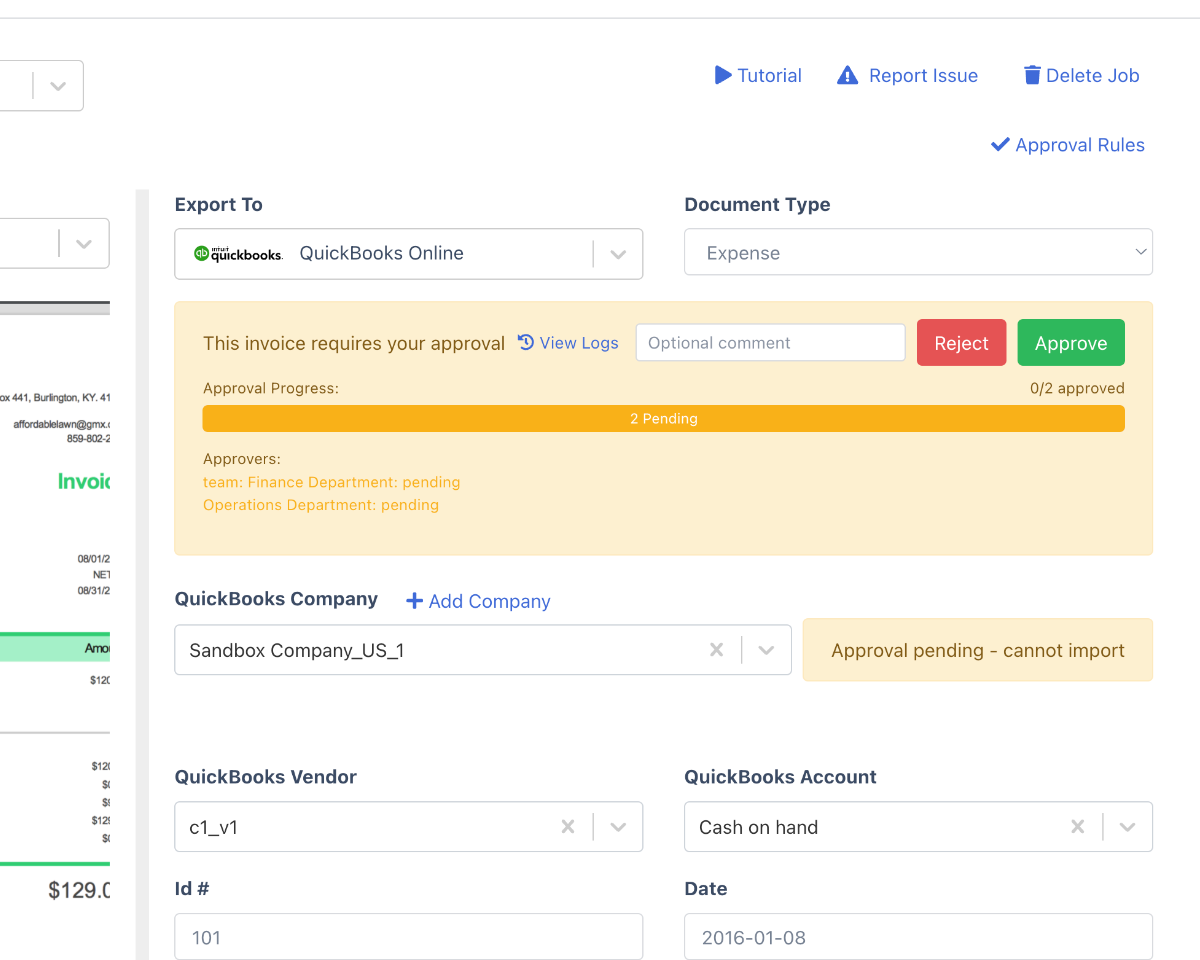
When the invoice is submitted, every matching rule attaches its approvers and DocuClipper emails them with the vendor, amount, and a deep link into the review page.
→
Approve or reject
Approvers sign in and vote. Each vote, the user, the rule, and the timestamp lands on the invoice timeline. Bulk approval clears multiple invoices at once.
Post to accounting
Once every requirement is satisfied, the invoice is approved and ready to push to QuickBooks Online or Xero, or to download as Excel/CSV for NetSuite, Sage, and other systems.
What makes DocuClipper invoice approval different
Approval built on top of accurate OCR, with the audit trail accountants and auditors actually need.
Approval on top of real extraction
Rules trigger on the actual extracted fields (vendor, amount, dates), not on a separate form your AP team has to re-key.
Field-driven rules
Build conditions against any extracted invoice field. Multiple rules can match a single invoice, and each rule contributes its own approvers.
User and team approvers
Assign individual users, whole teams, or a mix. Team approvers automatically resolve to admin and approver-role members.
All or any per rule
Each rule decides whether every listed approver must vote (all) or just one of them is enough (any). Combine rules to model real AP policies.
Bulk approve
Approvers clear backlog with a bulk-approval action across the queue. Per-invoice timeline events still get logged on every bulk vote.
Auditable timeline
Every approval submission, requirement creation, and vote is recorded on the invoice timeline with user, rule, and timestamp.
Who uses invoice approval software
AP teams at growing companies
- Replace email approval chains with a queue an approver can clear in bulk.
- Enforce thresholds, anything over $10,000 goes to the CFO before it can post.
- Show auditors a per-invoice timeline instead of digging through inboxes.
Accountants and bookkeepers
- Set up client-specific approval rules per client account.
- Capture every approval action against the source extracted invoice.
- Send approved invoices straight into QuickBooks Online or Xero.
Finance and ops
- Route invoices to a department team rather than a single named person.
- Use "any" approver groups so one out of three managers unblocks payment.
- Download approved invoices as Excel or CSV, in a saved format with your ERP's column names, for NetSuite, Sage, and other systems.
What Customers Say
Real reviews from accountants, bookkeepers, and finance teams.
“DocuClipper has helped us eliminate several manual data entry processes, saving us a lot of time.”
KR
Kristin Mitchell
Accounting, United States
“It's a complete game-changer. Instead of spending hours combing through statements, we get the data we need almost instantly.”
MA
Matt
Lending, United Kingdom
“DocuClipper allowed us to enhance our advisory services, directly impacting our bottom line.”
SA
Sarah Winship
Accounting, United Kingdom
Ready to try it? Start your free 14-day trial, no credit card required.
Start free trialRelated invoice tools
Invoice processing software
Full invoice workflow: OCR extraction, approvals, and accounting export.
Learn moreAccounts payable automation
End-to-end AP automation including approvals and posting.
Learn moreInvoice to QuickBooks
Post approved invoice data directly into QuickBooks.
Learn moreInvoice to Xero
Send approved invoices straight into Xero.
Learn moreApproval rules
How Invoice Approval Rules Actually Work
Rules are conditions on the data DocuClipper already extracted from the invoice — no separate form to fill in. A rules engine evaluates every active rule against each invoice, and each rule that matches attaches its own approvers. Multiple rules can match a single invoice, so you can layer policies (an amount threshold and a vendor rule) on the same bill.
- Threshold routing. Route by amount — anything over $5,000 to a controller, over $50,000 to the CFO.
- All or any per rule. Each rule requires either every listed approver to sign off (all) or just one of a group (any).
- Users or teams. Approvers are individual users or whole teams; a team resolves to its admin and approver-role members.
- Auto-approve when nothing matches. If no rule matches an invoice, it auto-approves and keeps moving — you only gate what you choose to gate.
Example approval rules
Amount over $10,000
AllField: amount → CFO
Vendor contains "Acme" or "Globex"
AnyField: vendor → Procurement team
GL account = Marketing
AllField: account → Marketing lead + Controller
Category = Travel
AnyField: category → Department manager
Customer over $25,000 (sales invoice)
AnyField: customer → Revenue manager
Rules support text operators like "contains any" and "does not contain any", and you can combine conditions within a single rule.
Approval lifecycle
From Submitted to Approved, Rejected, or Posted
Approval is a real state on the invoice, not a status someone types in a spreadsheet. Every transition is recorded so the invoice always has a defensible history.
Submitted
The invoice enters the workflow. Matching rules attach their approvers and each approver is emailed once.
Pending
Approvers sign in and vote. The invoice is held from posting until every requirement is satisfied.
Approved
Once all/any requirements are met on every rule, the invoice flips to approved and can post to accounting.
Rejected
A single rejection is terminal: the invoice is held back, with the rejecting approver and comment on the timeline.
What lands on the audit timeline
Approval submitted — when the invoice entered the workflow
Requirement created — which approver was attached, by which rule
Each vote — approve or reject, the user, and the timestamp
Comments — any note an approver leaves with their decision
What you can route on
Route on Any Extracted Field
Because approval rules read the fields DocuClipper extracts, you route on real invoice data — not on tags you have to maintain by hand. Mix and match to model your AP policy exactly.
- Amount — threshold routing (e.g. over $5,000 to a controller).
- Vendor — route specific suppliers, or vendor allowlists, to named approvers.
- Customer — route outgoing sales invoices (AR) by counterparty.
- GL account — send invoices coded to a given account to its budget owner.
- Expense category — e.g. all Travel or all Software to the relevant manager.
- Description / memo — match free-text on the invoice with contains / does-not-contain operators.
Keep reading
Accounts payable automation
The full capture-to-post pipeline the approval layer sits inside.
Invoice approval workflow guide
How to design an approval matrix that doesn't bottleneck on one person.
Invoice matching
How extracted invoice data is checked before it reaches an approver.
Invoice OCR
The extraction the approval rules read their fields from.
Invoice Approval Software vs Email & Spreadsheet Approval
Most teams "do approvals" by forwarding a PDF and waiting for a reply. Here is what changes when approval is a controlled step on the invoice itself.
| Capability | DocuClipper invoice approval | Email / spreadsheet approval |
|---|---|---|
| Invoice can't post until approved | Enforced — approval is a state on the invoice | Not enforced — relies on people remembering |
| Who approved, when, and why | Per-invoice audit timeline with user, rule, timestamp, comment | Scattered across inboxes and chat threads |
| Routing by amount / vendor / GL / category | Rules engine on extracted fields | Manual judgement, easy to skip |
| Multiple approvers (all or any) | Per-rule all/any operator; combine rules per invoice | Forwarded emails, no quorum logic |
| Reject with a reason | Reject + comment; rejection is terminal and logged | A reply that may get lost |
| Clearing a backlog | Bulk-approve the queue in one action | One email at a time |
| Posting to QuickBooks / Xero on approval | Approved invoices sync automatically — no re-keying | Re-typed into the accounting system by hand |
PO matching
Two-Way PO Matching Before an Approver Ever Sees It
Before an invoice is routed for sign-off, DocuClipper matches it two-way against its purchase order — supplier, PO number, quantities, and prices — and validates the invoice math. Approvers spend their time on judgment calls, not on catching a bracket that was billed at the wrong unit price. Matched-and-clean invoices flow straight into the approval queue; anything that doesn't tie out is flagged first.
- Two-way match. Invoice line items and totals checked against the purchase order.
- Math validation. Line items must sum to the subtotal, and subtotal + tax must equal the total.
- Duplicate detection. Repeated invoice numbers for the same vendor are flagged before routing.
- No payment rail. DocuClipper approves and posts invoices to your accounting system; it does not issue cards or pay vendors — settle through your bank or bill-pay tool.
Extracted invoice data flows into the approval queue after matching and validation.
A $12,400 Invoice, Routed and Approved
Here is exactly what happens when a large invoice hits a threshold rule — every event below lands on the invoice's audit timeline.
- 1ExtractedNorthwind Supply — Invoice #INV-20482, total $12,400.00 — captured by OCR with full line items. Math validated; matched two-way to PO #4471.
- 2Rule matchedRule “Amount over $10,000 → CFO (All)” attaches the CFO as a required approver.
- 3NotifiedThe CFO receives one transactional email with vendor, amount, invoice number, and a deep link into the review screen.
- 4VotedThe CFO signs in, reviews the structured invoice, and approves with a comment. The vote, user, rule, and timestamp are written to the timeline.
- 5PostedEvery requirement satisfied → the invoice flips to Approved and posts to QuickBooks Online as a line-item bill. No re-keying.
DocuClipper vs Dext vs Bill.com for Invoice Approval
The honest split: Bill.com is an AP suite with a built-in payment rail; DocuClipper is accurate extraction plus a real approval workflow that posts to your accounting system — without per-seat pricing. DocuClipper does not pay vendors. If you need to also settle bills from one tool, pair it with your bank, QuickBooks Bill Pay, or a payment provider.
| Capability | DocuClipper | Dext | Bill.com |
|---|---|---|---|
| Routing rules on extracted fields (amount, vendor, GL, category) | Yes — rules engine | Limited | Yes — approval policies |
| Multi-approver, all/any per rule | Yes | Basic | Yes |
| Per-invoice audit timeline (submitted, required, voted, comments) | Yes | Partial | Yes |
| Bulk-approve queue | Yes | Yes | Yes |
| Two-way PO matching before approval | Yes | Limited | Yes (higher tiers) |
| No-template line-item OCR feeding the workflow | Yes — 99.9% field accuracy | Yes | Yes |
| Post approved invoices to QuickBooks Online, QuickBooks Desktop (IIF), Xero | Yes | Export / sync | QBO & Xero sync |
| Pays vendors / issues ACH & cards | No — export to your bank or bill-pay | No | Yes — core feature |
| Pricing model | Page-based; approvals on Business from $159/mo, unlimited users | Per-client subscription | Per-user/mo + payment fees |
Competitor capabilities summarized from public product and pricing pages as of 2026. Dext and Bill.com are trademarks of their respective owners. DocuClipper does not issue payments; the 99.9% figure is prod-measured field-level accuracy across real customer invoices.
Invoice Approval Software FAQs
DocuClipper gives small businesses invoice capture, rule-based approvals, and QuickBooks posting in one tool, without per-user fees. Invoices arrive by email forwarding, upload, or Google Drive; every field and line item is extracted; rules on amount, vendor, or any extracted field assign the right approvers; and each approver gets an email linking to the invoice, with a full audit trail of every decision. Fully approved invoices post to QuickBooks Online as bills (or export as IIF for QuickBooks Desktop), and the same flow exports to Xero, NetSuite, and Sage. Approvals are on the Business plan, from $159/mo with unlimited approvers. Bill.com and Melio also offer approvals with QuickBooks sync but route payments through their own networks; DocuClipper keeps payments in your bank. More on the full flow: AP automation software.
Invoice approval software routes extracted invoice data through a defined approval workflow before the invoice is posted to an accounting system. It replaces ad hoc email chains with a trackable, auditable process. In DocuClipper, rules trigger on extracted invoice fields (amount, vendor, date, and other parsed values) and assign approvers when an invoice matches.
You build rules as conditions on extracted invoice fields, for example, amount over $5,000, or vendor name equals "Acme". When an invoice is submitted for approval, every matching rule attaches its approvers to that invoice. Each rule has an approver operator: "all" (every listed approver must approve) or "any" (one approver from the group is enough).
Approvers are either individual users in your DocuClipper account or teams. Team approvers resolve to the team's admin and approver-role members. A single rule can mix users and teams, and a single invoice can have multiple rules attached, each with its own approver list.
When an invoice is submitted for approval, DocuClipper sends each approver a transactional email with the vendor, amount, invoice date, invoice number, and which rule matched. The email links to the invoice review screen inside DocuClipper. Notifications are idempotent (one notification per requirement, even if the invoice is re-extracted) and respect a per-user email opt-out.
Yes. Approvers click the email link, sign in to DocuClipper, then approve or reject from the invoice page. We do not use email-only magic-link approvals so that every action is tied to an authenticated identity for the audit trail.
Yes. The approval queue exposes a bulk approval action so an approver can clear many invoices in one click. Bulk actions log the same per-invoice timeline events as single approvals.
Yes. Every approval-related action is recorded on the invoice timeline: approval_submitted (when the invoice entered the workflow), approval_required (when an approver was attached), and approval_voted (when an approver approved or rejected). Each event captures the user, timestamp, and the rule it relates to.
Once every requirement on the invoice is satisfied (all approvers for "all" rules, one approver for "any" rules), the invoice flips to approved and can be exported to QuickBooks Online, Xero, NetSuite, Sage, or downloaded to Excel/CSV. No re-keying.
DocuClipper is the best-value choice for a small business that needs an approval workflow. It captures invoices by email-in inbox, upload, watched folders, and API; extracts vendor, totals, tax, and line items at 99.9% accuracy; routes them through multi-step approval rules based on extracted fields like amount and vendor, with a full audit timeline; validates invoice math, flags duplicate invoice numbers, and performs two-way PO matching; and posts approved invoices to QuickBooks Online, QuickBooks Desktop, Xero, and Sage. The approval workflow is on the Business plan, from $159/mo for 640 pages, with unlimited users instead of per-seat charges. DocuClipper does not issue cards or pay vendors; to also pay vendors from one tool, add Bill.com, AvidXchange, Tipalti, or Melio for the payment rail, or pay through QuickBooks Bill Pay or your bank.
Invoice approval software is the routing-and-sign-off layer: it decides who needs to approve an invoice, notifies them, records their votes, and blocks the invoice from posting until every requirement is met. AP automation is the broader pipeline around it — capture, OCR extraction, validation, and posting to your accounting system. DocuClipper does both, but this page is about the approval layer specifically. If you want the full capture-to-post pipeline, see our accounts payable automation software. If your main need is getting the right people to approve invoices before they hit QuickBooks or Xero, invoice approval software is the right starting point.
DocuClipper builds approval rules on the data it extracts from each invoice: amount (for threshold routing, e.g. anything over $5,000), vendor name, customer name (for sales invoices), GL account, expense category, and the invoice description or memo. Rules use a conditions engine, so you can combine conditions (amount over $5,000 AND vendor contains "Acme") and use text operators like "contains any" or "does not contain any". Because the rules read the actual extracted fields, you never re-key invoice data into a separate approval form.
Yes. From the invoice review screen an approver can approve or reject, and attach a comment explaining the decision. A rejection is terminal: as soon as any required approver rejects, the invoice moves to a Rejected status, the comment and the approver are written to the audit timeline, and the invoice is held back from posting. Approved and rejected decisions both capture the user, the rule they relate to, the timestamp, and any comment.
Yes. Approval rules can match on the customer name as well as the vendor name, so you can route outgoing sales invoices (accounts receivable) through the same approval workflow you use for incoming vendor bills (accounts payable). For example, route any sales invoice above a credit threshold to a manager before it's sent or posted. The same audit timeline, all/any operators, and email notifications apply to both AP and AR invoices.
Email and spreadsheet approvals have no enforcement and no record. Anyone can forget to reply, approve out of band, or lose the thread, and at audit time you're reconstructing who signed off from inboxes. DocuClipper makes approval a controlled state on the invoice itself: the invoice cannot post until its approval requirements are satisfied, every vote is tied to an authenticated user, and the full history (submitted, required, approved or rejected, with comments and timestamps) lives on one timeline you can hand to an auditor. It also scales — a bulk-approval queue clears dozens of invoices at once instead of one email at a time.