
How DocuClipper Detects Duplicate Invoices
DocuClipper flags an extracted invoice as a possible duplicate when the same vendor has another invoice in the last 90 days with the same total and a date within ±3 days, billed under the same invoice number or to the same customer. The flag is informational - how to verify one and sync it anyway if it's a real new bill.
Last updated
DocuClipper automatically checks every newly extracted invoice against your recent invoices and warns you when one looks like a duplicate, so you don't accidentally pay or post the same bill twice.
Uploading the exact same file again is caught earlier, before anything is converted: the upload page lists the file as already converted, links to the earlier results, and skips it unless you choose Convert anyway, so it uses no pages. See File-level detection at upload.
The matching rule
An invoice is flagged as a possible duplicate when all of the following are true against another invoice in the same project (or, for loose uploads, your account):
- Same vendor - case-insensitive, leading and trailing spaces ignored.
- Same total, within ±$0.01.
- Invoice date within ±3 days of the other invoice.
- The other invoice was uploaded in the last 90 days.
- Same invoice, judged on what both invoices print:
- when both print an invoice number, the numbers are the same (letters and digits compared, so
#001199and1199match); - otherwise, when both name the customer they bill, it is the same customer (case and punctuation ignored, so Acme Holdings and ACME HOLDINGS, INC. match);
- when neither prints a number or a customer, the vendor, total and date decide on their own.
- when both print an invoice number, the numbers are the same (letters and digits compared, so
If even one of those misses, no flag is raised. So a firm's billing run - one fee invoice per client, many clients billed the same amount on the same day, sometimes all in one PDF - is never flagged as a set of duplicates, and neither are a vendor's consecutive invoices (#3888, #3899) for the same amount. The 90-day window covers the common "double-paid this month or last month" case without scanning your full history. Purchase orders are never treated as duplicate matches.
Where the flag shows up
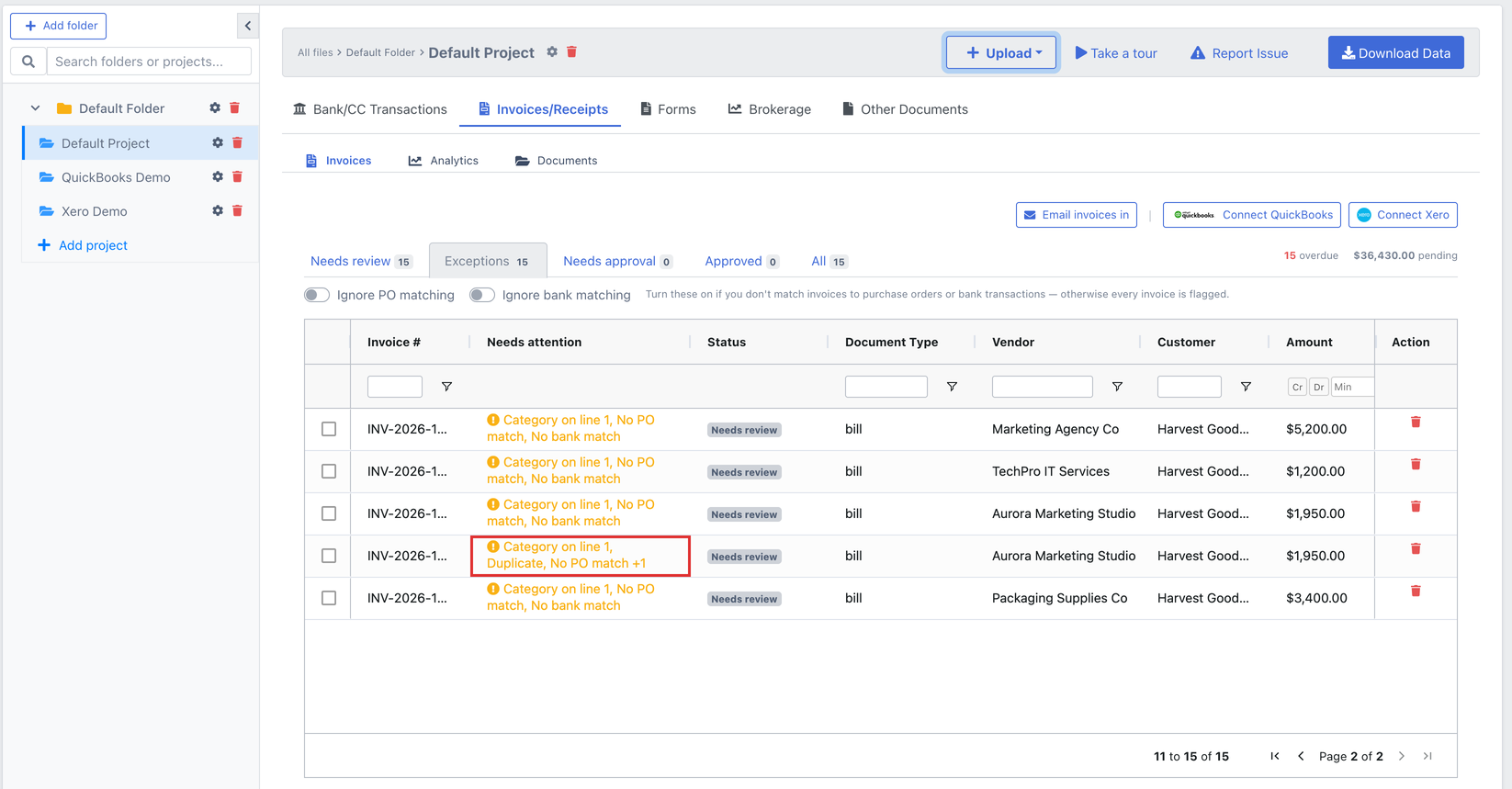
In the invoices list. The Needs attention column reads Duplicate on every auto-flagged row. Anything that blocks a sync, such as a missing category, is listed first, and Duplicate comes next, ahead of the PO and bank match flags. If someone marked the row a duplicate by hand, it reads Duplicate (manual) instead. When a row has more flags than fit in the cell, it ends with a count such as +1 more; hover over the cell to read the full list. Flagged duplicates are included in the Exceptions preset, together with invoices that have no PO or bank match in a project that uses purchase orders or bank statements. See Using the invoices list.
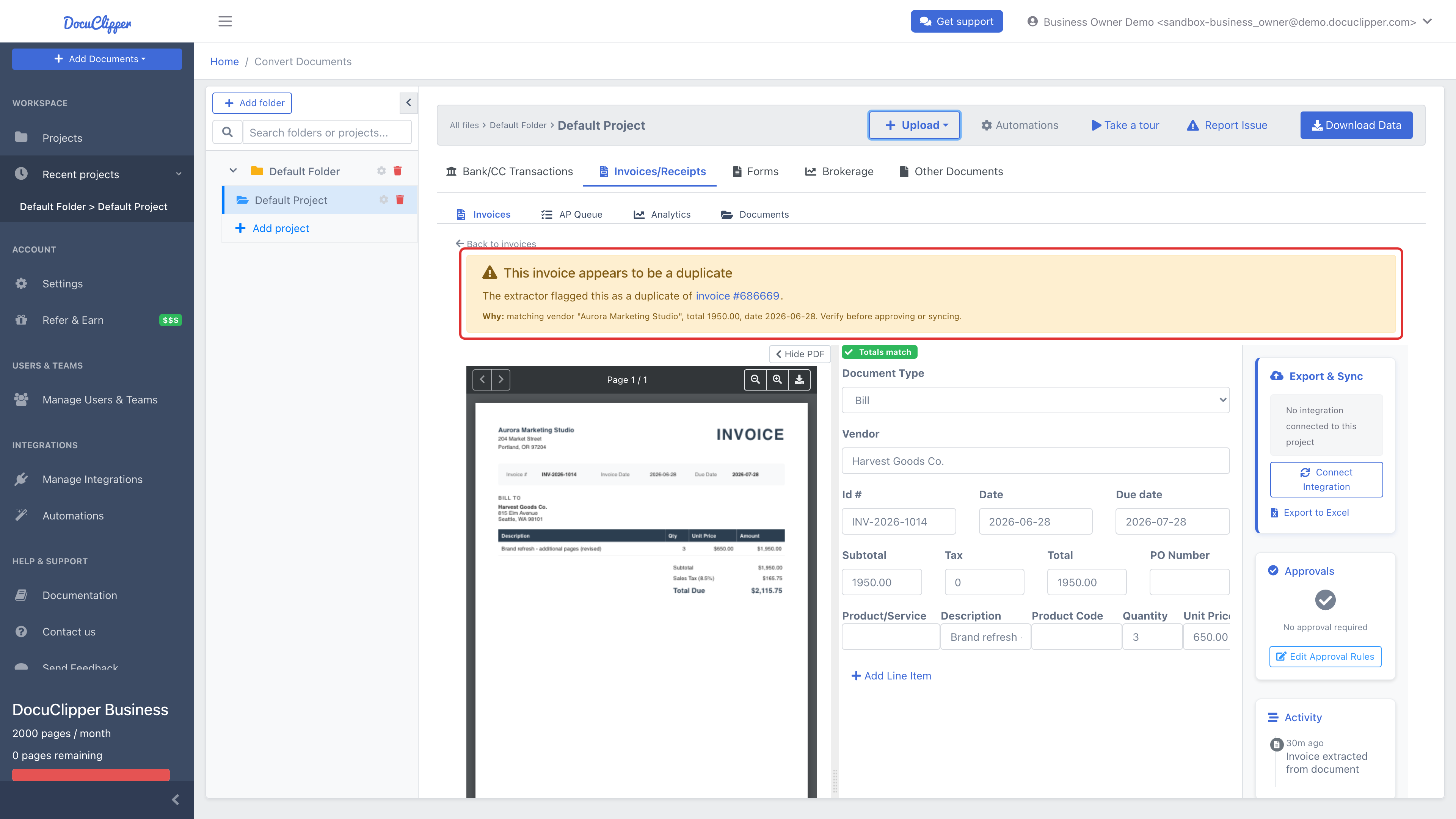
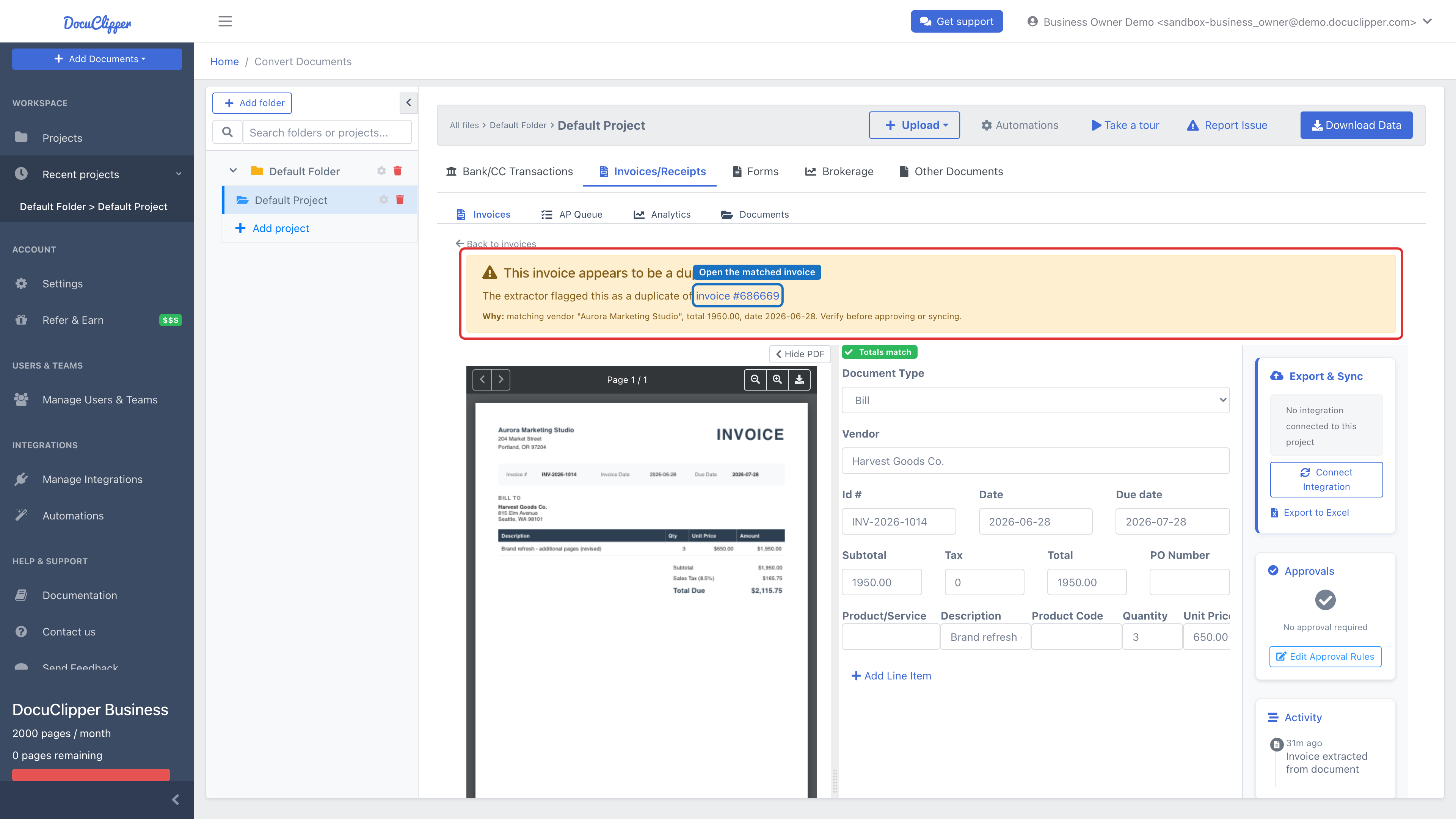
In the invoice editor. When you open a flagged invoice, a yellow alert appears at the top of the form: This invoice appears to be a duplicate. It links to the invoice it matched (invoice #…) so you can open the original in one click, and a Why line spells out the matching fields (vendor, total, and date) so you can verify before approving or syncing.
The flag is informational - it doesn't block anything
The duplicate flag is a warning, not a gate. It does not hold approval, pause export, or suppress an auto-sync to QuickBooks or Xero. You stay in control: review the alert, and if it's a genuine new bill, approve and sync it normally; if it's an accidental re-upload, delete the row.
(Auto-sync can pause for a different reason - when an invoice's totals don't add up. That's a separate reconciliation check with its own Sync anyway override, unrelated to duplicate detection.)
Separately, every sync to QuickBooks or Xero checks the accounting app itself before it creates anything - the automatic sync after extraction, the sync on approval, the sync after an edit, and a manual sync alike. A bill, sales invoice or credit note counts as already there when it has the same document number and the same vendor or customer (in Xero, the same invoice number and contact); the amount and date don't have to match, so a copy posted at a different total is still found. QuickBooks refusing a number because your company warns on duplicate numbers is treated the same way. When the record is already there, DocuClipper links to the existing record instead of creating a second copy - the sync succeeds and the invoice shows as Synced, pointing at the entry that's already there, with no extra step. So re-uploading a bill you already posted doesn't post it twice. (After an edit in DocuClipper, a matching Xero record is updated to the edited version.) Documents without a document number, expenses and purchase orders aren't checked this way, since there is nothing reliable to match them on. This check is unrelated to DocuClipper's duplicate flag and to the Sync anyway button (which overrides the separate reconciliation check when totals don't add up).
Manual overrides win
If you mark a row as a duplicate - or clear a flag DocuClipper raised - your decision sticks. The automatic detector won't overwrite a row a person has explicitly flagged or cleared. You can also bulk-mark a set of selected rows as duplicates of one canonical invoice from the list.
Syncing an invoice that's flagged as a duplicate
Because the flag never blocks anything, there's no override to click on the DocuClipper side - if the flagged invoice really is a new bill, you sync it the same way you sync any other invoice.
First, confirm it's genuinely new
- Open the flagged invoice from the invoices list.
- Read the yellow alert at the top: This invoice appears to be a duplicate. The Why line lists the fields that matched (vendor, total, and date within ±3 days).
- Click the invoice #… link in the alert to open the invoice DocuClipper matched it against, and compare the two.
- Decide: is this a genuinely separate bill (two identical service calls on the same day, a re-issued invoice with a corrected line item, two contracts billed at the same flat amount), or an accidental re-upload?
Then sync it the normal way
Once you're confident the invoice is new:
- Approve it if your project uses the approval workflow, then let auto-sync create it in the connected company - or use the sync action in the invoice's Export & Sync panel to push it to QuickBooks or Xero.
The Duplicate flag stays on the row afterward for audit - syncing doesn't clear it. If you want to remove it, clear it manually; your choice sticks and the auto-detector won't re-raise it.
Excel-only projects. Without QuickBooks or Xero connected, there's nothing to sync. The flag is just a reminder to check the row before you Download to Excel - remove it if it's a true duplicate, or keep it and note that it's an intentional repeat.
The one sync override: "Sync anyway"
DocuClipper's own duplicate flag never pauses sync, so there's nothing to override there. The only sync override you may run into is Sync anyway in the Export & Sync panel - and it has nothing to do with duplicates. It appears when an invoice's totals don't add up (subtotal + tax ≠ total): DocuClipper pauses the automatic push and offers Sync anyway to QuickBooks/Xero in case its reconciliation math is wrong. See QuickBooks & Xero two-way sync.
Why genuine recurring bills don't trigger this
Recurring monthly bills (your Comcast invoice, your office rent) almost never trigger the duplicate flag, because their dates land more than ±3 days apart from one month to the next. Quarterly and annual cadences are even safer. The flag is intentionally tight so it catches accidental re-uploads, not legitimate repeat invoices.
When you might see a false positive
The check is a heuristic. It can fire in legitimate cases, for example:
- Two genuine invoices issued on the same day, by the same vendor, for the same amount, that print no invoice number and name the same customer or none (e.g. two identical service calls on unnumbered receipts).
- A vendor that re-issues an invoice with a corrected line item but the same date and total.
- Re-extracting the same PDF after deleting and re-uploading it within 90 days.
In all of these the warning is correct that something matches; the right call is yours.