
How To Convert FNB Bank Statement To Excel, CSV, And QBO
First National Bank (FNB) issues statements as PDFs through Online Banking and the FNB App. Convert your FNB PDF statement to Excel, CSV, or QBO with DocuClipper.
First National Bank (FNB) of South Africa issues monthly statements as PDFs through FNB Online Banking and the FNB App. PDFs work fine for record-keeping but are awkward to use in Excel or import into QuickBooks, Xero, or Sage.
For fraud detection, anomaly review, and audit-style bank statement analysis, DocuClipper's bank statement analyzer helps flag unusual activity after statements are digitized.
In this article, we'll show you how to convert an FNB statement to Excel using a bank statement converter. For any bank, our bank statement to Excel converter handles the conversion.
To get started, upload your FNB statement here and follow the steps below:
Drag & Drop Bank Statement Here
or
While you are here
Extract every transaction from any bank PDF
Upload a statement from any bank and DocuClipper returns a clean table with dates, amounts, descriptions, and running balance intact. No reformatting before you can reconcile or import.
Step 1: Upload FNB Bank Statement to DocuClipper
Log into your DocuClipper account or sign up for a free trial.
Go to the "Bank and Credit Card Statements" section.
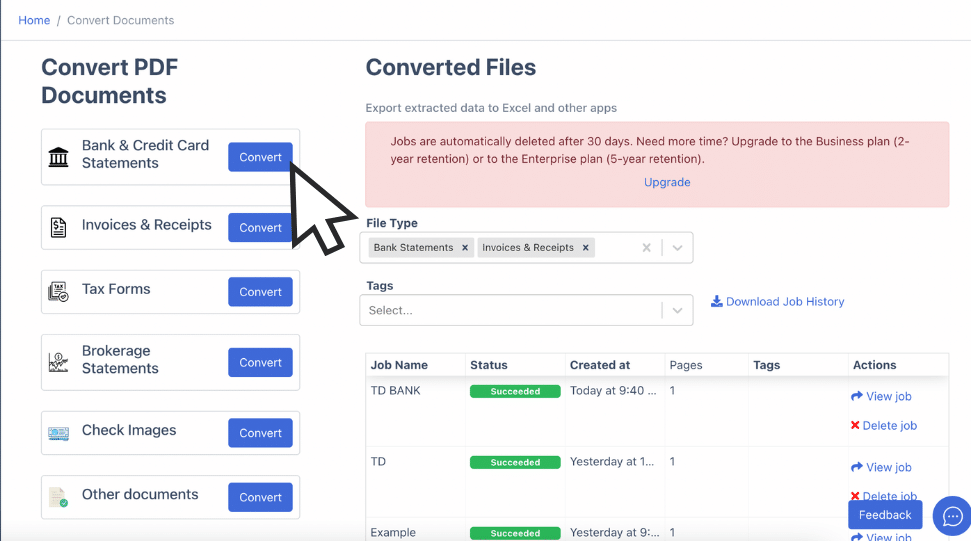
Drag and drop your FNB PDF statement. If your statement is on paper, scan it first.
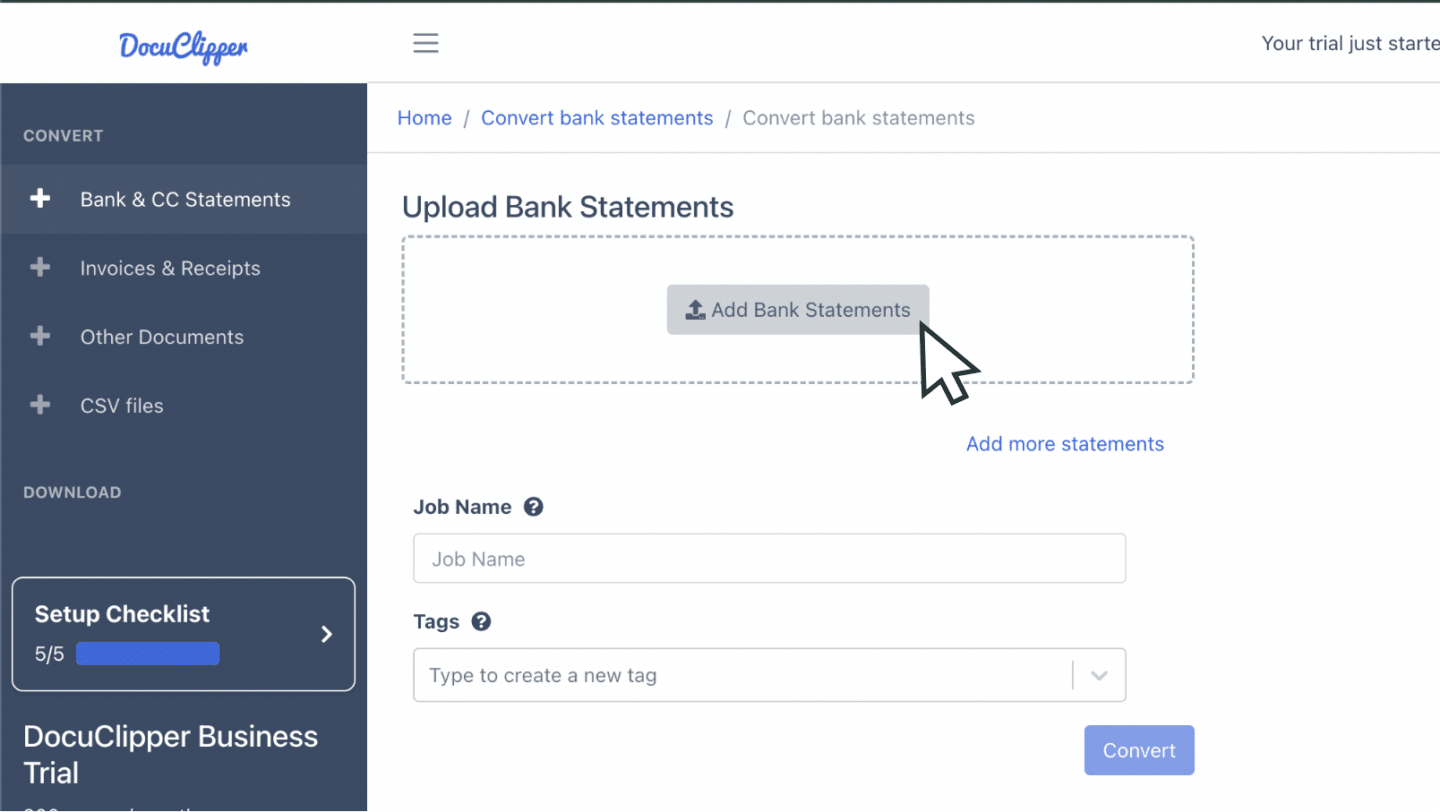
You can also email the statement to the address listed in your account settings.
Step 2: Analyze the FNB Bank Statement
View the original PDF and the spreadsheet side by side with a summary dashboard.
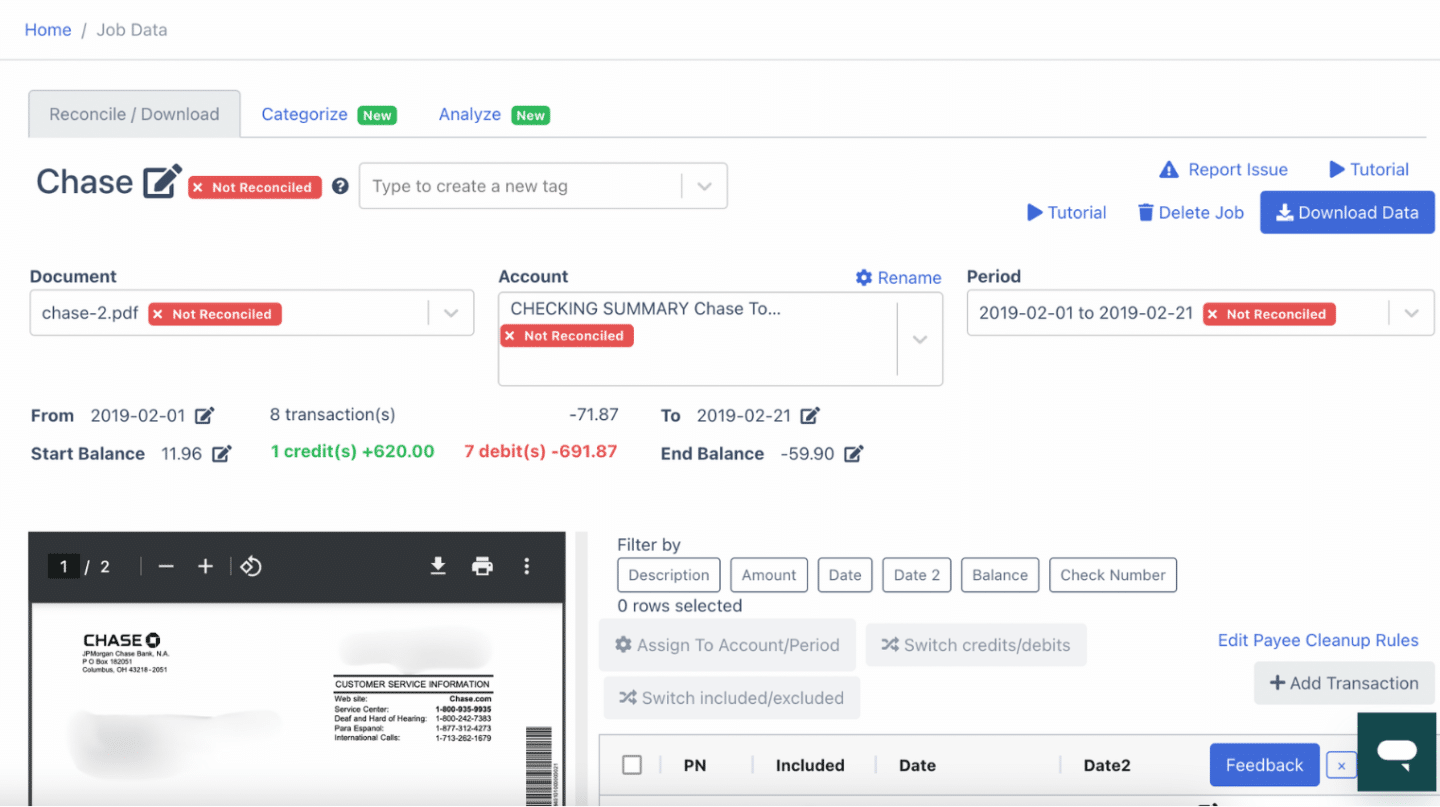
Confirm ZAR amounts, value dates, and running balance.
Step 3: Reconcile FNB Bank Statements
DocuClipper reconciles your bank statement automatically when you click convert. Discrepancies are flagged.
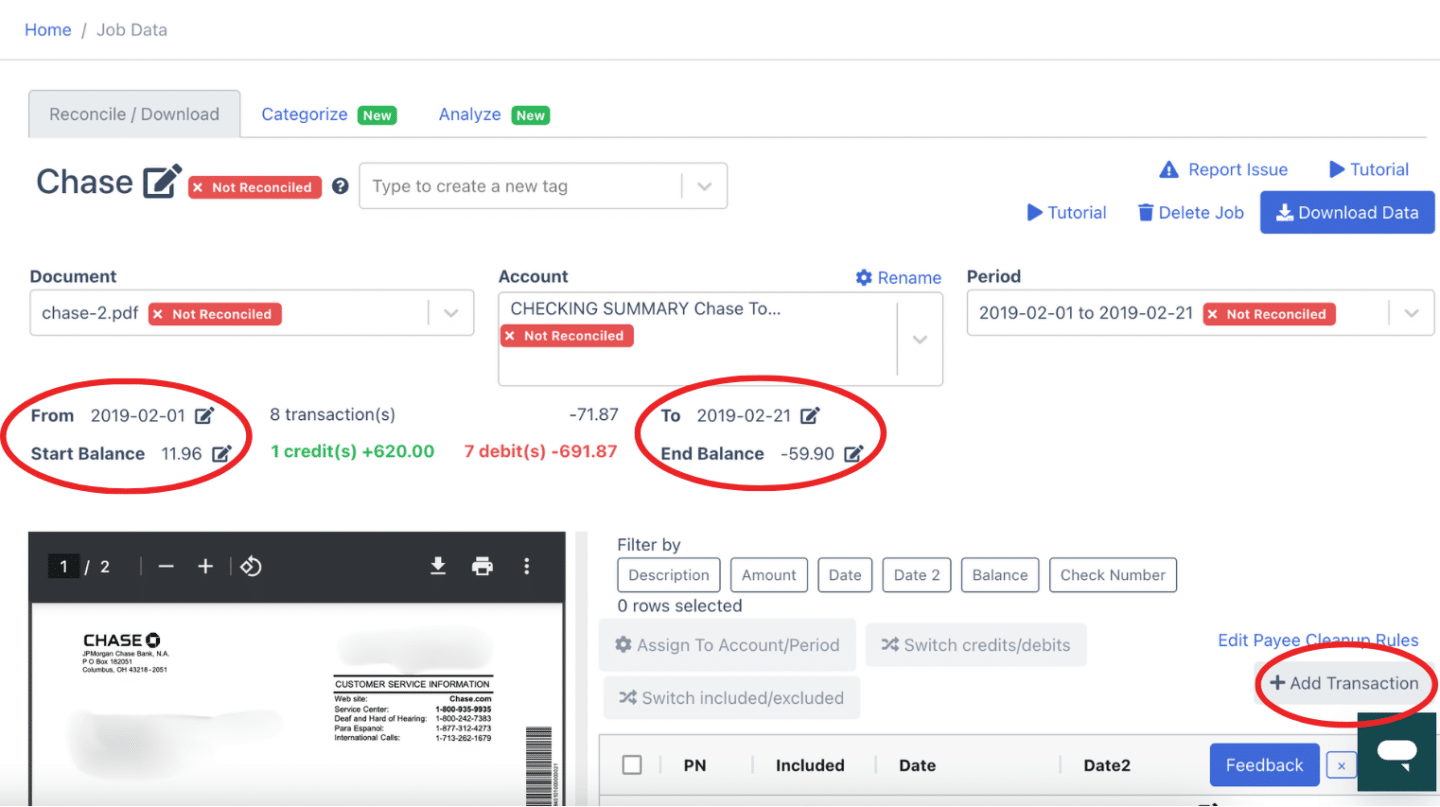
You can edit amounts, dates, or transactions, or add a missing line item.
Step 4: Export FNB Bank Statement to Excel, CSV, QBO
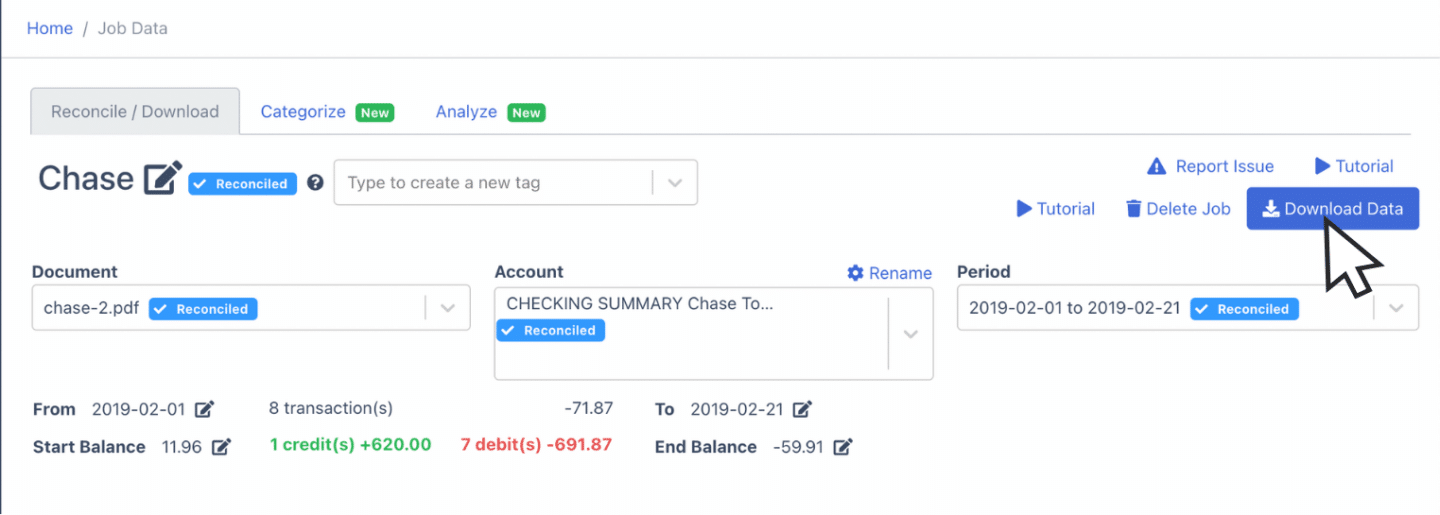
Export to Excel
Open the export menu, select "Excel", pick XLSX, click Download.
Export to CSV
Choose "Excel" then CSV. Premade formats for Quicken, Xero, Sage, MYOB, and NetSuite are included.
Export to QBO
Select "QuickBooks" in the export menu. For the full workflow, see bank statement to QuickBooks.
More import guides:
- Import bank statements into QuickBooks
- Import bank statements into Sage
- Import bank statements into Xero
- Import bank statements into NetSuite
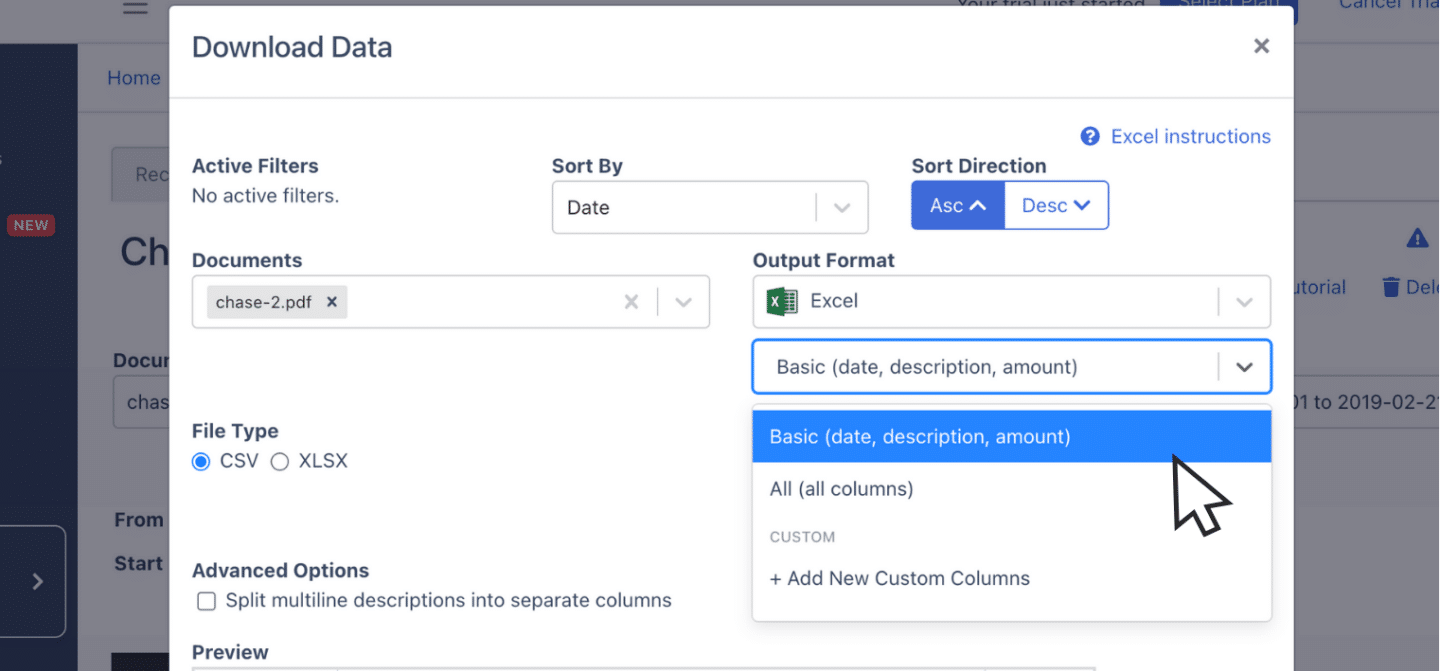
Step 5: Configure the Output Format
Before exporting, adjust date format (FNB uses DD MMM YYYY), reorder columns, or split debits and credits.
Put it into practice
Manual copy-paste is where errors begin
Split rows, drifting balances, missed transactions: they all trace back to re-keying. DocuClipper preserves the bank's layout so debits, credits, and totals tie out the first time.
How to Download an FNB Bank Statement
On the FNB Online Banking website (fnb.co.za):
- Log in to Online Banking.
- Select the relevant account from "My Bank Accounts".
- Click "History" or "Statements".
- Choose the period and click "View Statement", then save the PDF.
In the FNB App:
- Open the FNB App and log in.
- Tap the account.
- Tap "Statements" or "More" then "Statements".
- Pick a month, then tap the download or share icon to save the PDF.
eStatements are also delivered to your registered email address each month.
Final Advice
PDFs grow into hundreds of files quickly for accountants and bookkeepers. DocuClipper converts those PDFs into Excel, CSV, or QBO so you can spend time on analysis instead of data entry.
Why Use DocuClipper to Convert FNB Bank Statements
DocuClipper is a web-based tool used by 13,000+ businesses to convert PDF bank statements into XLS, CSV, and QBO. It integrates with QuickBooks, Sage, and Xero, and supports credit card statements, brokerage statements, receipts, and invoices.
FAQs about FNB Bank Statement to Excel
Can I download my FNB statement directly to Excel?
No. FNB Online Banking and the FNB App offer PDFs. Convert the PDF to Excel with DocuClipper.
Does FNB offer CSV downloads?
FNB allows you to view transaction history online, but the official statement download is PDF. Convert it with DocuClipper to get a CSV.
How many months of FNB statements can I download?
FNB typically retains several years of statements online. Older periods may require a branch request.
Does DocuClipper handle FNB business and corporate statements?
Yes. Personal, business, and FNB Commercial statements all convert.
Can I convert FNB credit card statements too?
Yes. DocuClipper handles FNB credit card statements alongside checking and savings.
Related Articles
<script type="application/ld+json"> { "@context": "https://schema.org", "@graph": [ {"@type": "Article", "headline": "How To Convert FNB Bank Statement To Excel, CSV, And QBO", "datePublished": "2026-04-25", "author": {"@type": "Organization", "name": "DocuClipper"}}, {"@type": "HowTo", "name": "Convert an FNB statement to Excel", "step": [ {"@type": "HowToStep", "name": "Upload", "text": "Upload your FNB PDF statement to DocuClipper."}, {"@type": "HowToStep", "name": "Review", "text": "Review extracted transactions side by side."}, {"@type": "HowToStep", "name": "Reconcile", "text": "DocuClipper reconciles automatically."}, {"@type": "HowToStep", "name": "Export", "text": "Export to Excel, CSV, or QBO."}, {"@type": "HowToStep", "name": "Configure", "text": "Configure date format and columns."} ]}, {"@type": "FAQPage", "mainEntity": [ {"@type": "Question", "name": "Can I download my FNB statement directly to Excel?", "acceptedAnswer": {"@type": "Answer", "text": "No. Use DocuClipper to convert the PDF to Excel."}}, {"@type": "Question", "name": "Does FNB offer CSV downloads?", "acceptedAnswer": {"@type": "Answer", "text": "Official statement downloads are PDF; convert with DocuClipper for CSV."}}, {"@type": "Question", "name": "How many months of FNB statements can I download?", "acceptedAnswer": {"@type": "Answer", "text": "Several years online; older periods through branch."}}, {"@type": "Question", "name": "Does DocuClipper handle FNB business statements?", "acceptedAnswer": {"@type": "Answer", "text": "Yes, personal, business, and Commercial statements convert."}}, {"@type": "Question", "name": "Can I convert FNB credit card statements?", "acceptedAnswer": {"@type": "Answer", "text": "Yes."}} ]} ] } </script>Next step
Upload your first statement free
No credit card required. See extracted transactions in seconds, then export to Excel, CSV, or QBO when you're ready to scale.