
Bank statement loan income calculation
Monthly income you can defend, from 24 months of statements
For non-QM underwriters and mortgage brokers. DocuClipper converts 12 or 24 months of personal and business statements, ties each one to its printed balances, takes out transfers, refunds and loan proceeds, and shows every deposit it counted.
 4.7/5(124 reviews)Trusted by 10,000+ finance teams
14-day free trialNo credit card required
- statements converted in 30 days
- 138,000+statements converted in 30 days
- of digital statements tied out to the printed balance
- 94.6%of digital statements tied out to the printed balance
Last updated:
How do you calculate income for a bank statement loan?
Total the eligible deposits across 12 or 24 months of statements, leave out transfers between the borrower's own accounts, refunds and loan proceeds, and divide by the months covered. Then apply your program's expense factor and the borrower's ownership share. DocuClipper does the deposit side from the PDFs, checks each statement against its printed balances, and lists every excluded deposit with its reason.
- Statements
- 12 or 24 months, personal and business, any bank, digital or scanned PDF
- Check on every statement
- Transactions totaled against the printed opening and closing balances; periods that do not tie out are flagged
- Left out of income
- Own-account transfers, loan and credit-line proceeds, refunds and reversals, deposits returned unpaid, credit card credits
- You get
- Average and recurring monthly income, sources by payer, large one-off deposits, month by month, CSV export
- Tamper check
- 0 to 100 authenticity score per statement (Business plans and free trial)
- Volume
- 138,000+ bank and credit card statements converted in the 30 days to October 15, 2026
Volume and tie-out figures: DocuClipper production data, bank and credit card statement jobs, 30 days to October 15, 2026. Tie-out is measured on digital PDFs.
What does a 24-month calculation look like, step by step?
Bank statement programs replace tax returns with the deposits on the borrower's own statements. The exact rules come from your investor, but the arithmetic has the same shape everywhere. Here it is with illustrative numbers for a self-employed borrower on 24 months of business statements.
- 1
Collect every statement
12 or 24 consecutive months for each account the borrower uses, business and personal.
- 2
Total the deposits
Every credit on every statement, read line by line.
- 3
Remove what is not income
Transfers between the borrower's own accounts, loan proceeds, refunds and reversals.
- 4
Average by month
Eligible deposits divided by the months the statements cover.
- 5
Apply the program's expense factor and ownership share
A fixed ratio by business type, or the expenses on a CPA or P&L letter, depending on the program.
| Line | Amount | Done by |
|---|---|---|
| Total deposits, 24 statementsDocuClipper | $612,400 | DocuClipper |
| Less transfers from the owner's other accountsDocuClipper | -$84,000 | DocuClipper |
| Less a loan disbursement and refundsDocuClipper | -$48,400 | DocuClipper |
| Eligible depositsDocuClipper | $480,000 | DocuClipper |
| Average monthly deposits (÷ 24)DocuClipper | $20,000 | DocuClipper |
| Expense factor, 50% in this exampleYour program | -$10,000 | Your program |
| Qualifying income at 100% ownership, per monthYour program | $10,000 | Your program |
The expense factor shown is an example, not a guideline. Use the ratio or expense letter your program requires.
What does DocuClipper do in that calculation?
Steps 1 to 4, from the PDFs, in one project per borrower. Upload all 24 statements at once; each one is converted to transactions and totaled against the balances the bank printed on it. Then open Bank/CC Transactions > Advanced Analysis > Income.
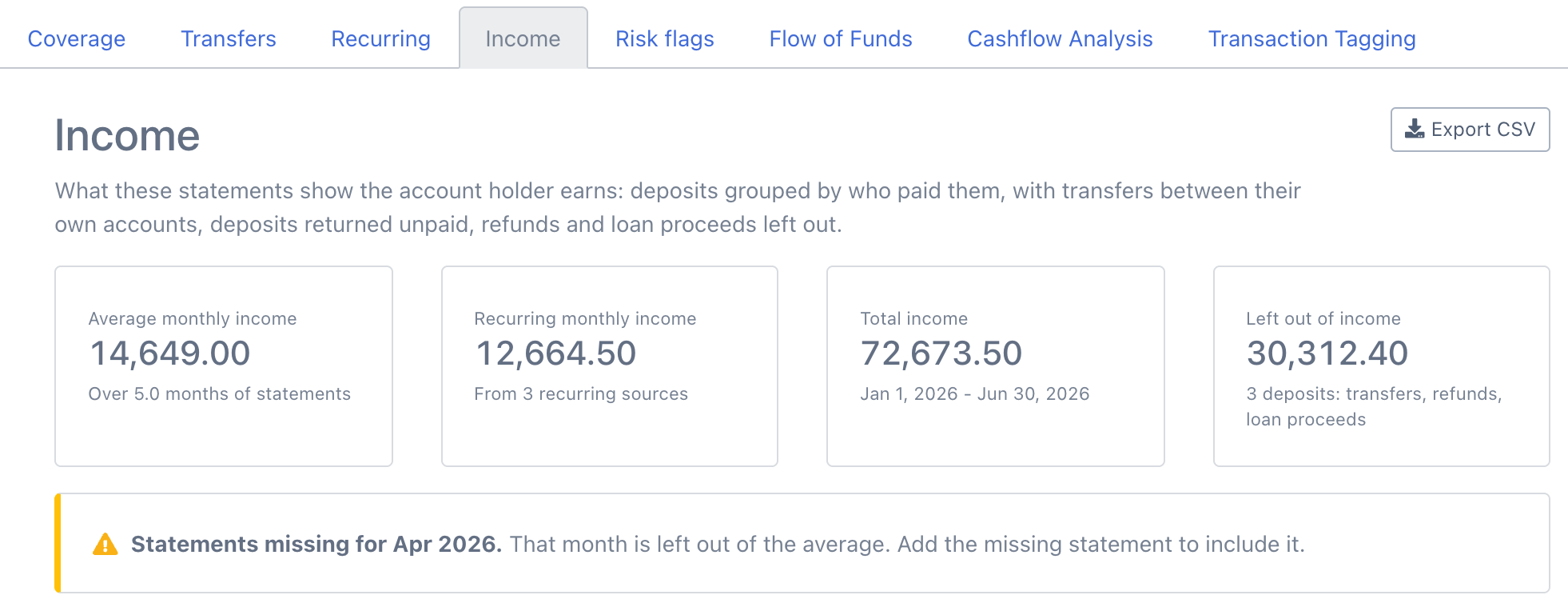
Average monthly income
Income divided by the months the statements cover, with partial first and last months counted by their days and missing months left out.
Recurring monthly income
The monthly equivalent of payers still paying at the end of the file: weekly, every 2 weeks, twice a month, monthly or quarterly.
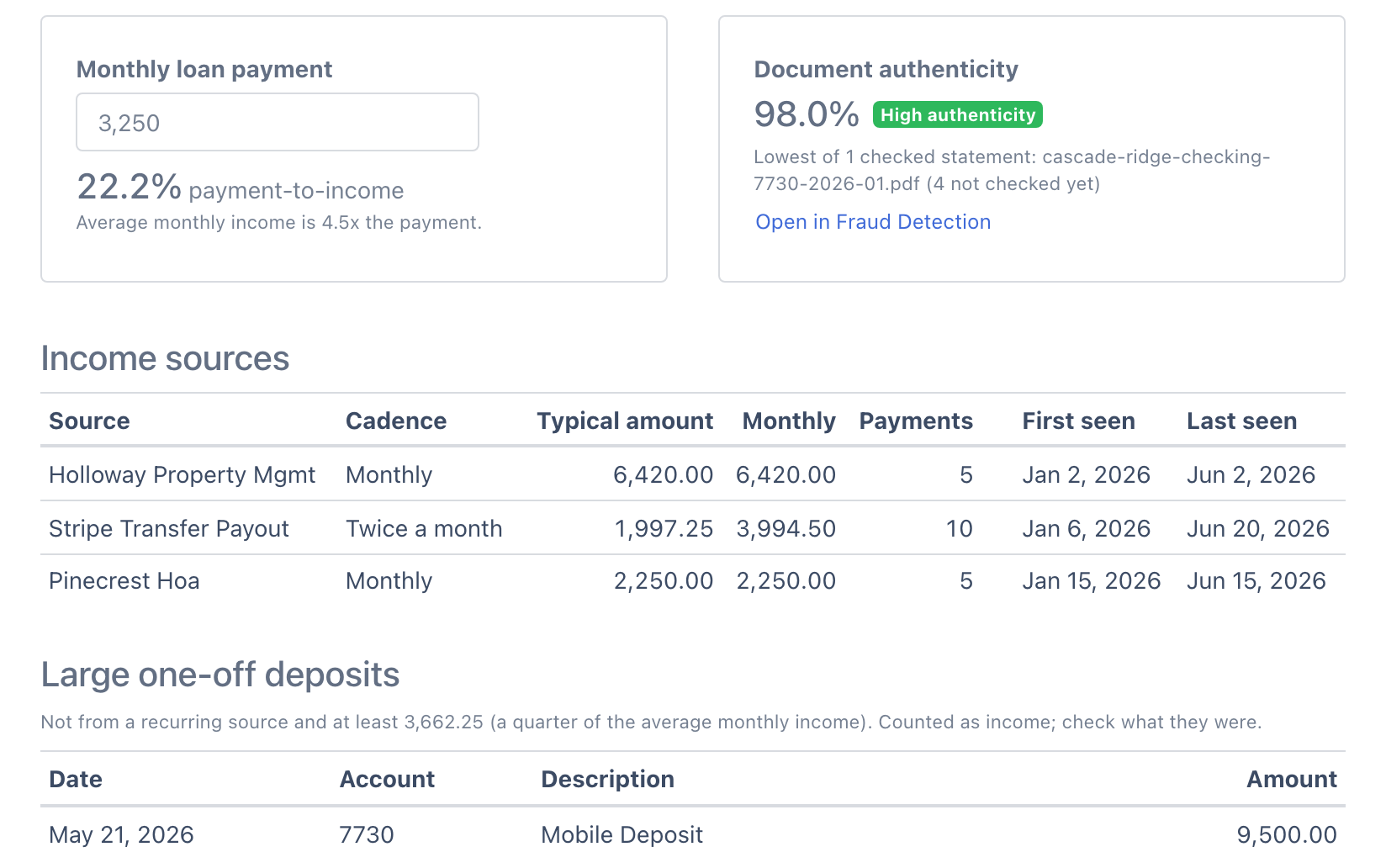
Income sources by payer
Every paycheck from one employer, or every payout from one card processor, grouped as one source with its cadence and typical amount.
Large one-off deposits
Deposits from no regular source worth at least a quarter of monthly income, listed so you can ask the borrower what they were.
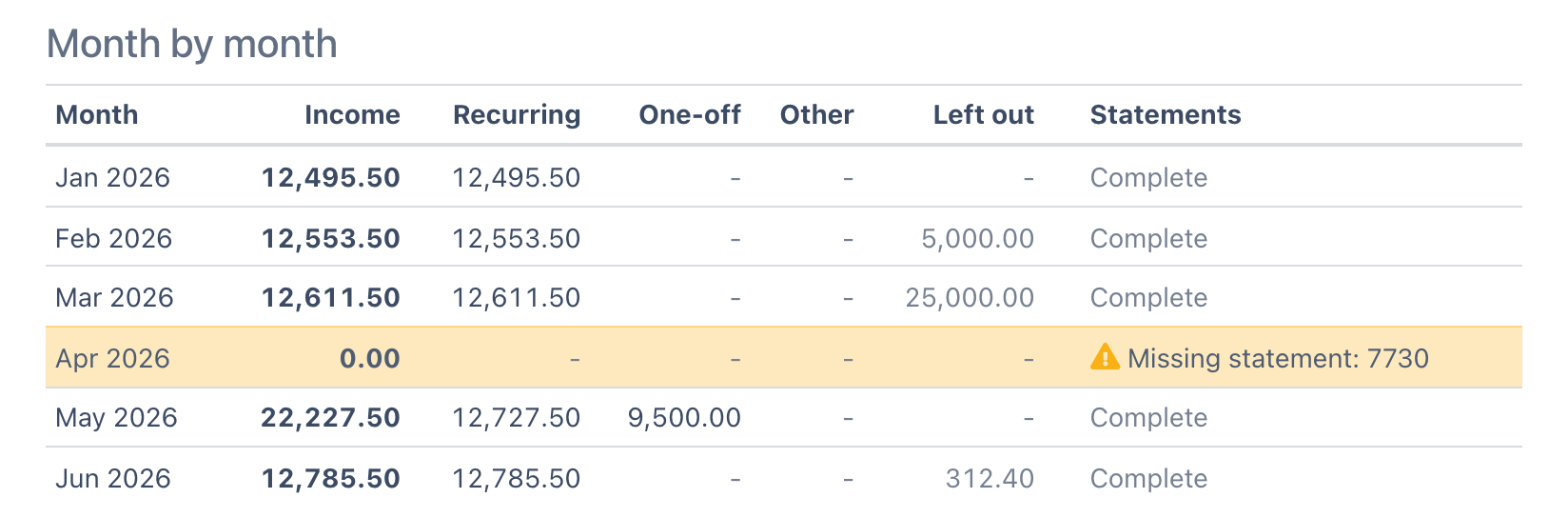
Month by month
Income per calendar month split into recurring, one-off and other, with what was left out and whether the month's statements are complete.
Left out of income
Every excluded deposit, with the rule that excluded it, so a reviewer can disagree with one line instead of redoing the file.
For a business account the same view shows revenue: Stripe, Square and Shopify payouts and customer payments become sources, and owner transfers between business accounts are left out. Type the proposed monthly payment and it also shows payment-to-income.
Which deposits are left out of income?
Every deposit is checked in this order, and the first rule that applies decides.
1. Credit card credits
Payments and merchant credits on a card statement are never income.
2. Deposits returned unpaid
A deposit the bank sent back: a returned-item withdrawal (RETURN ITEM, DEPOSITED ITEM RETURNED, NSF) of the same amount on the same account within 14 days. The returned-item fee stays a withdrawal.
3. Transfers between the borrower's own accounts
Paired with a withdrawal of the same amount from another account in the file within 5 days, or described as coming from the holder's own savings, checking or a sweep. Pairs you reject count as income again.
4. Loan and credit-line proceeds
Loan disbursements, line-of-credit draws, cash advances and merchant cash advance funding. Borrowed money is not income.
5. Refunds and reversals
Refunds, reversals, returned items, chargebacks and cash back, plus any deposit that undoes a purchase from the same merchant in the previous 60 days.
Zelle, Venmo, PayPal and wire deposits are never treated as transfers on their description alone, because money from another person can be real income. Upload every account the borrower has, so both sides of each transfer are in the file.
How do you know the statements are complete and unaltered?
Income built on a missing month or an edited PDF is a repurchase risk. Three checks run before you rely on the number.
Every statement ties out, or is flagged
Each statement period is totaled against its own printed opening and closing balances. In the 30 days to October 15, 2026, 94.6% of 118,000+ digital statement periods tied out; the rest were flagged for review before export.
Missing months are named
A month with statements before and after it but none for that month is called out, highlighted and left out of the average, so the gap cannot quietly lower the figure.
Edited PDFs are scored
Each statement gets a 0 to 100 authenticity score from its edit history, pasted-in amounts, the bank's layout fingerprint and reconciliation. The Income view shows the lowest score in the file.
DocuClipper reports 99.9% field-level accuracy, and the balance check is how you confirm it on each file. Authenticity scores are on Fraud Detection, included on Business and Enterprise plans and in the free trial.
What goes into the loan file?
Two exports, both ready to attach.
Income report (CSV)
The summary, the payment-to-income ratio if you entered a payment, the lowest authenticity score, income sources, month by month, one-off deposits, and every deposit with how it was counted. Opens in Excel.
All transactions (Excel or CSV)
Every transaction from every statement with date, description, amount and running balance, for the reviewer who wants to re-foot the file. Also available as JSON through the API.
What DocuClipper does not do
So you know where the tool stops and your guidelines take over.
The expense factor and qualifying income
DocuClipper gives you eligible deposits and the monthly average. Your program's expense ratio, CPA letter, ownership percentage and investor worksheet are applied by your team.
A loan origination system connector
There is no Encompass or other LOS integration. Use the Excel or CSV export, or the API and webhooks.
A credit decision
DocuClipper extracts, checks and summarizes. The underwriter decides.
If you need a full underwriting platform with investor-specific worksheets and an enterprise contract, a dedicated non-QM tool may fit better. If your team does the worksheet and needs the deposits right, fast and checkable, start here. Comparing options? DocuClipper vs Ocrolus.
“It's a complete game-changer. Instead of spending hours combing through statements, we get the data we need almost instantly.”
Bank statement loan income: questions underwriters ask
DocuClipper converts the 12 or 24 monthly PDFs, checks each one against its printed opening and closing balances, leaves out transfers between the borrower's own accounts, refunds and loan proceeds, and reports average monthly income with every deposit traced to its statement line. You then apply the expense factor and ownership share your loan program requires to reach qualifying income.
No. DocuClipper produces the deposit side of the calculation: eligible deposits, the monthly average, and the list of what was excluded and why. The expense ratio, the CPA or P&L letter, the ownership percentage and the investor's worksheet stay with your underwriting team, because they differ by program. The CSV export is laid out so the worksheet math is one formula.
Yes. Put every account for the borrower in one project. Transfers between those accounts, such as an owner draw from the business account to the personal account, are paired by amount within 5 days and left out of income, so the same dollar is not counted twice. For a business account, card processor payouts (Stripe, Square, Shopify) and customer payments show up as income sources.
Credits on credit card statements, deposits the bank returned unpaid, transfers between the borrower's own accounts, loan and credit-line proceeds (including merchant cash advance funding), and refunds, reversals, returned items and chargebacks. Each excluded deposit is listed with its reason. Zelle, Venmo, PayPal and wire deposits are not treated as transfers on their description alone, because money from another person can be real income.
DocuClipper flags it. A month is missing for an account when there are statements before and after it but none for that month. The month is named in a notice, highlighted in the month-by-month table and left out of the average, so a gap does not pull the monthly figure down. Add the statement and the report recalculates.
Each statement gets an authenticity score from 0 to 100 built from four families of checks: PDF metadata and edit history, amounts pasted in at a different text size, the layout fingerprint of the bank, and whether the transactions reconcile to the printed balances. The Income view shows the lowest score in the file. Fraud Detection is on Business and Enterprise plans and during the free trial.
Yes. Advanced Analysis > Risk flags counts NSF, returned-item and overdraft fees per month, lists returned items, and counts the days each account ended below zero, from the statement's printed running balance where it has one and from the opening balance plus the transactions where it does not. It also shows the low and average daily balance per month, deposit volatility over full months, and daily or weekly debits to known funders and lenders as possible existing advances. It counts and lists; how many NSFs your program allows is your guideline.
There is no built-in connector to Encompass or another loan origination system. Teams attach the Excel or CSV export to the loan file, or use the DocuClipper API and webhooks, which are included on every plan, to send converted transactions into their own systems.
Pages are counted per statement page. The average statement DocuClipper processes is about 6 pages, so 24 monthly statements for one account come to roughly 150 pages. Plans start at $29/month for 60 pages, and Business, which adds Fraud Detection, starts at $159/month for 640 pages. The 14-day free trial includes the Income view and Fraud Detection.