
Income Analysis
Verify income from bank statements: average and recurring monthly income, income sources by payer, month-by-month totals, rent-to-income or payment-to-income ratio, with transfers, returned deposits, refunds and loan proceeds left out.
Last updated
Overview
The Income sub-tab of Advanced Analysis answers one question: what do these bank statements show the account holder really earns? It reads every deposit in the project, leaves out money that is not income (transfers between the holder's own accounts, deposits returned unpaid, refunds, loan proceeds), groups the rest by who paid it, and turns it into an average monthly figure you can put in a tenant file, a loan file or a financial affidavit.
It is built for:
- Property managers and landlords screening a rental applicant (rent-to-income)
- Lenders, MCA funders and mortgage underwriters verifying income or revenue before a decision
- Family-law and forensic accountants establishing what a party actually earns
How to open it
- Open a project that holds the applicant's bank statements. Upload every account you have for them (checking, savings, and any card statements) so transfers between them can be recognised.
- Go to Bank/CC Transactions > Advanced Analysis and select the Income sub-tab.
The report is computed from the project's transactions each time you open it. Add, edit or re-extract a statement and the numbers follow.
What the report shows
Summary
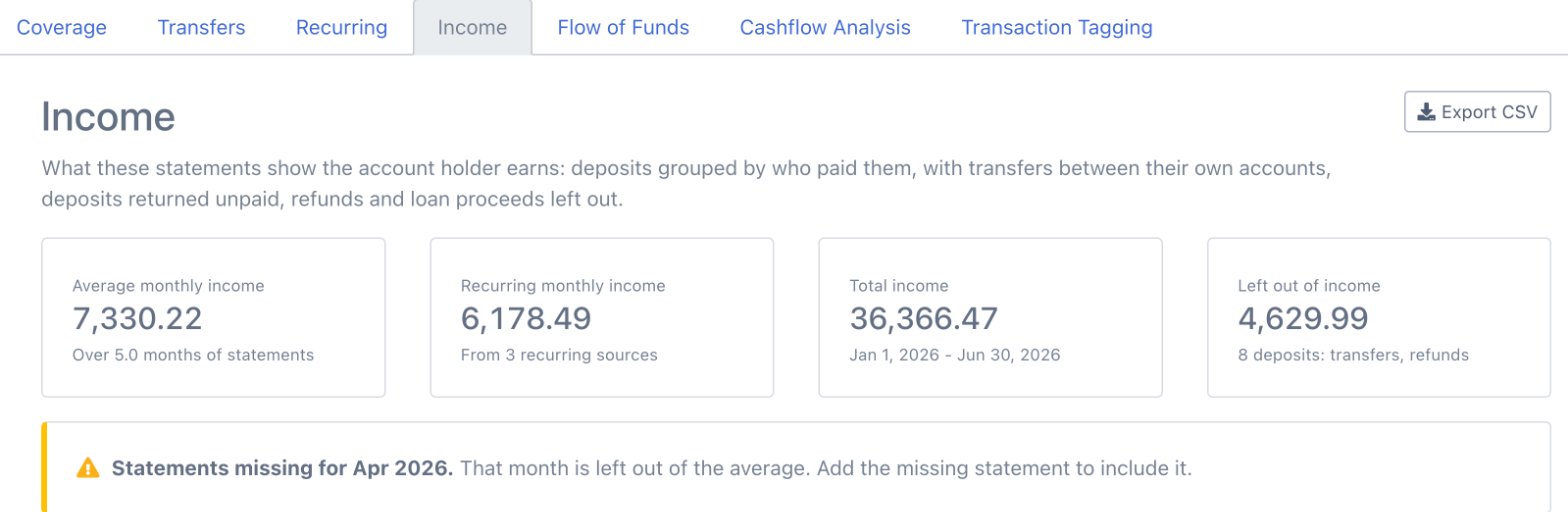
- Average monthly income - income received, divided by the months the statements cover. Months with a missing statement are left out of the average (see Missing statements below), and partial months at the start or end count by the days they cover, so a statement running January 15 to February 14 counts as one month, not two.
- Recurring monthly income - the monthly equivalent of the recurring sources that are still paying at the end of the statements. A biweekly paycheck of 2,412.55 is 2,412.55 x 26 / 12 = 5,227.19 a month. A source that stopped paying before the last statement is marked Stopped and is not part of this figure.
- Total income - every deposit counted as income over the statement period.
- Left out of income - the deposits that were not counted, with the reasons.
Monthly rent or payment, and the ratio
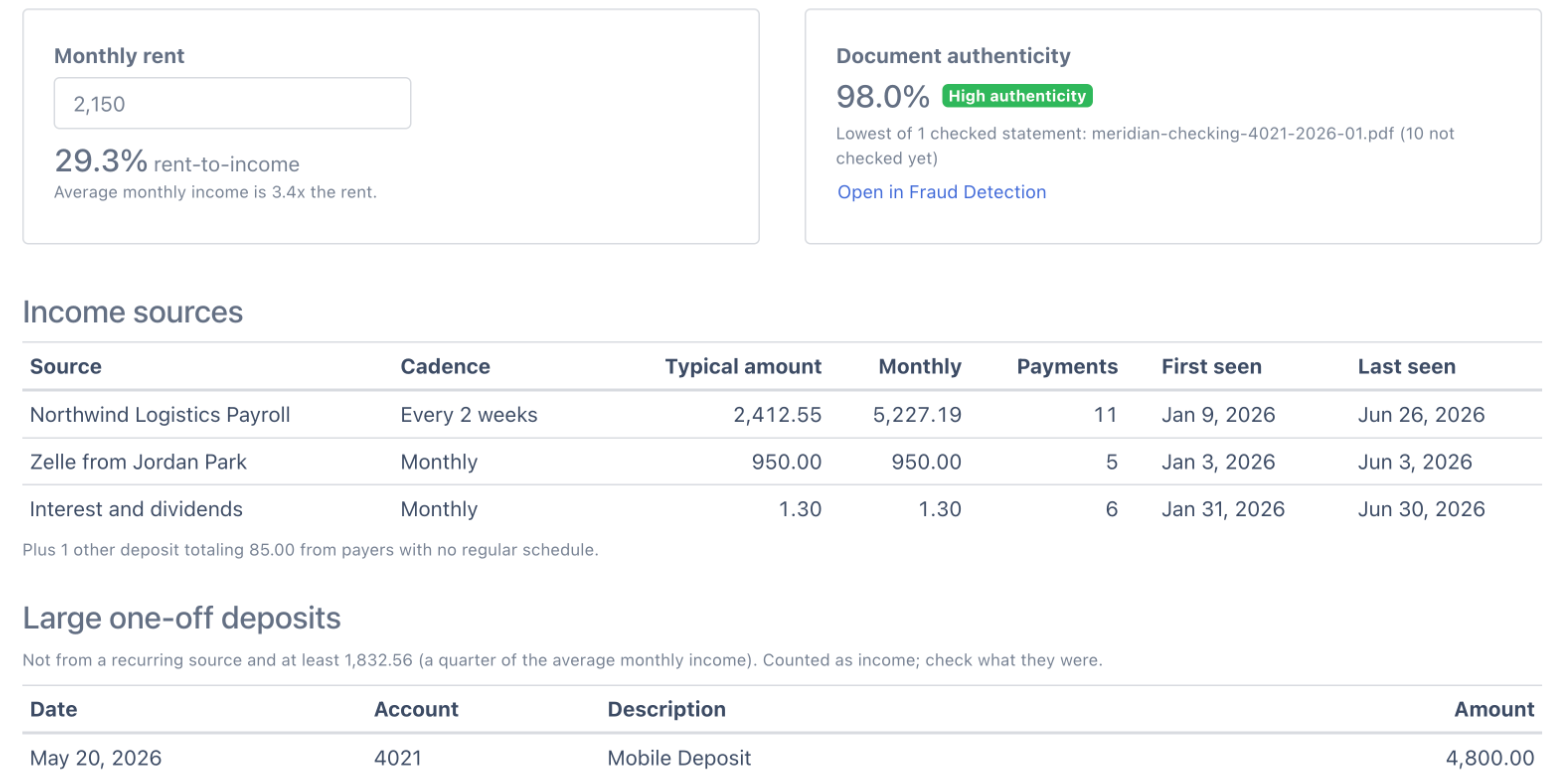
Type a monthly amount and the report shows what share of the average monthly income it takes, and how many times income covers it. The wording follows the role you picked in What best describes your work?: Property Manager / Real Estate (or a property or real-estate answer under Other) shows Monthly rent and Rent-to-income, lenders see Monthly loan payment and Payment-to-income, and everyone else sees Monthly payment. The amount is remembered for that project in your browser.
Document authenticity
Next to the ratio, the report shows the authenticity score of the lowest-scoring statement in the project, with its band (high, medium or low), from Fraud Detection. Open in Fraud Detection takes you straight to that statement's signals. Statements are scored when they are opened in the Fraud Detection tab; the card says how many are still to be checked. Fraud Detection is included in Business and Enterprise plans and during the free trial; on other plans the card offers the upgrade instead.
Income sources
Deposits are grouped by payer. The bank's boilerplate (Direct Deposit, ACH Credit, PPD, reference and ID numbers, dates) is ignored, so every paycheck from one employer is one source. Zelle, Venmo, Cash App and PayPal deposits are grouped by the person who sent them, check and cash deposits form one source, and interest and dividends form another.
A payer is a recurring source when it paid at least 3 times (2 times when the project covers less than two months) on a steady schedule:
| Cadence | Gap between payments |
|---|---|
| Weekly | 5 to 9 days |
| Every 2 weeks | a steady 13 to 15 days |
| Twice a month | 10 to 20 days, varying with month length (for example the 1st and the 15th) |
| Monthly | 25 to 36 days |
| Quarterly | 80 to 100 days |
At least 3 out of 4 gaps must fit the schedule. A gap that is a whole number of periods (a skipped paycheck, or a month whose statement is missing) still fits. For each source the table shows the typical amount (the median payment), the monthly equivalent, the number of payments, and when it was first and last seen.
Income from payers with no regular schedule is summarised under the sources table.
Large one-off deposits
Deposits that are not part of a recurring source and are at least a quarter of the average monthly income are listed on their own: a bonus, an insurance payout, a large check, a sale. They are counted as income, and listed so you can ask what they were.
Month by month
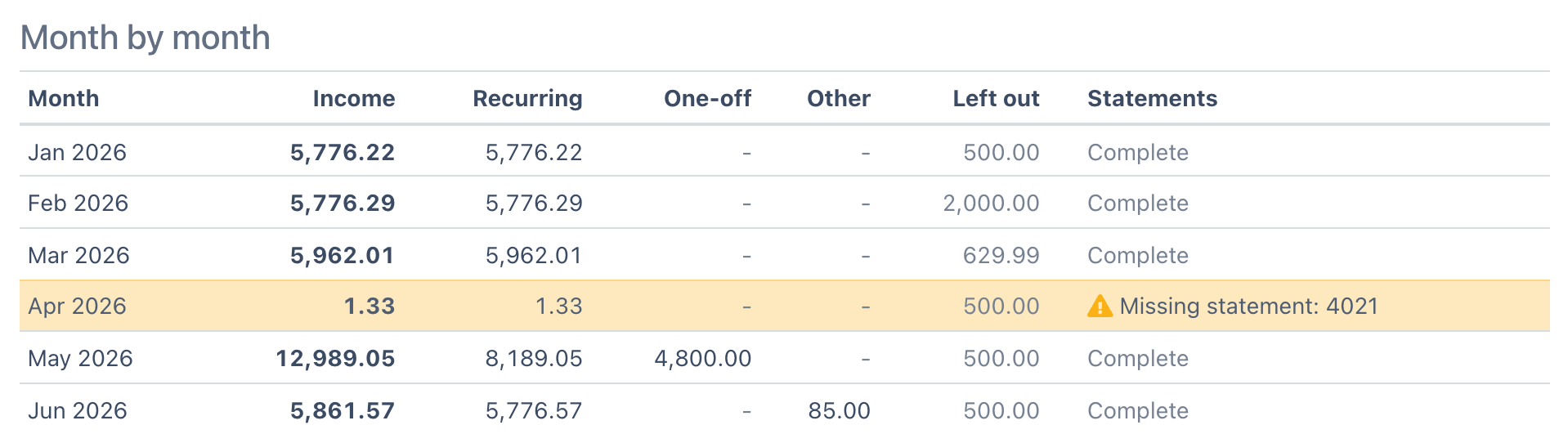
One row per calendar month with the income received, split into recurring, one-off and other, plus what was left out. The Statements column says whether the month is complete, partly covered, or missing a statement for one of the accounts.
What is left out of income
Every deposit is checked in this order, and the first rule that applies decides:
- Credit card accounts - credits on a credit card statement are payments or merchant credits, never income.
- Deposits returned unpaid - a deposit the bank later sends back: a returned-item withdrawal (for example "RETURN ITEM", "DEPOSITED ITEM RETURNED", "NSF" or "UNPAID ITEM") of the same amount on the same account within 14 days after the deposit. Each returned item cancels one deposit, the closest one before it, and the bank's returned-item fee stays a withdrawal. A returned item with no matching deposit in the project leaves the deposits as they are.
- Transfers between own accounts - deposits that the Transfers analysis pairs with a withdrawal of the same amount from another account in the project, within 5 days. Pairs you rejected in the Transfers tab count as income again. A deposit whose description says it came from the holder's own account ("Online transfer from savings", "Overdraft protection from...", a sweep) is also a transfer, even when the other account's statement is not in the project. Zelle, Venmo, PayPal and wire deposits are never treated as transfers on their description alone, because money from another person can be real income.
- Loan and credit-line proceeds - loan disbursements, line-of-credit draws, cash advances and merchant cash advance funding. Borrowed money is not income.
- Refunds and reversals - refunds, reversals, returned items, chargebacks, rewards and cash back, and any deposit that undoes an earlier purchase: the same amount from the same merchant on the same account within the previous 60 days.
Open Left out of income at the bottom of the report to see every excluded deposit and the reason for each one.
Missing statements
The report uses the same rule as Coverage: a month is missing for an account when there are statements for that account before and after it but none for that month. Missing months are highlighted in the month-by-month table, named in a notice at the top, and left out of the average, so a gap in the file never drags the monthly figure down. Add the missing statement to the project and the month is included.
Export
Export CSV downloads the whole report as one file: the summary (including the rent or payment and its ratio, if you entered one, and the lowest authenticity score), the income sources, the month-by-month table, the large one-off deposits, and every deposit with how it was counted. It is ready to attach to a tenant or loan file.
Good to know
- Amounts are shown in the statements' own currency, without a currency symbol.
- The report works from the transactions on the statements. A paycheck that goes to an account whose statements are not in the project cannot be seen, so ask for every account.
- Check and cash deposits do not name a payer, so they are grouped together. Look at the large one-off list for deposits that need an explanation.
- For a business, the same report shows revenue: card processor payouts (Stripe, Square, Shopify) and customer payments become sources, and owner transfers between business accounts are left out.
FAQs
How does DocuClipper calculate average monthly income from bank statements?
It adds up every deposit counted as income in the months that have every statement, divides by the days those statements cover, and multiplies by 30.4375 (the average month length). Transfers between the holder's own accounts, deposits returned unpaid, refunds, loan proceeds and credit card credits are left out first.
Does the income analysis exclude transfers between my applicant's own accounts?
Yes. Deposits that the Transfers analysis pairs with a withdrawal from another account in the same project are left out, and so are deposits described as transfers from the holder's own savings or checking. Upload every account for the applicant so both sides of each transfer are visible.
Can I calculate rent-to-income or debt-to-income?
Enter the monthly rent or loan payment in the Income sub-tab and the report shows the ratio against the average monthly income, and how many times income covers the payment. The ratio is included in the CSV export.
What counts as recurring income?
A payer who paid at least 3 times on a weekly, every-2-weeks, twice-monthly, monthly or quarterly schedule. Payroll, rental income, benefits and regular client payments usually qualify. Irregular deposits are counted as income but not as recurring.
Is the Income analysis available on my plan?
Income is part of Advanced Analysis, available on every plan and during the free trial. The document authenticity score beside it comes from Fraud Detection, which is included in Business and Enterprise plans and during the trial.