
Purchase Order → Structured Data 4.7/5(120+ reviews)Trusted by 10,000+ finance teams
Extract Data From Any Purchase Order, Automatically
Stop typing PO numbers, line items, and quantities into spreadsheets. DocuClipper extracts every field from any PO PDF, scanned or digital, into clean Excel, CSV, or JSON.
4.7/5(120+ reviews)Trusted by 10,000+ finance teams14-day free trialNo credit card required
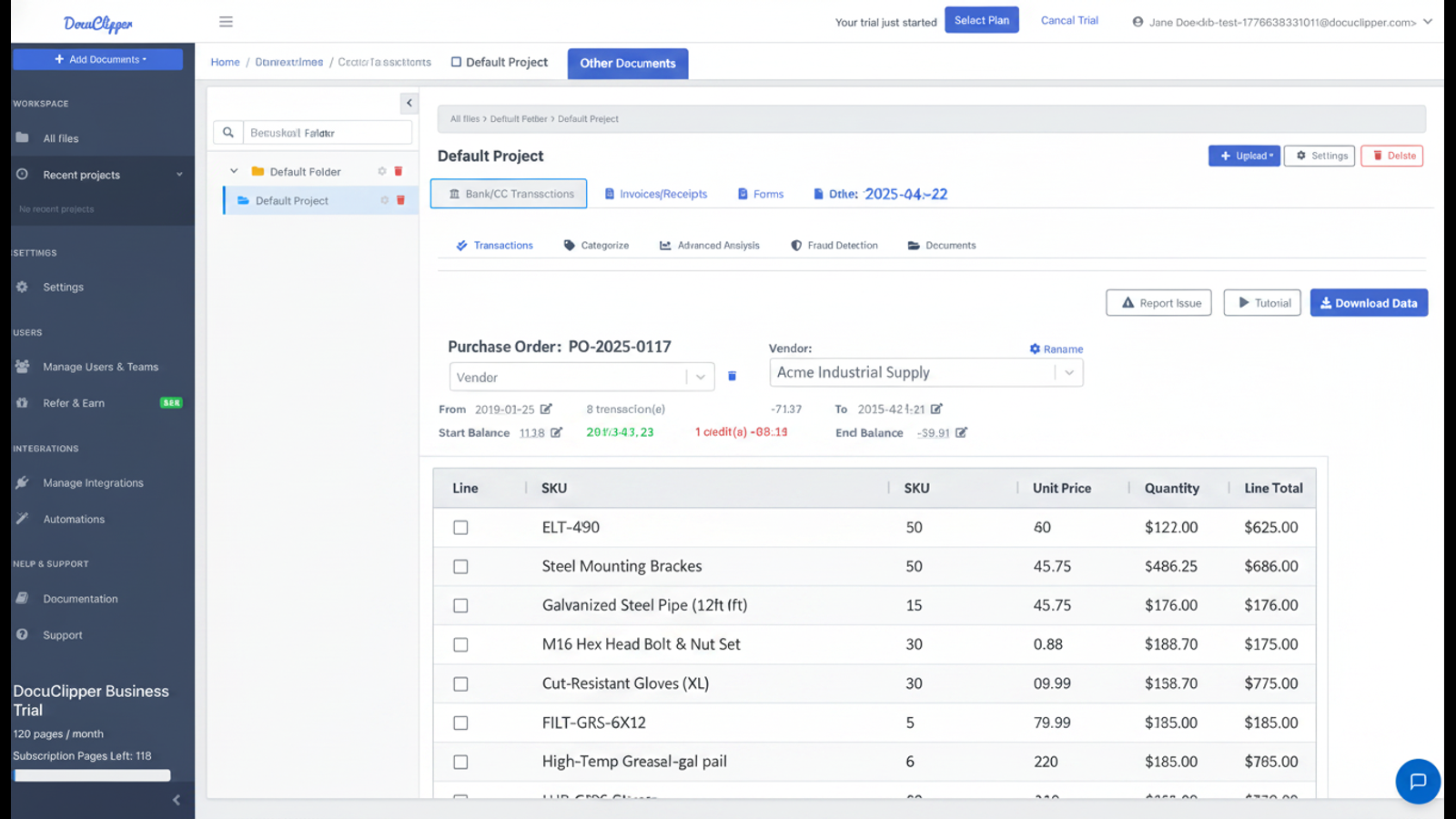
Everything you need from a PO, automatically
Header fields, line items, totals. Structured into columns. No per-vendor setup.
Full line-item extraction
Every line: SKU, description, quantity, unit price, line total. Structured into columns ready to use.
Works with any PO format
Vendor-issued POs, ERP-generated POs, scanned faxes, photos. No per-vendor template setup.
Scanned & image POs supported
OCR built in. Handles photographed and scanned purchase orders alongside digital PDFs.
Batch process hundreds at once
Drop a folder of POs and get one consolidated Excel or CSV in minutes.
How It Works
Three steps. No setup. No templates required.
1
Upload your purchase orders
Drop in PDFs, scanned images, or photos. Single PO or a batch of hundreds.
2
AI extracts every field
PO number, vendor, ship-to, line items, quantities, unit prices, totals. Custom fields via plain-English prompts.
3
Download structured data
Clean Excel, CSV, or JSON. One row per line item, ready for your ERP, AP system, or matching workflow.
Fields Extracted From Every Purchase Order
Header data and line items, structured and labeled.
- PO number, PO date, requested delivery date
- Vendor name and address; ship-to and bill-to addresses
- Buyer contact, payment terms, ship-via carrier
- Line items: SKU/part number, description, quantity, UOM, unit price, line total
- Subtotals, taxes, shipping, discounts, grand total
- Custom fields via plain-English AI prompts
Built for Procurement, AP, and Operations Teams
From single-buyer SMBs to procurement teams handling thousands of POs a month.
Two-way PO matching (invoice ↔ PO)Procurement audit & spend analysisERP ingestion (NetSuite, SAP, Dynamics)Vendor onboarding & catalog importAP automationInventory reconciliation
AI Prompts for Custom PO Fields
Beyond the standard fields, describe anything else you need in plain English.
Project / cost-center code
"The project code or cost-center code in the PO header, usually labeled Project, GL Code, or Cost Center."
Ship-via and freight terms
"The shipping carrier and freight terms (FOB Origin, FOB Destination, etc.) from the PO."
Buyer authorization
"The name and title of the person who authorized this PO, from the signature block."
Vendor part numbers vs internal SKUs
"For each line item, return both the vendor part number and our internal SKU."
Read more about AI prompt-based extraction.
What customers say
Real reviews from accountants, bookkeepers, and finance teams.
“DocuClipper has helped us eliminate several manual data entry processes, saving us a lot of time.”
KR
Kristin Mitchell
Accounting, United States
“It's a complete game-changer. Instead of spending hours combing through statements, we get the data we need almost instantly.”
MA
Matt
Lending, United Kingdom
“DocuClipper allowed us to enhance our advisory services, directly impacting our bottom line.”
SA
Sarah Winship
Accounting, United Kingdom
Convert purchase orders to Excel automatically. Start your free 14-day trial, no credit card required.
Start free trialFrequently asked questions
Everything you need to know about extracting data from purchase orders.
PO number, PO date, vendor name and address, ship-to and bill-to addresses, buyer contact, payment terms, requested delivery date, line items (SKU/part number, description, quantity, unit of measure, unit price, line total), subtotals, taxes, shipping, and grand total. Custom fields can be added with an AI prompt.
No. DocuClipper's AI reads each PO regardless of layout. If you do have a single recurring layout you want to lock down, you can save a custom template for that vendor, but it's optional, not required.
Yes. Use the AI prompt mode to describe any custom field in plain English — for example "the project code in the top-right header" or "the ship-via carrier on page 1" — and DocuClipper will pull it from every PO you upload.
Yes. Built-in OCR handles scanned, faxed, and photographed POs alongside digitally generated PDFs.
Yes — DocuClipper does two-way, line-level PO matching in-app: each invoice is matched to its purchase order (from QuickBooks, Xero, or an uploaded PO) at the line level, flagging overbilling, underbilling, missing lines, and amount mismatches into an exception queue. It does not do 3-way goods-receipt matching; if you need a goods-receipt leg, export the structured PO and invoice data to your ERP. Pair this with our invoice extraction to automate the AP cycle.
DocuClipper averages 99%+ field-level accuracy across well-formatted POs. Scanned and low-resolution POs may need a quick review. You can edit any extracted value before exporting.
Excel (.xlsx), CSV, and JSON. The Excel and CSV outputs use one row per line item with clear column headers, ready to import or analyze.
Yes. Export to Excel/CSV for any system, or use our QuickBooks and Xero integrations to post matched invoices directly. For other ERPs, the structured CSV/JSON output is ready to import.
Yes. DocuClipper has a REST API. Send a PO PDF and receive structured JSON back. See the API documentation for examples.
Related extraction & AP tools
Other document types and automation workflows.
Invoice processing software
End-to-end invoice capture, approval, and posting workflow with built-in two-way invoice-to-PO matching.
Invoice to Excel
Extract vendor invoices and line items into Excel for matching against POs.
AI document parser
Describe any custom field in plain English. Save a template once, run on every similar PO.
Accounts payable OCR
AP-focused OCR for vendor data, line items, totals, and two-way PO matching.
Receipt data extraction
Capture vendor receipts to pair with invoices and POs for matching in your ERP.
Bank statement converter
Reconcile PO/invoice spend against bank transactions in Excel or QuickBooks.