
Receipt OCR 4.7/5(120+ reviews)Trusted by 10,000+ finance teams
Receipt OCR: How DocuClipper Reads Receipts
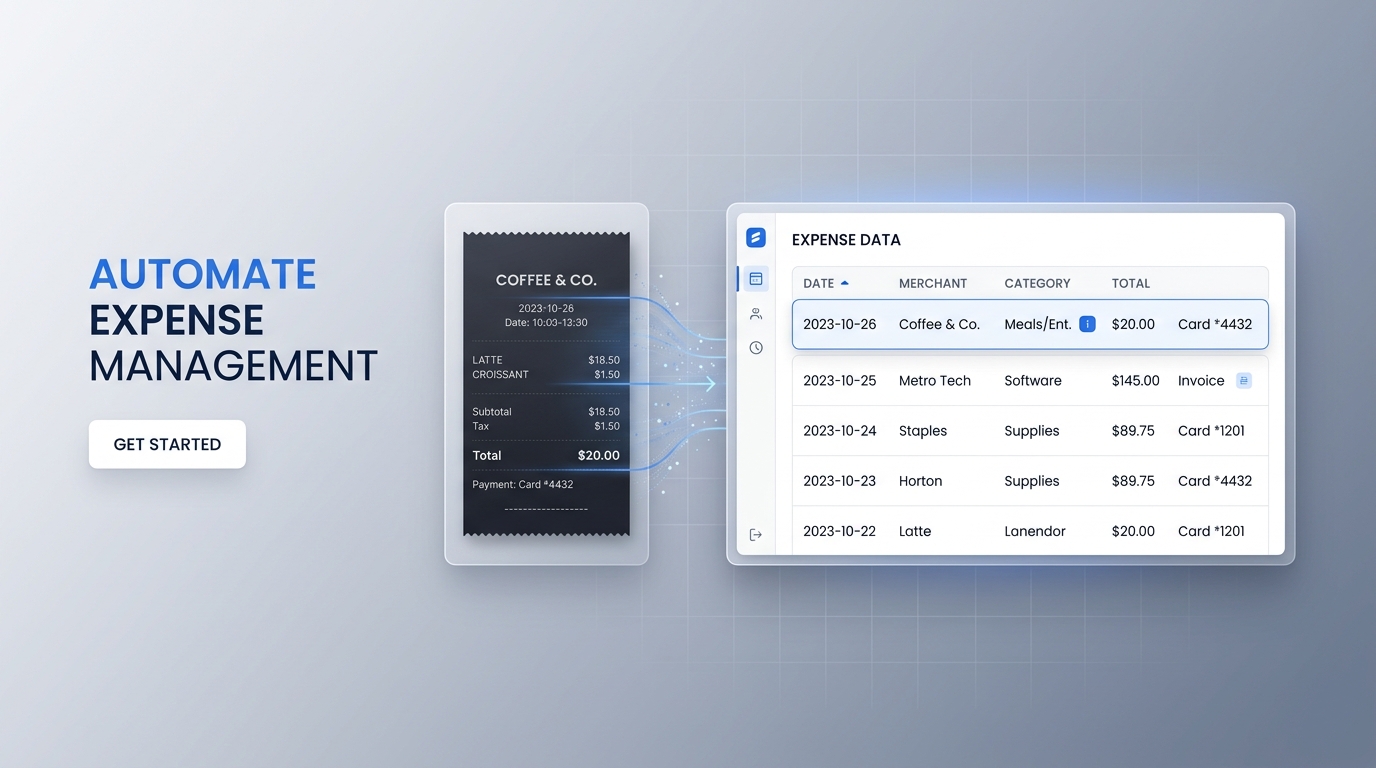
Feature deep-dive on the OCR engine that powers DocuClipper's receipt scanning. Reads paper receipts, digital PDFs, and email receipts and extracts merchant, date, subtotal, tax, tip, total, payment method, and line items with 99.9% accuracy. No templates.
4.7/5(120+ reviews)Trusted by 10,000+ finance teams14-day free trialNo credit card required
Trusted by 10,000+ Accounting, Lending, and Finance Professionals













What receipt OCR extracts
- Merchant name, address, and phone number from the receipt header.
- Transaction date and time.
- Subtotal, tax amount, tip, and total, each as a separate field.
- Payment method: cash, card type, and last 4 digits where printed.
- Line-item details from itemized receipts: descriptions, quantities, and prices.
- Works on paper receipt photos, scanned PDF receipts, and emailed digital receipts.
How receipt OCR works
Upload, extract, categorize, export, in seconds.
→
Upload receipt images or PDFs
Upload JPG, PNG, or PDF receipts, paper photos, flatbed scans, or digital receipts. Bulk upload a batch at once.
→
OCR reads every field
AI locates the merchant block, date, totals section, and line-item table in any receipt layout. Every field is extracted and labeled automatically.
→
Categorize by expense type
Configurable rules tag receipts by expense category, meals, travel, office supplies, utilities, based on merchant name or description.
Export to accounting
Send structured receipt data to Excel, CSV, QuickBooks, Xero, or Google Sheets, ready for expense reporting and reconciliation.
Why DocuClipper receipt OCR
Built for accountants and finance teams, not just individual expense tracking.
Any receipt type
Paper receipts, thermal till receipts, PDF receipts, email receipts, restaurant checks, hotel folios, DocuClipper reads any receipt format without templates.
Line-item extraction
Captures full itemized receipt details, individual item descriptions, quantities, and unit prices, not just the total. Useful for detailed expense coding.
Totals cross-validation
Checks that subtotal + tax + tip = total and flags any arithmetic discrepancy before export, catching receipt errors automatically.
Automatic categorization
Configurable expense category rules tag receipts by type, meals, travel, utilities, supplies, based on merchant name or description keywords.
Bulk receipt processing
Upload an entire month or quarter of receipts in one session. Process multiple clients or employees simultaneously from one dashboard.
SOC 2 & secure storage
AES-256 encryption and SOC 2 compliance. Receipt images and extracted data are processed and stored securely.
Every receipt field, extracted and structured
DocuClipper outputs a clean record for each receipt, header fields and line items.
| Field | Source on receipt | Example value |
|---|---|---|
| Merchant name | Receipt header | Chipotle Mexican Grill |
| Date | Date/time line | 04/15/2025 |
| Time | Date/time line | 12:43 PM |
| Subtotal | Totals section | $18.40 |
| Tax | Totals section | $1.66 |
| Tip | Totals section | $3.70 |
| Total | Totals section | $23.76 |
| Payment method | Payment line | Visa ****4892 |
| Line item 1 | Itemized section | Chicken Bowl × 1, $10.95 |
| Line item 2 | Itemized section | Guac × 1, $2.45 |
| Expense category | Auto-tagged | Meals & Entertainment |
All fields export as structured columns to Excel, QuickBooks, Xero, or CSV, ready for expense reporting.
Who uses receipt OCR
Accountants & bookkeepers
- Extract client receipt data and post expenses directly to QuickBooks or Xero, no manual entry.
- Process receipt backlogs for multiple clients in bulk from one dashboard.
- Build a clean expense record for tax preparation without spreadsheet work.
Small businesses
- Capture business expenses from receipts automatically, no manual spreadsheets.
- Keep a digital record of all receipts for tax season.
- Categorize receipts by expense type automatically for accurate P&L reporting.
AP & expense teams
- Extract employee receipt data at scale and push to expense management systems.
- Verify receipt amounts against submitted expense reports automatically.
- Export approved receipt data to QuickBooks or Xero for reimbursement processing.
What Customers Say
Real reviews from accountants, bookkeepers, and finance teams.
“DocuClipper has helped us eliminate several manual data entry processes, saving us a lot of time.”
KR
Kristin Mitchell
Accounting, United States
“It's a complete game-changer. Instead of spending hours combing through statements, we get the data we need almost instantly.”
MA
Matt
Lending, United Kingdom
“DocuClipper allowed us to enhance our advisory services, directly impacting our bottom line.”
SA
Sarah Winship
Accounting, United Kingdom
Ready to try it? Start your free 14-day trial, no credit card required.
Start free trialRelated receipt and expense tools
Receipt scanning software
Complete receipt scanning workflow, any format, bulk processing, expense export.
Learn moreReceipt data extraction
Extract structured data from any receipt type at scale.
Learn moreExpense management
Manage and categorize business expenses from extracted receipt data.
Learn moreTransaction categorization
Auto-categorize transactions and receipts by expense type using configurable rules.
Learn moreInvoice OCR
Extract vendor, line items, and totals from invoice PDFs.
Learn moreAI document parser
Custom field extraction for non-standard receipt or expense document formats.
Learn moreReceipt OCR FAQs
Receipt OCR software reads receipt images and PDFs and converts them into structured data, merchant name, date, subtotal, tax, tip, total, payment method, and line items, automatically. The extracted data can be exported to accounting software like QuickBooks or Xero, or downloaded as Excel or CSV for expense reporting.
Paper receipts photographed on a phone, flatbed-scanned receipts, PDF receipts, emailed digital receipts, restaurant checks, hotel folios, gas station receipts, and grocery receipts. Any receipt format is supported, no templates needed.
DocuClipper extracts full line-item details from itemized receipts, individual item descriptions, quantities, and prices, in addition to the subtotal, tax, tip, and total.
DocuClipper achieves high accuracy on standard receipts. Totals are cross-validated: subtotal + tax + tip is checked against the stated total, and any discrepancy is flagged before export. Lower-quality photos may require a manual review step for edge-case fields.
Yes. Configurable category rules automatically tag receipts by expense type, meals, travel, office supplies, utilities, based on merchant name or description keywords.
Excel (.xlsx), CSV, QuickBooks Online, Xero, and Google Sheets. API integration is also available for custom expense management or ERP systems.
Yes. Bulk image uploads are supported. You can upload an entire month or quarter of receipts in one session and download all structured data at once. Email forwarding is also supported for automated ingestion.
Receipt OCR is the data extraction layer, reading the receipt image and pulling out structured fields. Receipt scanning software (/solutions/receipt-scanning-software) is the complete workflow: upload, OCR extraction, categorization, review, and export. DocuClipper provides both as part of a single platform.