
Email invoices to QuickBooks
Vendor invoices by email, posted to QuickBooks as coded bills
For AP teams and bookkeepers handling hundreds of vendor invoices a month. Every invoice that arrives is read with its line items, checked for duplicates, coded by your vendor rules, approved if you want a sign-off, and created as a bill in QuickBooks Online.
 4.7/5(124 reviews)Trusted by 10,000+ finance teams
14-day free trialNo credit card required
- invoices and receipts processed in 12 months
- 48,100invoices and receipts processed in 12 months
- invoice and receipt pages read in 12 months
- 111,662invoice and receipt pages read in 12 months
Last updated:
How do you get emailed vendor invoices into QuickBooks without data entry?
Forward them to a DocuClipper bills address. Every PDF or image attached to an email sent there is extracted with its vendor, invoice number, dates, tax, total and line items, checked against recent bills for duplicates, coded by your vendor rules, and created in QuickBooks Online as a bill, after approval if your project uses approval rules.
- Ways in
- Forwarding address (bills-…@files.docuclipper.com), Google Drive, OneDrive, Dropbox or Box folders, upload, API
- Read from each invoice
- Vendor, invoice #, dates, PO #, subtotal, tax, total, and line items
- Into QuickBooks Online
- Bill, Expense or Vendor Credit, created as it extracts or on approval; Xero bills as drafts
- Checks
- Duplicate flag, a duplicate check in QuickBooks before each bill, required fields, PO match
- Approvals
- Rules by amount, vendor, account, category or description (Business plan)
- Volume
- 48,100 invoice and receipt documents (111,662 pages) for 1,298 accounts in the 12 months to October 2026
Volume figures: DocuClipper production data, October 2026. Invoices and receipts are processed by the same engine and counted together.
How does emailing invoices into QuickBooks work?
Five steps, set up once per QuickBooks company. After that the inbox does the work.
- 1
Get a forwarding address
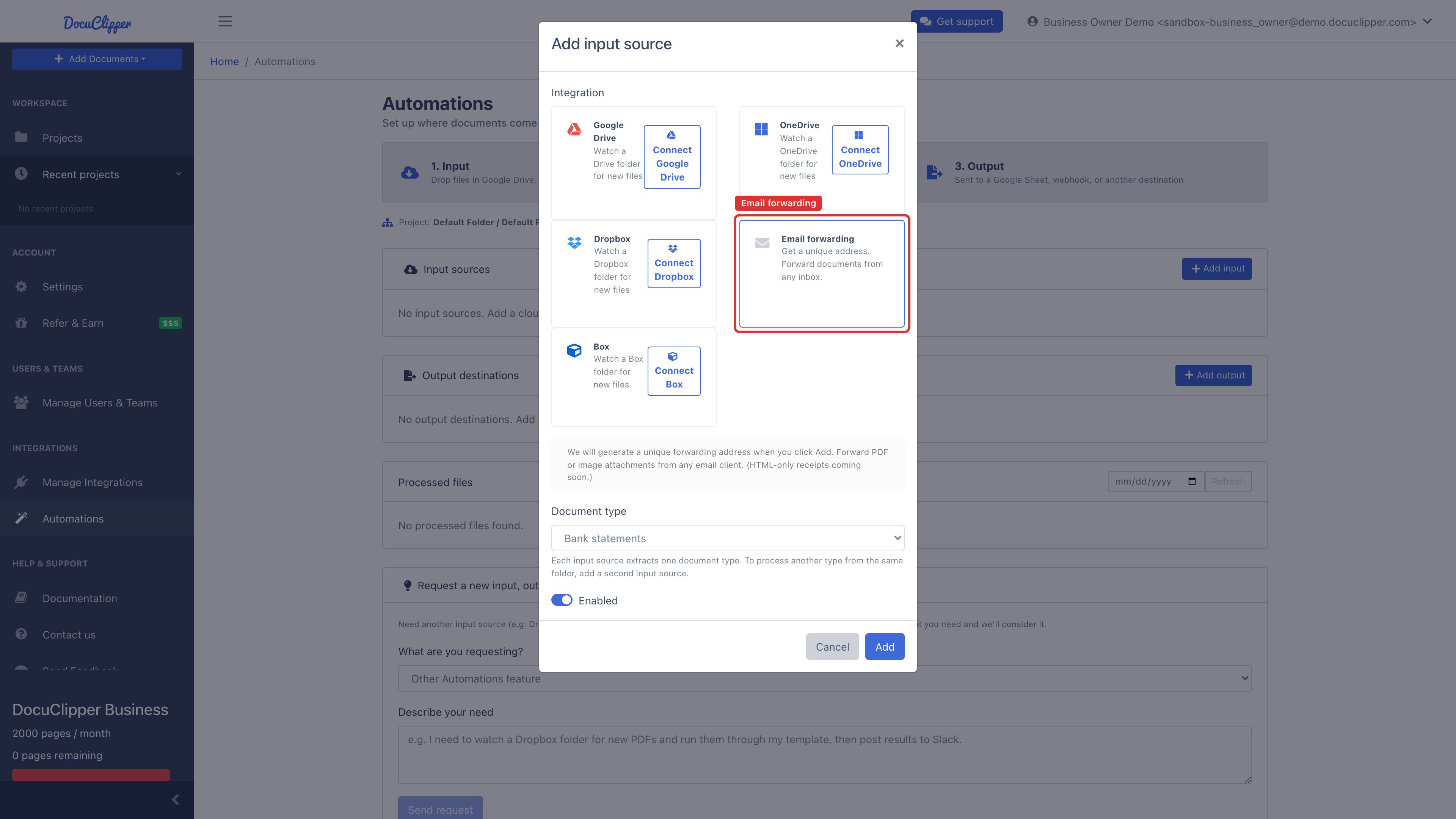
In Automations, add an Email forwarding input to the project and pick Bills & receipts (you pay). You get a unique
bills-…@files.docuclipper.comaddress. The same address is one click away on the invoice upload screen and above the invoices list. - 2
Point the AP inbox at it
Add a forwarding rule in Outlook or Gmail for your ap@ mailbox, or give the address to vendors directly. Every PDF or image attachment that arrives becomes a job in the project, exactly as if you had uploaded it.
- 3
Each invoice is read, line by line
Vendor, invoice number, invoice and due dates, PO number, subtotal, tax, total, and every line item with description, quantity, unit price and amount. No vendor templates to set up, and scanned invoices work alongside native PDFs.
- 4
Coded, checked and, if you want, approved
Vendor rules set the category, product or service and tax code, so repeat vendors arrive coded. Duplicates and missing fields are flagged. Approval rules route invoices over a threshold, and PO matching runs where the project has purchase orders.
- 5
Created in QuickBooks as a bill
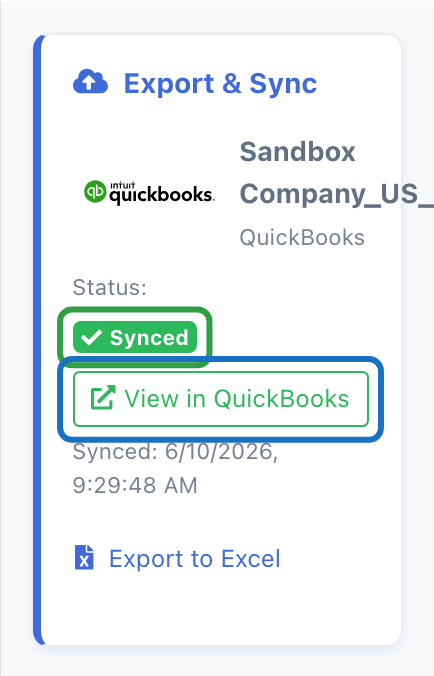
With the project linked to QuickBooks Online, each invoice is created as a bill as it finishes extracting, or once it is approved. The invoice then shows Synced with a link to the bill, and its paid status follows QuickBooks.
What stops a bill from being posted twice?
At 300 invoices a month, a vendor resending an invoice or two people forwarding the same email is a weekly event. Three layers catch it.
Same file, skipped
A file identical to one already in the project is skipped. It uses no pages and is not added again.
Same invoice, flagged
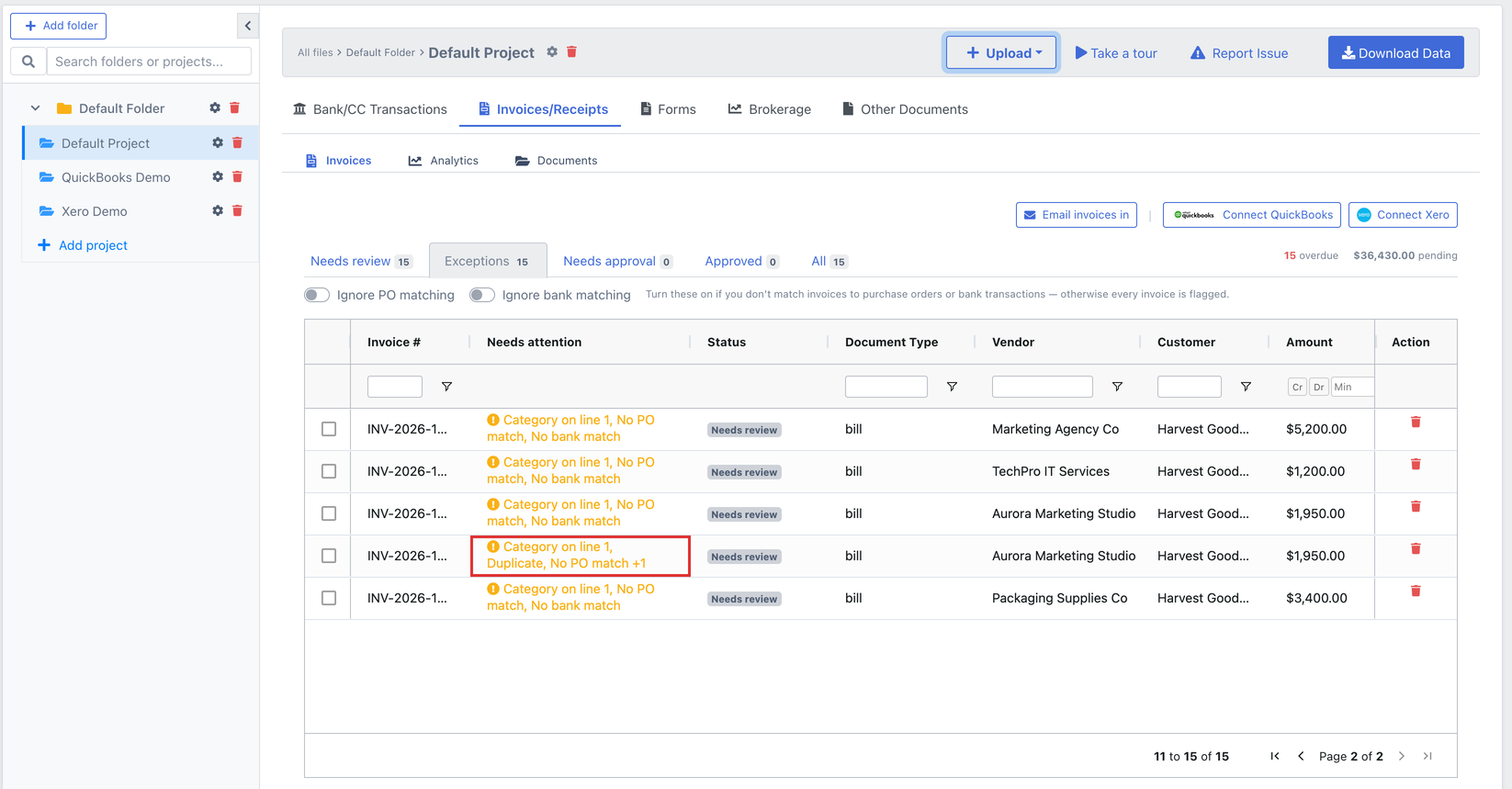
Same vendor, same total, a date within 3 days and the same invoice number or customer, within 90 days, reads Duplicate in the list and in the editor, with a link to the original.
Already in QuickBooks, linked
Before creating a bill, DocuClipper looks in QuickBooks for one with the same document number and vendor. If it exists, the invoice links to it instead of creating a copy.
The duplicate flag is a warning, not a block: two identical service calls on the same day are real bills. Consecutive invoices from one vendor for the same amount, or a billing run of one fee per client, are not flagged. See how duplicate detection works.
Can invoices be approved and matched to POs before they post?
Yes, and both run on the same record the extraction created, so nothing is exported and re-imported between capture and approval.
Approval rules
Route by amount, vendor, account, category or description to individual users or teams, requiring all approvers or any one. Approvers are emailed, one rejection is final, and the history shows who did what and when. With rules in place, an invoice reaches QuickBooks once it is approved. Business plan.
Invoice approval softwarePurchase order matching
Invoices are matched to POs from your QuickBooks Online company, or to POs you upload, with a confidence score and the amount and line-item differences. In a project with POs, unmatched invoices are flagged No PO match until someone confirms one.
PO matching guideEverything that needs a person lands in one place: the Exceptions preset on the invoices list shows missing vendors, invoice numbers or amounts, sync errors, duplicates and unmatched POs, and Needs approval shows what is waiting on an approver.
What does the bill look like in QuickBooks?
It posts at the invoice's printed total, with the lines coded and freight, fees, discounts and tax included, so the bill in your books matches the invoice in your inbox.
- Vendor, category, product or service and tax code are picked from your QuickBooks company, so lines map to records that exist.
- Vendor rules code repeat vendors: set a category once, click Always do this for the vendor, and every later bill from them arrives coded.
- Required fields are checked before any call to QuickBooks, so a missing vendor or category is reported on the invoice with the line number, not as a QuickBooks error.
- Later edits to category, item or tax code are pushed to the same bill by its ID, never as a second bill.
- Paid status comes back from QuickBooks, so paid bills drop out of the review list and AP aging on their own.
How does DocuClipper compare with Dext, AutoEntry and Hubdoc?
All four take invoices by email and publish bills to QuickBooks Online. They differ in line items and in pricing. Checked in October 2026 against each vendor's public pricing and help pages.
Email-in address
- DocuClipper
- Yes, one per project and direction (bills- or sales-)
- Dext
- Yes, Extract by Email per user
- AutoEntry
- Yes, email upload
- Hubdoc
- Yes, per organisation
Invoice line items
- DocuClipper
- Extracted on every plan
- Dext
- Extracted
- AutoEntry
- Extracted, 2 credits per invoice
- Hubdoc
- Header fields only; Xero has no further line-item work planned
Into QuickBooks Online
- DocuClipper
- Bills created automatically, or on approval
- Dext
- Published as bills
- AutoEntry
- Published as bills
- Hubdoc
- Published as bills
Pricing model
- DocuClipper
- By page, firm-wide, unlimited users
- Dext
- Practice plans per client, 10-client minimum
- AutoEntry
- Credits, from $13 for 50 a month
- Hubdoc
- Included with most Xero plans; $12/month standalone
| DocuClipper | Dext | AutoEntry | Hubdoc | |
|---|---|---|---|---|
| Email-in address | Yes, one per project and direction (bills- or sales-) | Yes, Extract by Email per user | Yes, email upload | Yes, per organisation |
| Invoice line items | Extracted on every plan | Extracted | Extracted, 2 credits per invoice | Header fields only; Xero has no further line-item work planned |
| Into QuickBooks Online | Bills created automatically, or on approval | Published as bills | Published as bills | Published as bills |
| Pricing model | By page, firm-wide, unlimited users | Practice plans per client, 10-client minimum | Credits, from $13 for 50 a month | Included with most Xero plans; $12/month standalone |
Dext
A good fit for practices already running every client through Dext. Pricing is per client with a 10-client minimum, so the cost follows the client count rather than the invoice count.
DocuClipper vs DextAutoEntry
Owned by Sage and priced in credits: 1 per invoice, 2 with line items, 3 per bank statement page. Works well at low, steady volume; plan around the credit cost per document type.
DocuClipper vs AutoEntryHubdoc
Included with most Xero plans, which makes it the default for Xero firms. It captures header fields, not line items, which matters when bills have to be coded line by line.
DocuClipper vs HubdocPick DocuClipper when you want line items on every invoice, approvals and PO matching on the same record, and bank and credit card statements under one page-based plan with unlimited users.
What to know before you switch the inbox over
The edges, so nothing surprises you in month one.
Attachments, not the email body
Invoices are read from PDF and image attachments. Spreadsheets, ZIP files and signature images are skipped, so ask vendors who paste an invoice into the email to attach the PDF.
QuickBooks bills post
In QuickBooks the bill is created posted, not as a draft. If you want a sign-off first, turn on approval rules so only approved invoices sync.
Pages run out, invoices wait
Forwarded invoices use pages. With none left they are held as Out of Pages, nothing is lost, and the owner gets one email. Add pages and resume them.
The address is open
Anyone with the address can send to it. Give it to vendors and your team, and keep it out of public pages.
Email invoices to QuickBooks: common questions
Create a DocuClipper bills address for the project linked to your QuickBooks Online company, and add a forwarding rule in your AP inbox (or give the address to vendors). Each PDF or image attached to an email sent there is extracted with its line items, checked for duplicates, coded by your vendor rules and created in QuickBooks as a bill, after approval if you use approval rules.
Anything sent to the bills address is treated as accounts payable. A vendor invoice becomes a QuickBooks Bill, a paid receipt can be set to Expense, and a credit note becomes a Vendor Credit. QuickBooks records are created posted; in Xero, bills land as drafts for approval inside Xero.
Two checks. DocuClipper flags an invoice as a possible duplicate when the same vendor has another invoice from the last 90 days with the same total, a date within 3 days and the same invoice number or customer. And before creating any bill, it looks in QuickBooks for one with the same document number and vendor; if it is there, DocuClipper links to it instead of creating a second copy.
Yes. Approval rules route an invoice to people or teams by amount, vendor, account, category or description, and can require all approvers or any one. With rules in place, an invoice syncs to QuickBooks once it is approved. Approvals are on the Business plan.
Yes. Invoices are matched to purchase orders from your connected QuickBooks Online company, or to POs you upload, with a confidence score and the amount and line-item differences shown. In a project that has POs, an unmatched invoice is flagged No PO match until someone confirms a match.
Anyone who knows the address can send to it, so share it with vendors and your team and keep it private otherwise. PDF and image attachments are processed; spreadsheets, ZIP files and other attachments are skipped, and so are tiny images such as email signature logos.
Forwarded invoices use pages like any upload. If the account has no pages left, each forwarded invoice is saved and held as Out of Pages instead of being processed, and the account owner gets one email about it. Add pages and resume the held jobs.
DocuClipper is priced by page, with unlimited users. The average invoice document we process is a little over 2 pages, so 300 invoices is roughly 700 pages a month, which fits Business 1,000 at $219/month. Business also includes approvals. Starter plans begin at $29/month for 60 pages, and the 14-day free trial needs no credit card.