
Rent Roll → Excel 4.7/5(120+ reviews)Trusted by 10,000+ finance teams
Convert Any Rent Roll PDF to Excel, Automatically
Stop retyping units, tenants, and balances row by row. DocuClipper turns any rent roll, Yardi, AppFolio, RealPage, Buildium, or custom, into a clean Excel file in seconds.
4.7/5(120+ reviews)Trusted by 10,000+ finance teams14-day free trialNo credit card required
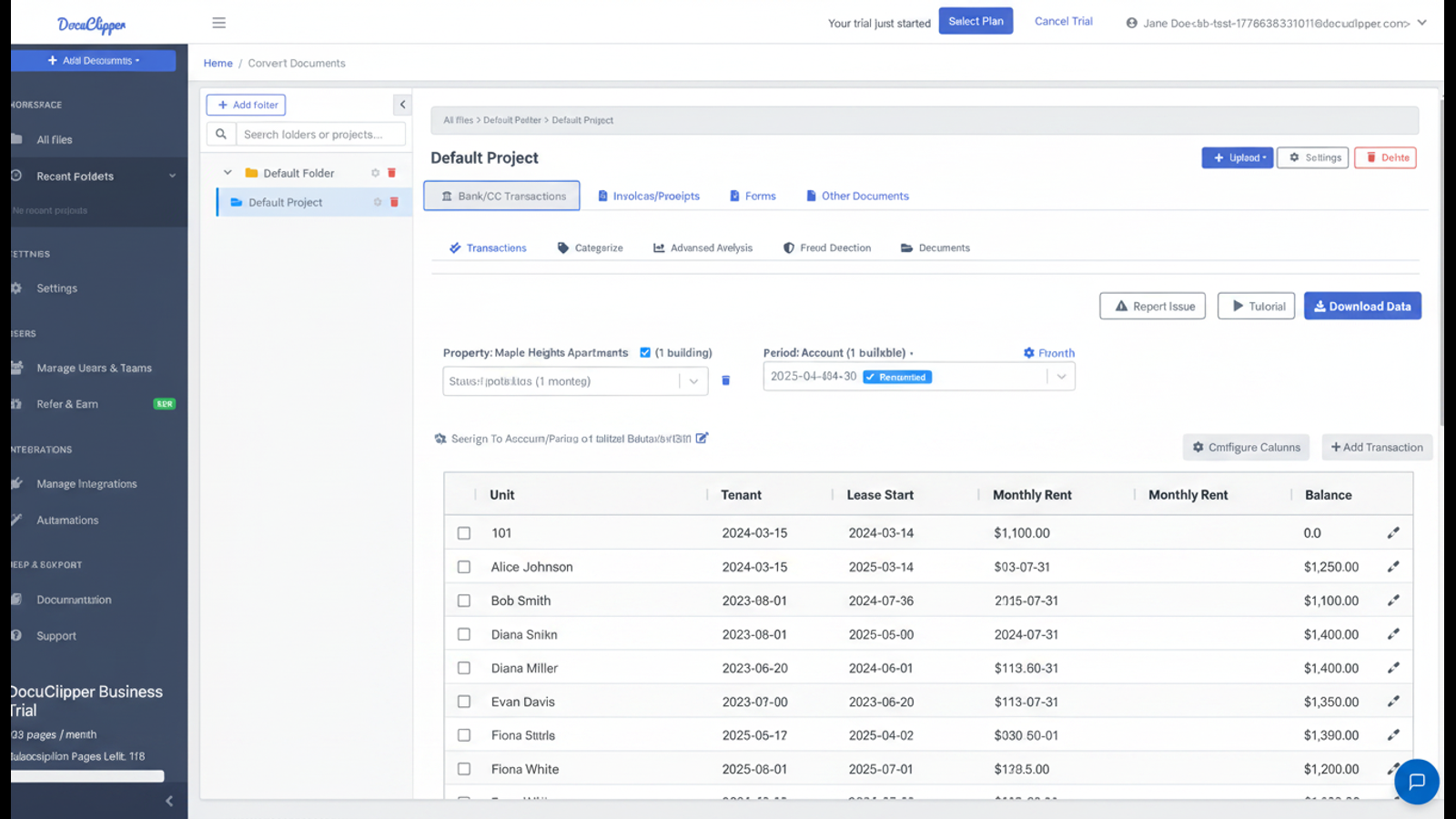
Every column, every row, automatically
Unit, tenant, lease, rent, balance. Structured into clean Excel.
Every unit, every charge, every balance
Unit, tenant, lease start/end, monthly rent, deposit, balance, late fees. Structured into clean Excel columns.
Works with any rent-roll format
Yardi, AppFolio, RealPage, Buildium, ResMan, Rent Manager, or custom property-manager exports. No per-template setup.
Multi-page rent rolls supported
Hundred-page rent rolls with rolling totals, sub-totals, and notes are extracted into a single consolidated table.
Batch process whole portfolios
Drop a folder of rent rolls from every property in your portfolio. Get one consolidated Excel for analysis.
How It Works
Three steps. No setup. No per-PMS template work.
1
Upload your rent rolls
Drop in PDFs from Yardi, AppFolio, RealPage, Buildium, ResMan, or any property-management system. Single property or whole portfolio.
2
AI reads every unit row
Unit, tenant, lease dates, rent, balance, charges. Continuation rows and subtotals handled.
3
Download a clean Excel file
One row per unit. No merged cells. Ready to filter, pivot, or import into your underwriting model.
Standard Rent-Roll Fields, Extracted Automatically
The columns every rent roll has, structured into clean Excel.
- Unit number, building, floor plan, square footage
- Tenant name(s), move-in date, lease start, lease end
- Monthly rent, market rent, scheduled rent
- Security deposit, prepaid rent, balance due
- Other charges: pet fee, parking, storage, late fees
- Status: occupied, vacant, notice given, model unit
- Custom fields via plain-English AI prompts
Built for Property Investors, Lenders, and Asset Managers
From single-property due diligence to whole-portfolio analysis.
Multifamily acquisition due diligenceUnderwriting and loan originationAsset-management reportingVacancy and rent-vs-market analysisLease-expiration risk modelingSection 8 / voucher trackingProperty-tax appeals
AI Prompts for Custom Rent-Roll Fields
Beyond the standard columns, describe anything else you need in plain English.
Section 8 / voucher amount
"For each unit, return the Section 8 / voucher amount if present, otherwise leave blank."
Lease renewal date in notes
"For each occupied unit, return the lease renewal date if mentioned in the notes column."
Concessions and rent abatements
"For each unit, return any concession, free month, or rent abatement listed."
Property and building totals
"At the bottom of the rent roll, return total occupied units, total vacant units, total scheduled rent, and total actual rent."
Read more about AI prompt-based extraction.
What customers say
Real reviews from accountants, bookkeepers, and finance teams.
“DocuClipper has helped us eliminate several manual data entry processes, saving us a lot of time.”
KR
Kristin Mitchell
Accounting, United States
“It's a complete game-changer. Instead of spending hours combing through statements, we get the data we need almost instantly.”
MA
Matt
Lending, United Kingdom
“DocuClipper allowed us to enhance our advisory services, directly impacting our bottom line.”
SA
Sarah Winship
Accounting, United Kingdom
Convert rent rolls to Excel automatically. Start your free 14-day trial, no credit card required.
Start free trialFrequently asked questions
Everything you need to know about converting rent rolls to Excel.
Unit number, floor plan, tenant name, lease start and end dates, monthly rent, market rent, deposit, prepaid balance, current balance, late fees, and any other charges or notes columns. Custom fields can be added with an AI prompt.
Yes. DocuClipper handles rent rolls from every major property-management system: Yardi, AppFolio, RealPage, Buildium, ResMan, Rent Manager, Entrata, MRI, Propertyware, and custom Excel-exported rent rolls converted to PDF.
Yes. Use the AI prompt mode to describe the field in plain English — for example "the section 8 voucher amount" or "the lease renewal date in the notes column" — and DocuClipper will extract it from every unit row.
Yes. Multi-page rent rolls with continuation rows, building/property subtotals, and grand totals at the bottom are extracted into a single clean table. Subtotal rows are flagged so you can filter them out for unit-level analysis.
A clean .xlsx with one row per unit and clear column headers. No merged cells, no empty section rows, ready to filter, sort, and pivot. CSV and JSON outputs are also available.
Yes. This is one of the most common use cases. Drop in the seller's rent roll PDFs, get clean Excel data, and run vacancy analysis, rent-vs-market comparison, lease-expiration risk, and other underwriting models in minutes instead of hours.
Yes. Built-in OCR handles scanned, faxed, and photographed rent rolls alongside digitally generated PDFs.
DocuClipper averages 99%+ field-level accuracy on well-formatted rent rolls. You can review and edit any cell before exporting.
Yes. DocuClipper has a REST API. Send a rent-roll PDF and receive structured JSON back. Useful for property-management platforms, lenders, and underwriting tools that need rent-roll ingestion at scale.
Related extraction tools for real-estate workflows
Other documents and capabilities for property and lending teams.
Bank statement converter
Extract bank-statement transactions into Excel for income verification on tenant or borrower applications.
Income verification
Use bank-statement data to verify rental or borrower income for underwriting.
AI document parser
Describe any custom field in plain English. Save a template once, run on every similar rent roll.
Lease abstraction software
Abstract every lease in your portfolio into structured data. Pair with rent rolls for full asset due diligence.
Forensic accounting software
Trace flows of funds across rent rolls, bank statements, and operating accounts.
Bank statement analyzer
Analyze cash flow and operating accounts alongside rent-roll data.
Purchase order data extraction
Extract PO data for property management capex and operating expenses.