
Embezzlement review
How to detect embezzlement in business bank statements
A step-by-step review method for business owners, nonprofit boards, church and HOA treasurers, and the accountants they call: what embezzlement looks like on a bank statement, how to review every payee and transfer, and how to document what you find. Works in a spreadsheet; DocuClipper does the heavy lifting.
Embezzlement shows up in business bank statements as money paid to someone who should not have been paid: checks or transfers to the employee or their accounts, payments to vendors that do not exist, duplicate or round-dollar payments, extra payroll, cash withdrawals, and personal charges on business cards. To find it, get 12 to 24 months of statements for every account directly from the bank, put every transaction in one table, review every payee against your real vendor and payroll lists, and follow every transfer to the account that received it. Deposits matter too: money that was collected and never deposited is also missing.
This guide is the review method, step by step, for owners, nonprofit boards, church and HOA treasurers, and the accountants they bring in. It works in a spreadsheet. Each step says where DocuClipper does the work and what it does not do.
While you are here
Catch anomalies before you sign off
Manual PDF review misses things, especially at page 80. DocuClipper's analyzer flags edits, suspicious patterns, and anomalies so your team focuses on the right pages first.
What does embezzlement look like on a bank statement?
The Association of Certified Fraud Examiners groups employee asset theft into a few schemes. Each one leaves a different mark on the statements:
| Scheme | What you see on the statement |
|---|---|
| Transfers to personal accounts | ONLINE TRANSFER TO CHK ...8833, Zelle or wire payments to an individual, often the employee or a relative |
| Check tampering | Checks to payees that differ from the check register, checks to the employee or to cash, missing or out-of-sequence check numbers |
| Billing schemes (fake vendors) | A new payee with regular payments, round amounts, no invoices behind it, or an address that matches an employee |
| Personal purchases | Card charges at retailers, travel and services with no business purpose |
| Payroll schemes | Extra payroll runs, paychecks to people who no longer work there, pay rates that changed without approval |
| Cash withdrawals | ATM or counter withdrawals with no petty-cash record |
| Skimming | Nothing on the statement: receipts that were collected but never deposited. You find it by comparing deposits with invoices, donations or dues |
The ACFE's Report to the Nations has found, edition after edition, that tips are the most common way occupational fraud is detected, ahead of audits. A bank statement review is how you test a tip, and how you size the loss.
Step-by-step: reviewing business bank statements for embezzlement
- Get the statements from the bank. Download them yourself from online banking, or request them from the bank, for every business checking, savings and card account for at least 12 months, and 24 when the scheme may be older. Ask for check images. Copies supplied by the person you suspect may have been altered.
- Check the set is complete and genuine. Every account, every month. Each statement's opening balance plus deposits minus withdrawals must equal its closing balance, and each closing balance must carry into the next opening balance. A missing month or a statement that does not tie out is a finding in its own right.
- Put every transaction in one table. Date, description, amount, account and check number on every row, across all accounts.
- Review every payee. Total the payments by payee and count them. Compare the list with the real vendor list, the payroll register and the names of the people with access. New payees, payees with no invoices, and payees that match an employee's name or address come first.
- Follow every transfer out. Match each transfer to the account that received it. Transfers between the business's own accounts are fine. Transfers to accounts the business does not own, especially to individuals, are the most common finding.
- Run pattern tests. Duplicate payments (same payee, same amount, close dates), round-dollar amounts, payments just under an approval limit, payroll runs outside the normal schedule, weekend activity, and cash withdrawals.
- Check the checks. Compare the payee on each check image with the payee in the check register. A check written to a vendor in the books but cashed by someone else is classic check tampering.
- Compare deposits with records. Match deposits to invoices, donations, dues or sales reports. A gap points to skimming.
- Document and escalate. Mark every suspect transaction with the statement it came from, keep the original files unchanged, and talk to counsel, a forensic accountant and your insurer (crime or fidelity policies often have notice deadlines) before confronting anyone.
Where DocuClipper does each step
Upload every statement for the business into one project. DocuClipper converts them into transactions and checks each one against its printed balances.
| Step | DocuClipper | Plan |
|---|---|---|
| Complete and genuine | Coverage shows each account by month with missing statements and reconciliation status; Fraud Detection scores each PDF for signs of editing | Coverage: all plans. Fraud Detection: Business and Enterprise |
| One table | Every statement converted, with check payees filled from check images on statements that include them; export to Excel or CSV | All plans |
| Review every payee | Categorize shows a vendor breakdown; Recurring lists payments that repeat, with amount, interval, count and first and last date | All plans |
| Follow every transfer | Transfers pairs transfers between accounts in the project; Referenced, not produced lists account numbers the descriptions name that you hold no statement for | All plans |
| Trace where the money went | Flow of Funds shows money moving between accounts and counterparties, with a filterable transaction table and a multi-sheet XLSX export | Business and Enterprise |
| Mark and document | Transaction Tagging tags transactions by hand or with If/Then rules on description and amount | Business and Enterprise |
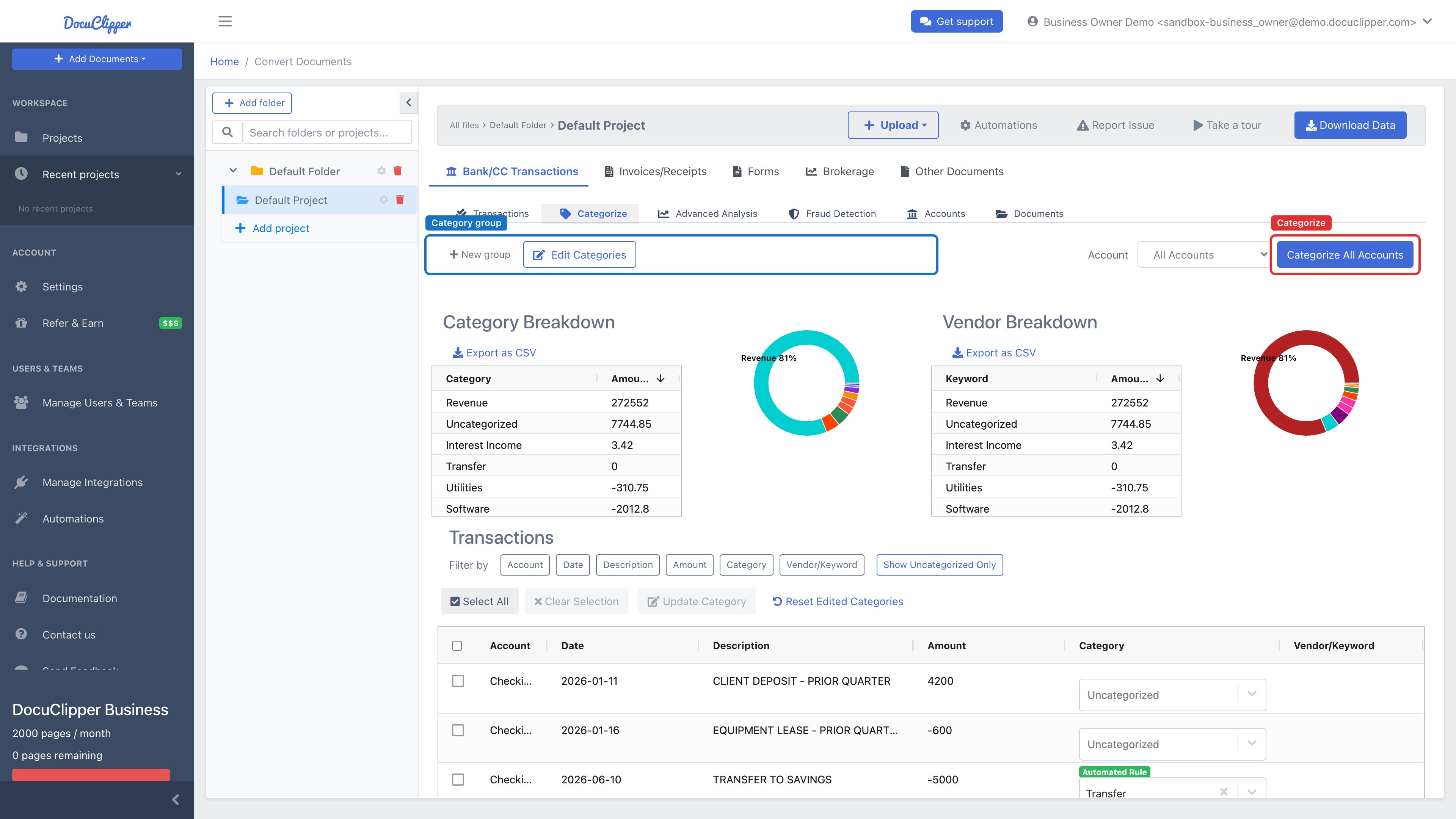
The vendor breakdown in Categorize is the payee review: every payee, with totals, after categorization runs across all accounts.
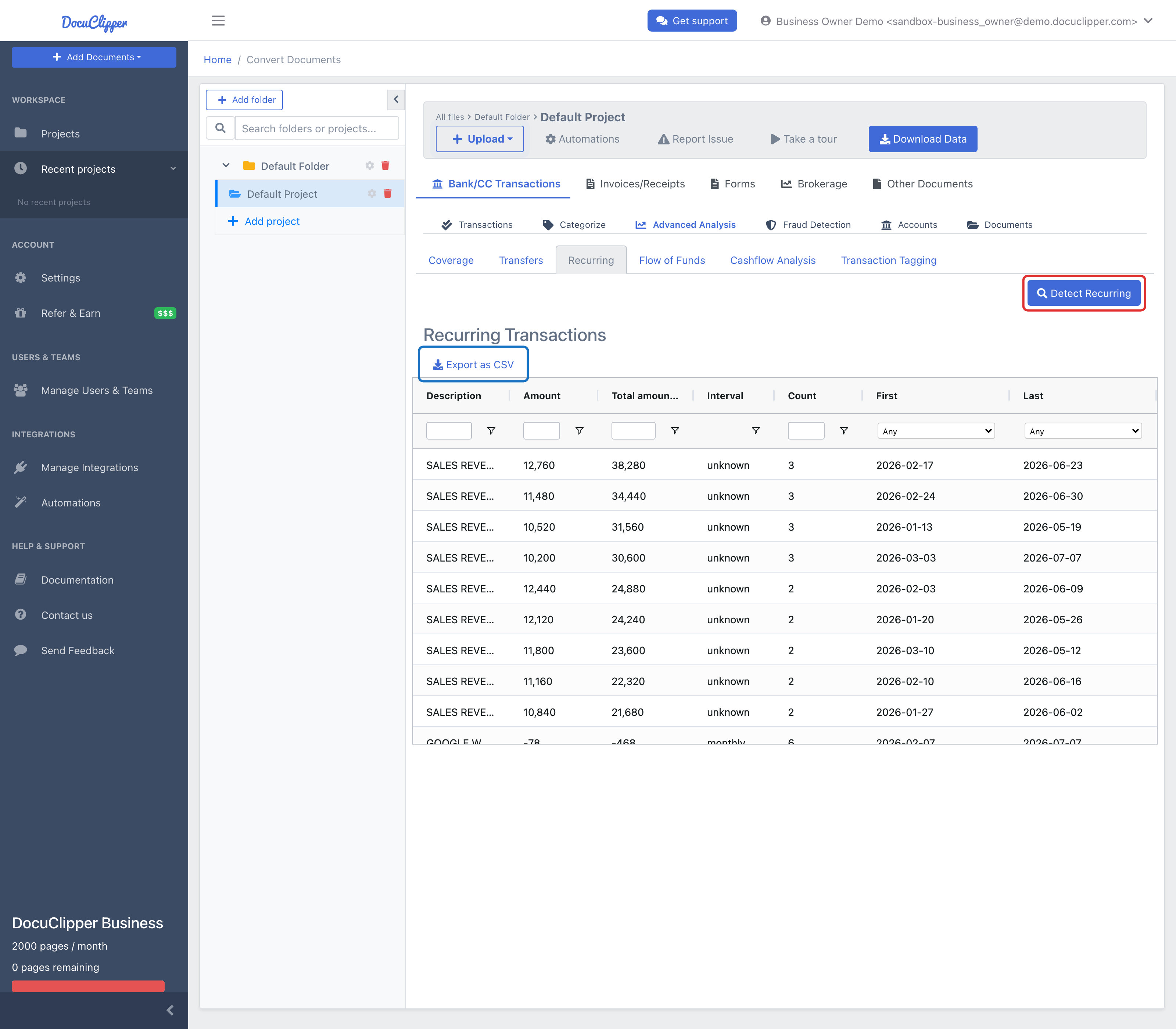
Recurring shows what is paid again and again, which is where a fake vendor or an unauthorized standing transfer hides:
When a transfer goes to an account number the business never gave you a statement for, it appears in the Coverage view under Referenced, not produced, with every transaction that names it and the totals moved out and back in. That is often the employee's own account. See Finding Undisclosed Accounts.
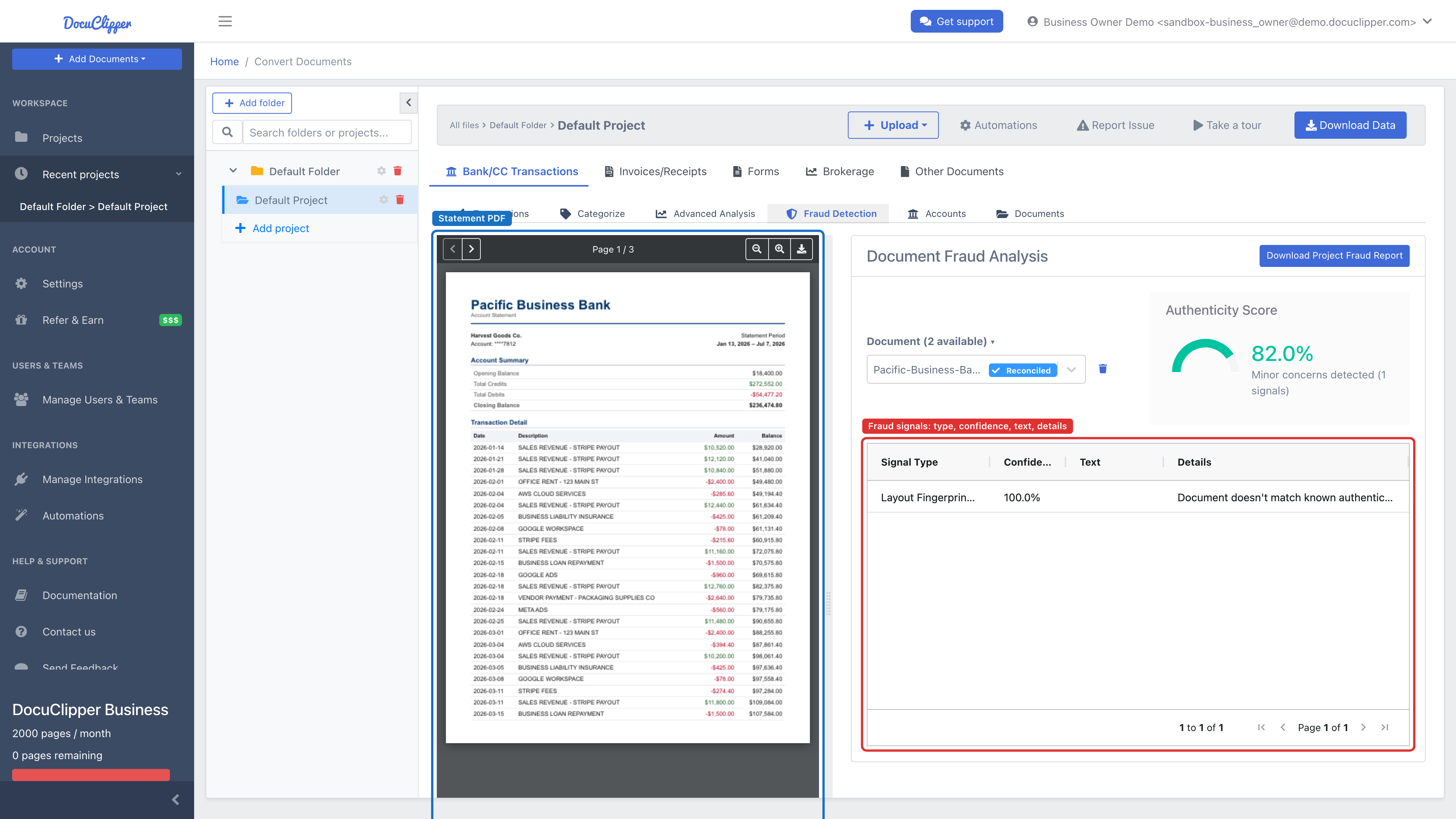
If anyone other than the bank supplied the statements, check them. Fraud Detection gives each PDF an authenticity score from 0 to 100 based on its metadata and edit history, amounts that are a different size from the rest of their row, a layout fingerprint, and the reconciliation check:
Put it into practice
A checklist only works when nobody's tired
Structured signals give managers a repeatable first pass. Reviewers get consistent results whether they're looking at page 3 or page 300.
Can I do this without special software?
Yes. Download the statements, get the transactions into a spreadsheet (Excel's Get Data > From PDF works on some digital PDFs; scans need OCR), and add account and check-number columns. Then:
- A pivot table by description, with sum and count, is your payee review.
- Sort by amount, then by payee, to see duplicates and round amounts.
- Filter descriptions for
TRANSFER,ZELLE,WIRE,ATMandCHECKto review transfers, cash and checks. - Tie out each statement to its printed balances before you rely on the totals.
For a full-ledger review (journal entries, the vendor master, approvals) the right tools are data-analytics packages such as Caseware IDEA or ACL. See forensic accounting software compared.
Limits
- DocuClipper does not decide what is theft. A payment to an unknown payee can be a real vendor nobody wrote down. Every flag needs the invoice, the approval or the explanation behind it.
- It sees bank activity, not the books. It reads statements, not your general ledger, vendor master or payroll system. Skimmed receipts that were never deposited do not appear on any statement.
- There is no dedicated duplicate-payment test. Recurring groups repeating payments and you can sort by payee and amount, but a duplicate review is still your filter.
- It only reads the accounts you upload. An account that never appears in any statement description cannot be found from the statements.
- The authenticity score is a signal, not proof. Scans and re-saved files can lower it. When in doubt, get the statement from the bank.
- It does not contact the bank or report to anyone. Preserving evidence, notifying insurers and involving law enforcement are decisions for you and your counsel.
FAQ
How do you detect embezzlement in bank statements?
Get 12 to 24 months of statements for every business account directly from the bank, check every month is there and ties to its printed balances, then review every payee against your real vendor and payroll lists and follow every transfer to the account that received it. Look for payments to the employee, unknown payees, duplicate and round-dollar payments, extra payroll and cash withdrawals.
What are the red flags of embezzlement in a business bank account?
Transfers to individuals or to accounts the business does not own, checks to cash or to the bookkeeper, new vendors with no invoices, round-dollar or duplicate payments, payroll outside the normal schedule, personal charges on business cards, missing statements, and deposits that do not match invoices or donations.
How far back should I review bank statements for embezzlement?
Start with 12 months, and extend to 24 months or more as soon as you find something, because schemes often run for a year or longer before they are discovered. Go back to the point where the suspicious pattern first appears.
Can an employee hide embezzlement by editing bank statements?
Yes, which is why the statements should come directly from the bank. If you have to work from copies someone supplied, check that every statement ties to its printed balances and check the PDF for signs of editing, then compare with the bank's own copy.
Can software detect embezzlement automatically?
Software can do the counting and surface what to look at: payees, repeating payments, transfers to accounts you do not hold, missing months and statements with signs of editing. It cannot tell a legitimate payment from a fraudulent one. That judgment needs the invoices, the approvals and the people.
What should I do if I find embezzlement?
Preserve the original statements and your work, do not confront the employee yet, and talk to a lawyer, a forensic accountant and your insurance carrier. Crime and fidelity policies usually have notice requirements, and how evidence is preserved matters if the case goes to court or to law enforcement.
Related guides
Next step
Data-backed verification before you approve
Whether you're onboarding a borrower or reviewing submitted statements, start with signals, not intuition.