
iOS & Android — Coming Soon 4.7/5(120+ reviews)Trusted by 10,000+ finance teams
Snap a Receipt. We Handle the Rest.
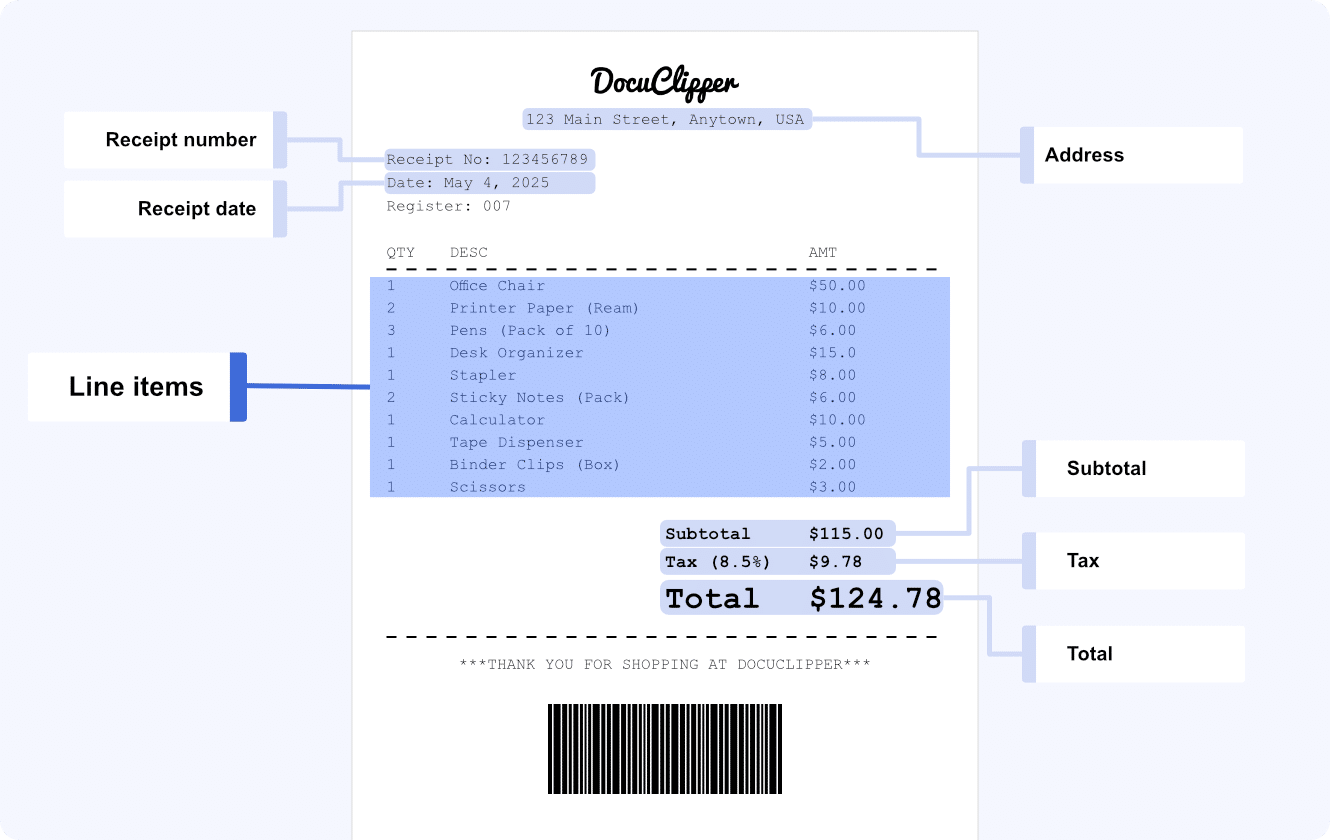
DocuClipper's mobile receipt capture app lets you photograph a paper receipt and instantly extract merchant, date, tax, total, and line items — then code it and sync it to QuickBooks or Xero. Native iOS and Android apps are launching soon. Join the waitlist to be first in.
4.7/5(120+ reviews)Trusted by 10,000+ finance teamsiOS & Android coming soonCapture from email or browser today
The native iOS and Android apps are coming soon. Today you can already capture receipts by email, browser upload, or Google Drive sync.
Join the waitlistBuilt for capture in the field, coding at the desk
One photo, and the receipt is extracted, coded, and on its way to your ledger.
Snap and go
Photograph a paper receipt the moment you get it. The app handles glare, creases, and crumpled thermal paper.
99.9% field accuracy
Merchant, date, subtotal, tax, tip, total, and payment method extracted automatically — with math validation.
Line items, not just totals
Itemized receipts are parsed line by line: description, quantity, and unit price — ready for accurate coding.
Coded and synced
Per-vendor GL coding, optional approval routing, then direct sync to QuickBooks Online or Xero. PDF stays attached.
How Mobile Receipt Capture Will Work
From the photo in your hand to a coded entry in your accounting system.
1
Snap the receipt
Open the app, take a photo. Capture several in a row — they queue and upload in the background.
2
AI extracts the data
Merchant, date, tax, total, payment method, and line items, validated against the receipt total.
3
Code & approve
Per-vendor GL coding applied automatically; route through approval if your workflow requires it.
4
Sync to your ledger
Direct sync to QuickBooks Online or Xero, or export to Excel/CSV. Image attached for audit.
Don't Want to Wait? Capture Receipts Today.
The native apps are coming soon — but DocuClipper already captures receipts three ways, no install required.
Browser upload
Photograph a receipt on your phone and upload it through DocuClipper in any mobile browser.
Email forwarding
Forward email receipts to a dedicated DocuClipper address; they're processed automatically.
Google Drive sync
Drop receipt photos in a synced folder and DocuClipper extracts them on arrival.
Every captured receipt keeps its original image attached and is logged with a full audit trail. Data is encrypted at rest and in transit. DocuClipper does not move money or issue cards — captured receipts are coded and synced to your accounting system, where you handle reimbursement and payment as you do today.
Mobile receipt capture FAQs
What's launching, what works today, and how it fits your workflow.
The DocuClipper iOS and Android receipt capture apps are launching soon. Join the waitlist and we'll email you the moment they're live on the App Store and Google Play. In the meantime, you can already capture receipts today by forwarding receipt emails to your DocuClipper inbox, uploading photos in your browser, or syncing a Google Drive folder.
Yes. While the native apps are in the final stretch before launch, you can photograph a paper receipt on your phone and upload it through the DocuClipper web app in any mobile browser, email receipts to a dedicated DocuClipper address, or drop them in a synced Google Drive folder. DocuClipper extracts merchant, date, subtotal, tax, tip, total, payment method, and line items at 99.9% field-level accuracy.
Merchant name, transaction date, subtotal, tax, tip, total, payment method, and line items (description, quantity, unit price) where the receipt is itemized. DocuClipper validates the math — line items and tax should tie to the total — and flags low-confidence fields for review.
Captured receipts flow into your DocuClipper project, where they're coded to the right GL account using your per-vendor defaults, optionally routed through an approval workflow, and synced to QuickBooks Online or Xero (or exported to Excel/CSV). The original receipt image stays attached for audit.
Expensify and Dext are built primarily around employee expense reports. DocuClipper is built for bookkeepers, accountants, and finance teams who need clean, coded receipt data synced into QuickBooks or Xero — with line-item extraction and an invoice approval workflow, not just reimbursement. Mobile capture closes the field-capture gap so you can grab a receipt the moment you get it.
Related receipt & invoice tools
Capture, extract, and sync — across receipts and invoices.
Receipt scanning software
Bulk receipt OCR with Excel, QuickBooks, and Xero output — available today.
Receipt OCR (feature)
How DocuClipper reads merchant, total, tax, and line items from any receipt.
Invoice scanning software
Capture, code, approve, and sync vendor invoices to your ledger.
Expense management
Turn receipts and invoices into coded, reconciled expense data.
AP automation software
End-to-end invoice capture, approval, and posting to QuickBooks or Xero.
DocuClipper vs Expensify
Receipt capture built for accountants, not just employee reimbursement.