
Bank statement converter & financial data extraction software
Bank statement conversion your firm can trust
Turn client bank and credit card statements into Excel, QuickBooks or Xero in seconds. Every statement is checked against the bank's own balances, so your team reviews only what doesn't add up. Invoices and receipts too.
 4.7/5(124 reviews)Trusted by 10,000+ finance teams
14-day free trialNo credit card required
- accuracy on extracted data
- 99.9%accuracy on extracted data
- statements converted in the last 30 days
- 138,000+statements converted in the last 30 days
- Type II audited
- SOC 2Type II audited
- users on every plan
- Unlimitedusers on every plan
Financial documents
Chase Checking
–Queued
INV-2401
–Queued
Uber · Trip receipt
–Queued
Overall progress0%
0 of 3 complete
Extract → analyze → push to spreadsheets, accounting systems, or your stack
AI chat tools and generic OCR hand you rows and leave the checking to you. DocuClipper shows you which statements match the bank before anything reaches your client's books.
Compare DocuClipper with the alternativesTrusted by 10,000+ Businesses Around the World













Firms that stopped retyping statements
GBQ got 400+ staff hours back in one busy season. Hancock Askew cut audit prep by 70%. Ross PC reports 90% fewer data-entry errors.
GBQ400+ hours saved
Before
Hundreds of staff hours lost to manual transaction rekeying each busy season
After DocuClipper
400+ staff hours recovered: same busy season, half the manual work
Hancock Askew70% faster audit prep
Before
Audit prep took days of manual statement review and data entry
After DocuClipper
Audit prep cut from days to hours, a 70% time reduction
Ross PC90% fewer errors
Before
Frequent data-entry mistakes required time-consuming review and rework
After DocuClipper
90% fewer data-entry errors, almost zero rework
Bank Statement Converter
DocuClipper is a bank statement converter that turns PDF bank and credit card statements from any bank, scanned or digital, into Excel, CSV, QuickBooks or Xero files. Each statement is checked against its own printed opening and closing balances, and any statement that does not tie out is flagged before you export.
- Converts
- PDF bank and credit card statements, scanned or digital, including multi-account statements
- Banks
- Any US or international bank, with no templates to set up (Chase, Bank of America, Wells Fargo, Barclays, RBC and thousands more)
- Output
- Excel (.xlsx), CSV, QuickBooks (QBO), Quicken (QFX), OFX, QIF and Xero
- Reconciliation
- Extracted totals are compared with the statement's printed opening and closing balances; mismatches are flagged
- Accuracy
- 99.9% field-level accuracy
- Volume
- 138,000+ statements converted by 5,400+ accounts in the 30 days to October 15, 2026; median job time 17 seconds
- Price
- From $29/month (60 pages) or $79/month (300 pages); 14-day free trial, no credit card
Bank Statement Extraction Software, Scanned or Digital
DocuClipper captures statements from wherever they arrive, reads them with OCR when the pages are scanned, extracts every transaction and checks the result against the bank's own printed balances.
- Step 1
Capture
Upload PDFs in bulk, forward them to a project email address, sync a Google Drive, Dropbox, OneDrive or Box folder, or send them through the API.
Automations - Step 2
Read (text layer or OCR)
Digital PDFs are read from their text layer. Scanned and photographed pages go through OCR, and crooked pages are rotated automatically.
Bank statement OCR - Step 3
Extract
Every transaction becomes a row with date, description, amount and running balance. Statements that hold several accounts or periods are split for you.
Bank statement to Excel - Step 4
Verify
Each period is totaled against the statement's printed opening and closing balances. Periods that do not tie out are flagged before you export.
Reconciliation
Extraction in production, 30 days to October 15, 2026
- bank and credit card statements extracted
- 138,000+bank and credit card statements extracted
- statement pages processed
- 854,000+statement pages processed
- scanned statements read with OCR (188,000+ pages)
- 23,000+scanned statements read with OCR (188,000+ pages)
- of 118,000+ digital statement periods tied out to the printed balances
- 94.6%of 118,000+ digital statement periods tied out to the printed balances
- median job time
- 17 smedian job time
- accounts converting statements
- 5,400+accounts converting statements
Source: DocuClipper production data, bank and credit card statement jobs, 30 days to October 15, 2026. A period ties out when its extracted transactions add up exactly to the printed closing balance; the rest are flagged for review.
SOC 2 Type II. How we handle statement data
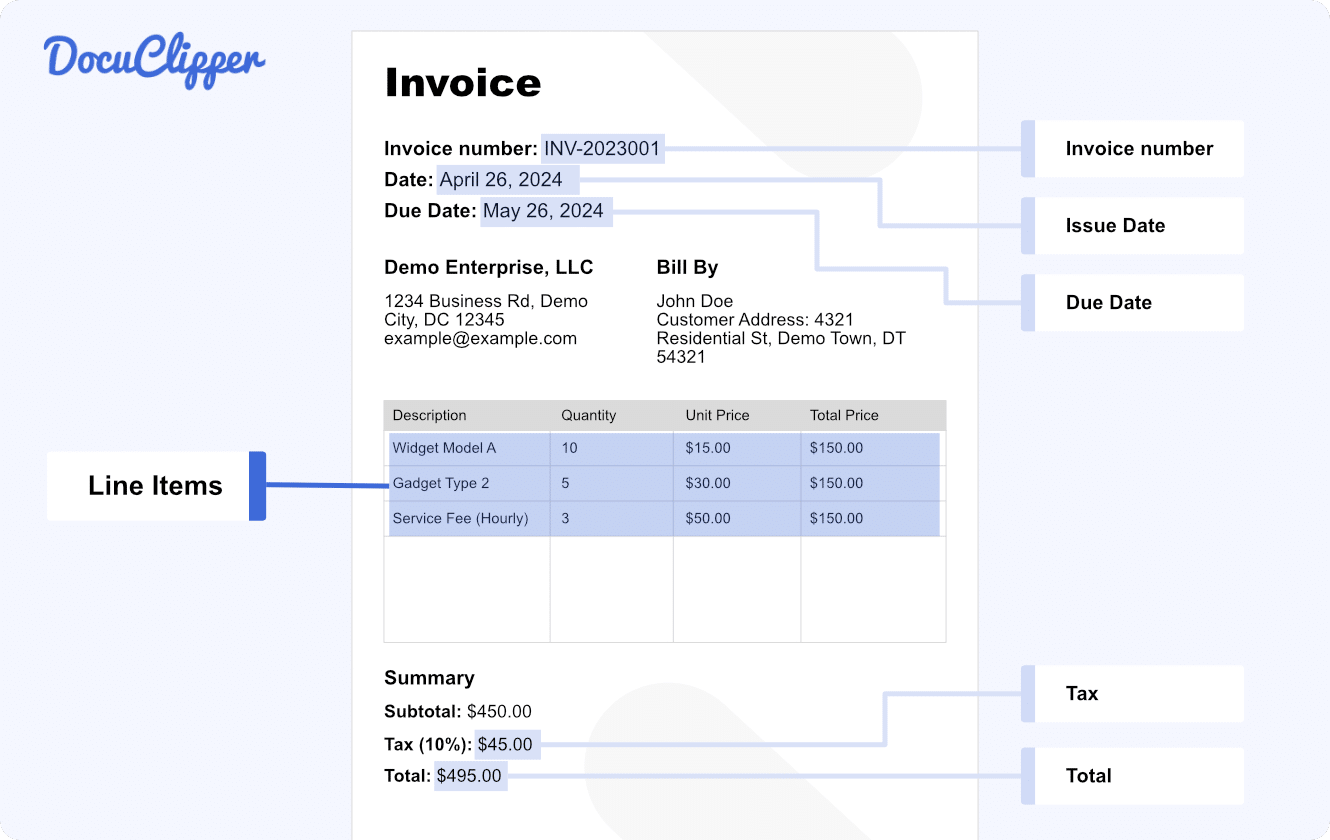
Stop Manually Entering Invoices and Receipts
Process invoices and receipts in bulk without touching a keyboard. DocuClipper captures every line item, vendor, date, and amount, from scanned images or digital PDFs.
- Automatic conversion for any PDF invoices & receipts
- Supports both scanned and digital PDF versions
- Import to Excel and your accounting software
- Unlimited line item extraction
- Invoice & receipt rules automation
One Platform for Your Entire Document Workflow
Three capabilities built into one platform so your team stops switching tools.
Extract Data from Any Financial Document
Turn PDFs into structured, export-ready data in seconds. No templates, no manual entry.
Analyze Financial Data
Go beyond extraction. Understand what the numbers mean with built-in financial intelligence.
Automate Workflows
Replace manual processes with pipelines that ingest, process, and export without human touch.
From document to data in 3 steps
No setup. No templates. No manual cleanup.
1
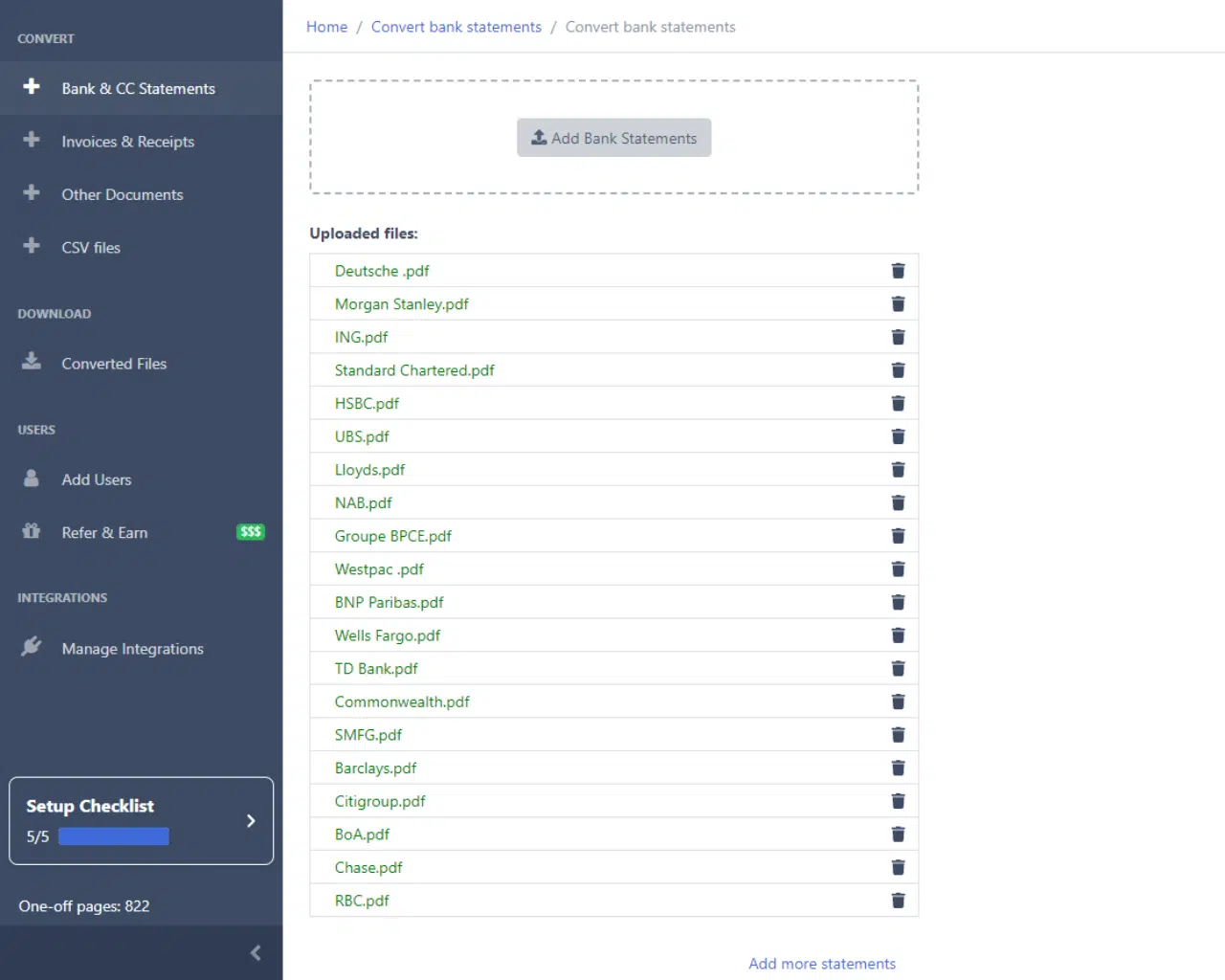
Upload or connect documents
Drop in PDFs, images, or connect Google Drive. Supports bank statements, invoices, receipts, checks, and tax forms.
2
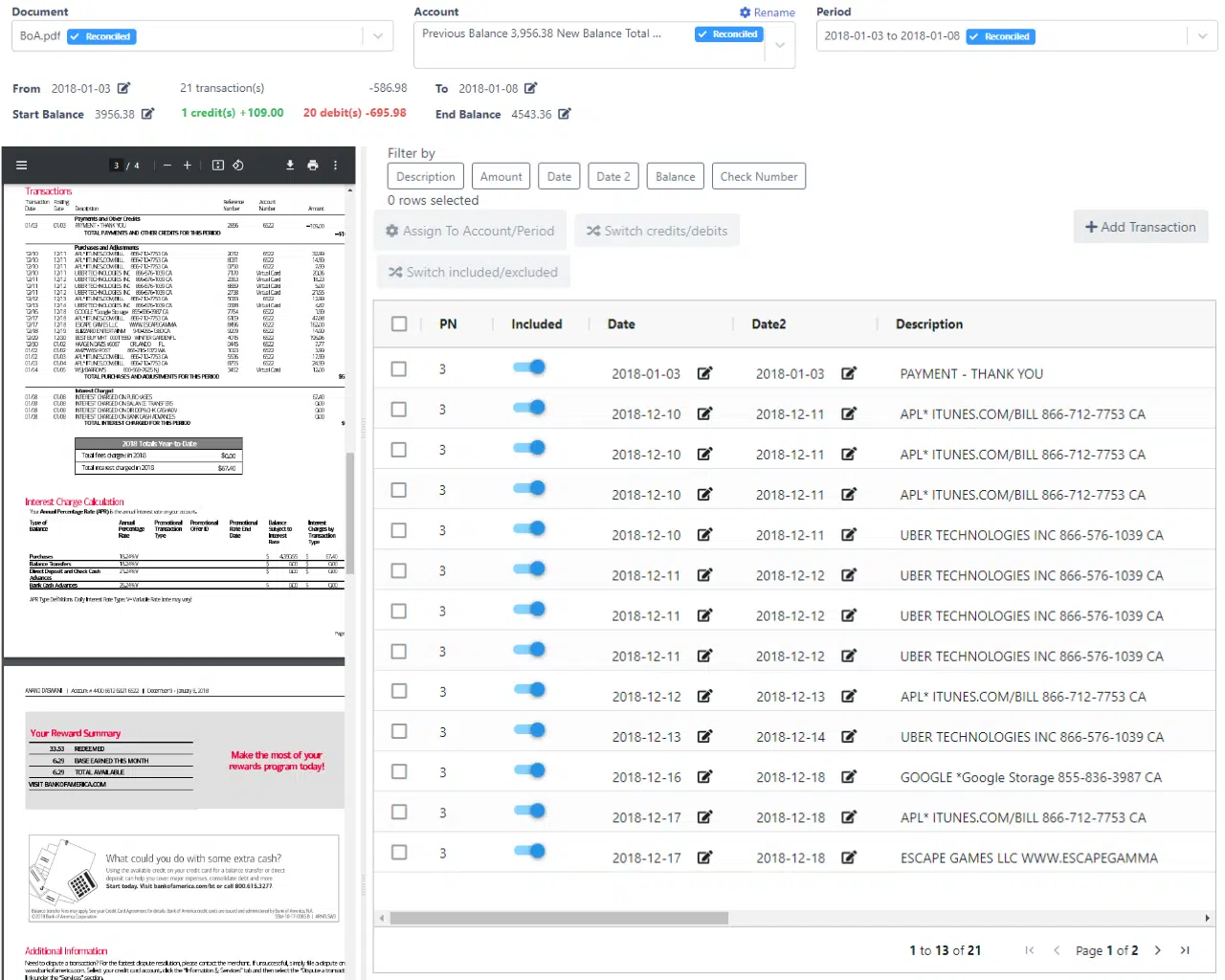
AI extracts and structures the data
DocuClipper's OCR and parsing engine extracts transactions, line items, and fields with 99.9% field-level accuracy, automatically.
3
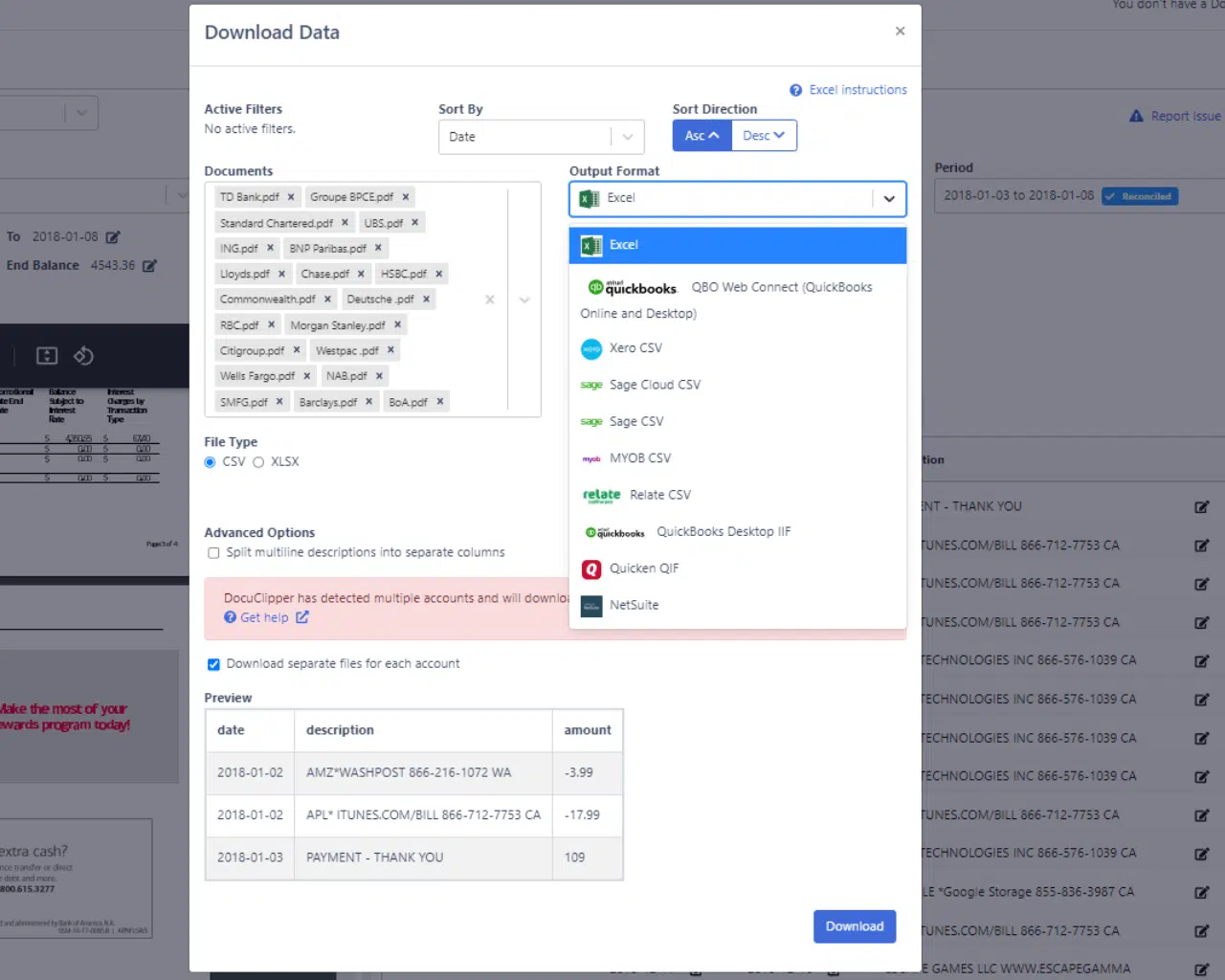
Export or automate workflows
Push to Excel, CSV, QuickBooks, or Xero with one click. Or build automated pipelines with the API.
Upload your messiest client statement and see which numbers match the bank. 14-day free trial, no credit card.
Try it freeBuilt for firms that can't afford a wrong number
Accounting, bookkeeping, forensic and lending teams use DocuClipper on client statements where every figure has to hold up.
Accounting & Bookkeeping
Close client books without retyping statements. Ross PC reports 90% fewer data-entry errors since switching.
- Bank statement to QuickBooks/Xero/Excel
- Bulk invoice & receipt extraction
- Transaction categorization & tagging
Forensic & Litigation Support
Turn years of subpoenaed or discovery statements into schedules that add up to the bank's own balances, then trace where the money went.
- Flow of funds analysis
- Transfer detection across accounts
- Anomaly and pattern flagging
Lending & Underwriting
Read a borrower's bank statements in seconds instead of hours, with cash flow, balances and warning signs laid out for review.
- Income verification from bank data
- Cash flow & balance analysis
- Fraud and manipulation detection
Works with the tools you already use
Export to your accounting system with one click. No reformatting required.
 QuickBooks
 Xero
Xero Excel
Excel
Loved by Finance Professionals Worldwide
“DocuClipper has helped us eliminate several manual data entry processes, saving us a lot of time.”

Kristin Mitchell
Staff Accountant, Sikich
“The accuracy and processing speed of DocuClipper saved us a lot of time and transformed our operational efficiency.”

Joanne Coetsee
Director, Simplistic Accounting
“DocuClipper allows us to process client financials with speed and precision, freeing our teams to focus on delivering strategic value.”

Sally Tinkler
Director, Hawksford
Start free. Scale with your volume.
14-day free trial. No credit card required. Upgrade as your document volume grows.
Frequently Asked Questions
DocuClipper is a bank statement converter and financial data extraction software. It extracts structured data from bank and credit card statements, invoices, receipts, checks and tax forms, and exports it to Excel, CSV, QuickBooks or Xero with 99.9% field-level accuracy.
A bank statement converter reads a PDF bank statement and returns its transactions as structured data: one row per transaction with date, description, debit or credit, and running balance, ready for Excel, CSV, QuickBooks (QBO) or Xero. DocuClipper works with any bank, handles scanned and digital PDFs, and checks each statement against its printed opening and closing balances so you can see which statements tie out before you export.
Bank statement extraction software reads a PDF statement (from its text layer, or with OCR when the pages are scanned) and returns the transactions as rows with date, description, amount and running balance, split by account and statement period. DocuClipper extracted 138,000+ bank and credit card statements (854,000+ pages) in the 30 days to October 15, 2026.
DocuClipper delivers 99.9% field-level accuracy. You do not have to take that on trust: every statement period is totaled against the statement's own printed opening and closing balances, and any period that does not tie out is flagged before you export. In the 30 days to October 15, 2026, 94.6% of 118,000+ digital statement periods tied out. DocuClipper is rated 4.7/5 on G2 from 124 reviews.
DocuClipper supports bank statements (from thousands of banks worldwide), credit card statements, invoices, receipts, checks, W-2s, 1099s, and brokerage statements, all in one platform.
DocuClipper connects directly to QuickBooks Online and Xero. After extracting data from your PDFs, push transactions and invoices to your accounting system with one click. No CSV export or manual import required.
Yes. Every new account includes a 14-day free trial with no credit card required. Upload your own statements and check the extracted transactions and the reconciliation result before you subscribe.
The median bank statement job finished in 17 seconds over the 30 days to October 15, 2026. Multi-page and scanned statements take longer than a short digital PDF.
Yes. Digital PDFs are read from their text layer and scanned or photographed pages go through OCR, with crooked pages rotated automatically. In the 30 days to October 15, 2026, DocuClipper read 23,000+ scanned statements (188,000+ pages) with OCR. Scanned statements are checked against their printed balances like any other statement.
DocuClipper starts at $29/month for 60 pages. All plans include unlimited users, so your entire team accesses the same account at no extra per-seat cost. Annual billing saves 30%.