
Date Gaps Analysis
Find missing statement periods across a set of bank statements in DocuClipper, plus accounts the statements reference but never produce, before a gap breaks a reconciliation, underwriting review, or forensic investigation.
Last updated
DocuClipper's Date Gaps Analysis scans every bank statement in a project and flags any periods where coverage is missing. It's the fastest way to confirm continuous statement coverage before starting a reconciliation, an underwriting review, or a forensic investigation.
Lenders use it to verify a borrower submitted every month requested. Forensic accountants use it to detect undisclosed accounts or concealed periods. Bookkeepers use it to catch a missing statement before it breaks the reconciliation.
How does Date Gaps detection work?
DocuClipper groups the statements in a project by account, then walks each account's statements in date order. For every adjacent pair, it compares the period end date of the earlier statement to the period start date of the next statement.
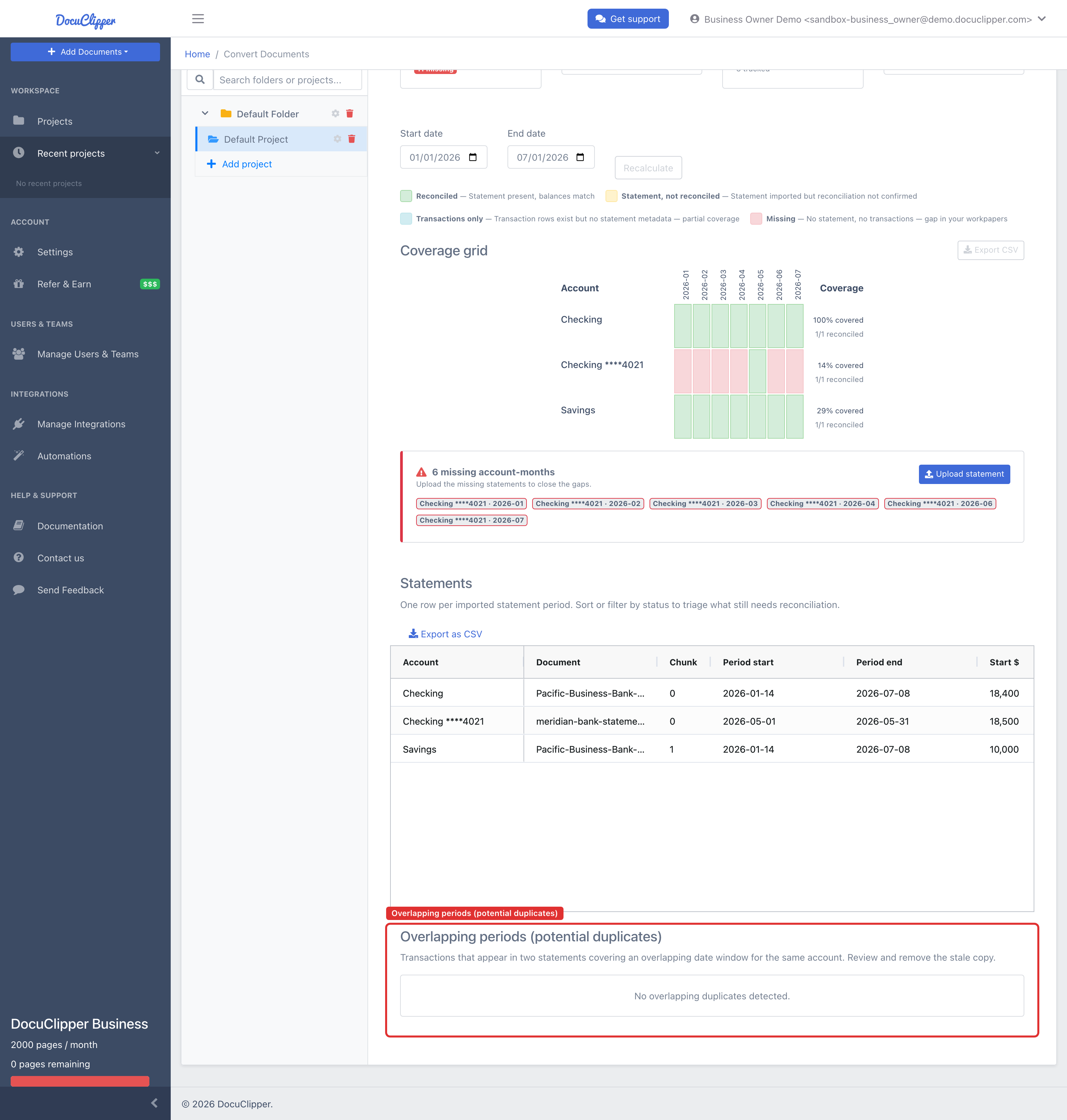
If those dates don't line up — for example, statement A ends June 30 and statement B starts August 1 — the missing window (July 1–31) shows as a Missing month in the coverage grid. Separately, when two statements cover the same account and window, DocuClipper flags the duplicate transactions in the Overlapping periods (potential duplicates) table, usually a sign of a duplicate upload.
The dates come from each statement's extracted metadata. If a statement's period was OCR'd incorrectly, the coverage will be wrong too — fixing the period on that statement fixes the analysis.
Running the analysis
- Open the project that contains the statements.
- Open the Advanced Analysis tab.
- Select the Coverage sub-tab. (This is where Date Gaps lives — the view is titled Statement coverage.)
Set an optional Start date / End date to scope the engagement span, then click Recalculate. The view shows:
- Summary chips — account-months covered, statements reconciled, number of accounts, and the engagement span in months.
- A coverage grid — one row per account, one column per month, with each cell color-coded by state (see the legend below). This is where missing months and unreconciled months jump out at a glance.
- A Statements table — every extracted statement with its period start, period end, and reconciliation status.
- An Overlapping periods (potential duplicates) table — see below.
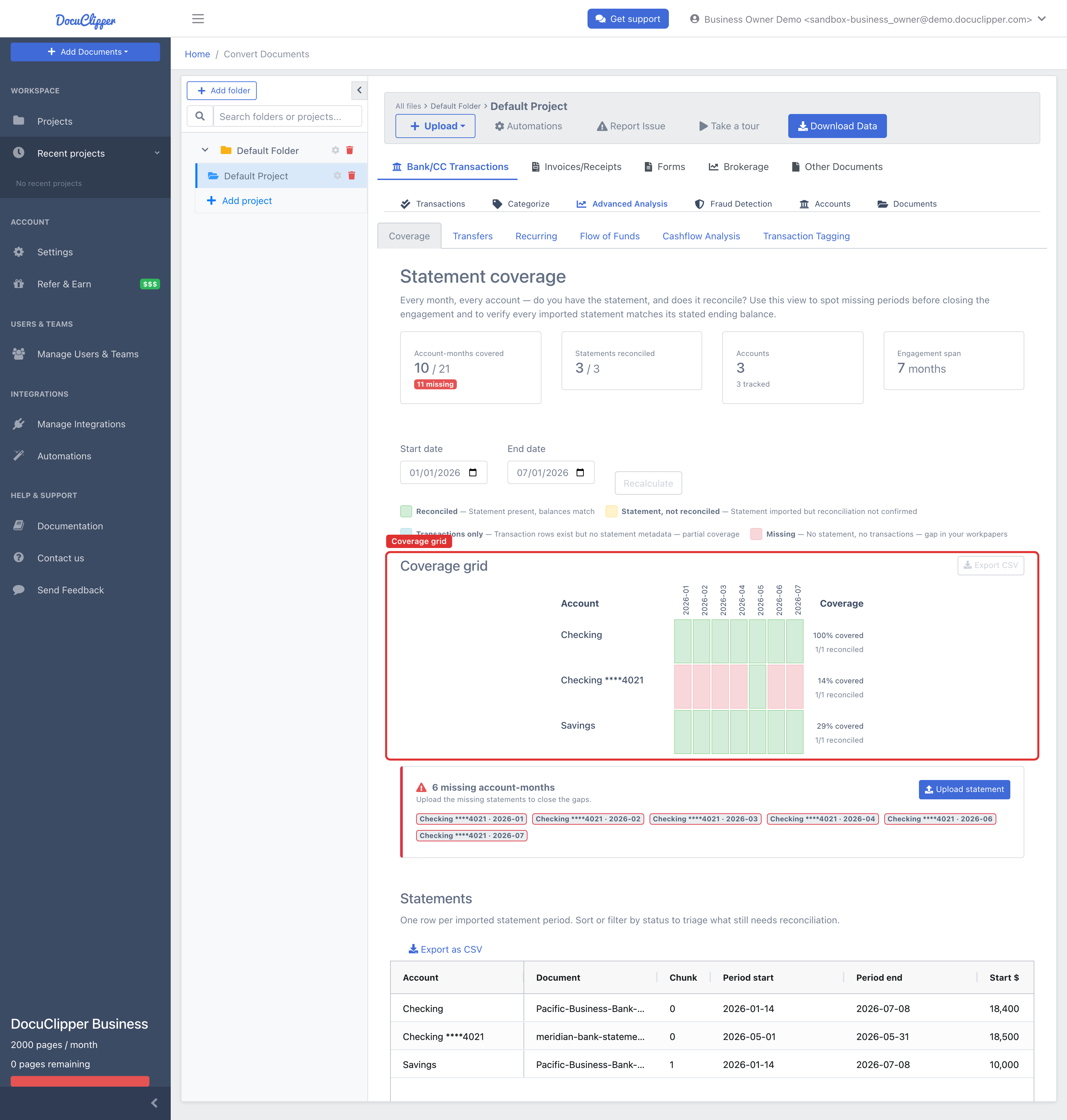
Each cell in the grid is one of four states:
- Reconciled — statement present and its balances match.
- Statement, not reconciled — statement imported, but reconciliation isn't confirmed.
- Transactions only — transaction rows exist for that month but no statement metadata (partial coverage).
- Missing — no statement and no transactions: a true gap.
Reconciliation status per period
Coverage isn't only about whether a period is present — it's also about whether that statement's math checks out. For each period, DocuClipper shows the reconciliation status of the underlying statement, so you can tell a clean, balanced month from one that's present but didn't reconcile.
A period can be:
- Covered and reconciled — the statement is on file and its opening balance + transactions = closing balance.
- Covered but not reconciled — the statement is present, so it's not a gap, but the numbers don't balance (a misread balance, missing transactions, or swapped debits/credits). These are easy to miss when you only look at coverage, because the month "looks" covered.
- Missing — no statement for that period at all.
For an underwriting or forensic review, "covered but not reconciled" periods deserve the same attention as gaps: the data is there but you can't trust the totals until it balances. See How Reconciliation Works and How to Fix Not Reconciled Statements.
Exporting the Coverage CSV
Click Export CSV on the Coverage grid to export the whole coverage picture for a workpaper, a loan file, or a shared review. Each row is an account, with one column per month (holding that cell's state) plus three summary columns:
- Coverage % — how much of the spanned range is actually covered.
- Reconciled / Statements — how many statements you have for the account, and how many of them reconciled.
- Missing Periods — an explicit column that names the gap ranges rather than just flagging that gaps exist. Contiguous missing months are collapsed into a single range. For example, the column might read
Feb 2026for a single missing month, orApr 2026 – Jun 2026for a three-month gap.
Because the Missing Periods column spells out exactly which months are absent, you can hand the CSV straight to a borrower or client as the list of statements to send, or attach it to a workpaper as documented proof of coverage.
Why does DocuClipper say I have date gaps?
A gap means the analysis can't see continuous coverage between two adjacent statements. Common reasons:
- A statement was never uploaded. The most common cause. Request the missing month from the client.
- The account changed mid-period. The client switched accounts and only sent statements for the new one. You'll see a gap on the old account starting at the cutover.
- The statement period was mis-detected. OCR pulled the wrong start or end date from the statement header. Open the statement detail and correct the period.
- A statement spans a non-calendar period. Some banks issue statements on cycles that don't align to month boundaries. The analysis still works — it cares about period contiguity, not calendar months.
- An undisclosed account. In forensic work, gaps in one account that align with deposits or transfers from another can indicate a concealed account funneling money.
How do I fix a date gap?
Three options, depending on the cause:
- Upload the missing statement to the same project. The analysis updates automatically once extraction completes.
- Correct a mis-detected period. Open the offending statement, check the extracted period dates on the statement detail page, and fix them if OCR got them wrong.
- Treat the gap as intentional if you've confirmed the account was closed, dormant, or genuinely had no statement for that period. Document the reason in your workpaper — DocuClipper won't suppress the flag, but you can ignore it knowingly.
When the Overlapping periods (potential duplicates) table flags duplicate transactions, remove the duplicate statement from the project via the Documents sub-tab. See Managing Project Documents.
Use cases for lenders and underwriters
For SBA loans, bank loans, and any credit decision that relies on cash-flow analysis, complete coverage means every month in the requested review period has a statement on file. A single missing month can invalidate the cash-flow conclusion: you can't claim the borrower averaged $X in deposits if you have no data for July.
Date Gaps gives underwriters a single screen that proves coverage (or lists exactly what's missing to request from the borrower). It also catches a common borrower trick — submitting 11 of 12 months and hoping no one notices the gap.
Use cases for forensic accountants
In divorce, fraud, and asset-tracing engagements, gaps are a red flag. A respondent who provides "all my bank statements" but has July missing — when a real-estate closing happened that month — is hiding something. Date Gaps surfaces those windows immediately, and the overlap detection catches duplicate uploads designed to pad the production.
The same grid also answers the question one step further out: which accounts were never produced at all. Accounts that the statements reference but that have no statement in the project appear as red rows under Referenced, not produced, with the transactions that name them. See Finding Undisclosed Accounts.
Pair Date Gaps with Flow of Funds Analysis and Transfers Analysis to trace money across accounts during the gap windows.
FAQs
Why does DocuClipper say I have date gaps?
A gap means two adjacent statements don't have contiguous period dates — the earlier statement ends before the next one begins. Usually it's a missing statement, an account that changed, or a mis-detected period from OCR.
How do I fix a date gap?
Either upload the missing statement to the project, correct the period dates on the statement that was extracted incorrectly, or accept the gap as intentional and document the reason. The analysis updates automatically as soon as a new statement is extracted.
Do I need 100% coverage for SBA underwriting?
Underwriting standards vary by lender and program, but for cash-flow-based credit decisions, complete coverage of the requested review period is the norm. A missing month undermines the cash-flow conclusion, so most underwriters require the gap closed before approval.
Can DocuClipper detect a hidden account?
Yes, when the statements you do hold refer to it. DocuClipper reads every transaction description for account numbers and institutions, and any account it finds that you hold no statement for is listed on this same Coverage grid under Referenced, not produced, with the transactions that name it. See Finding Undisclosed Accounts.
What it cannot do is see an account that is never mentioned anywhere in the production. If money never moves between that account and one you were given, nothing in the file points to it.
What date range does Date Gaps check against?
It checks contiguity between adjacent statements per account — not against an external requested range. If you need to prove coverage from January through December, upload statements that span that range; the analysis will flag any missing periods between the earliest and latest statements you provided.