
Understanding Bank Statement Fraud Detection
Detect forged bank statements with DocuClipper's authenticity score: PDF metadata, document-fingerprint, and reconciliation signals scored 0 to 100.
Last updated
DocuClipper's bank statement fraud detection assigns each document an authenticity score from 0 to 100, derived from three families of checks: PDF metadata (producer, creation-vs-modification gap, PDF version), document fingerprinting (does the file match known-authentic templates), and reconciliation (do the balances and transactions add up).
A score of 90–100 indicates the statement appears authentic; 0–49 indicates high fraud risk. The score is a signal, not a verdict — always review the individual signals in context before deciding.
You'll find it on the Fraud Detection tab of any bank or credit card project, next to Transactions and Categorize.
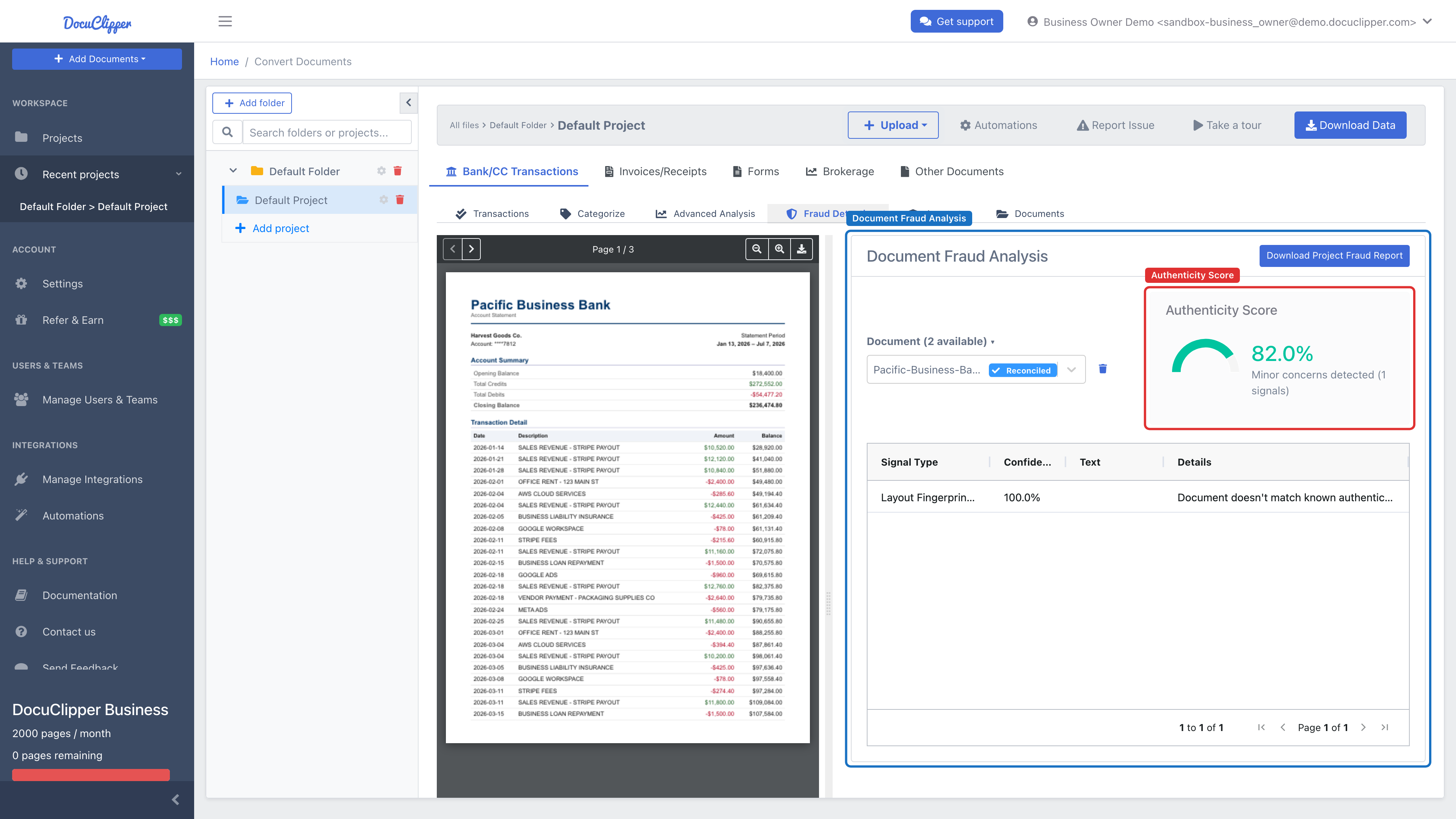
What is the DocuClipper authenticity score?
Each document receives a score from 0 to 100. It summarizes multiple checks and the confidence of the findings.
| Score range | Interpretation |
|---|---|
| 90–100 | Document appears authentic |
| 70–89 | Minor concerns detected |
| 50–69 | Moderate risk detected |
| 0–49 | High risk of fraud detected |
Important: The score is not a final decision. Always review the individual signals and consider the context.
What we analyze
PDF metadata analysis
- Unusual producers (e.g., image editors or word processors) for a bank statement.
- Large gaps between a PDF's creation and last-modification time.
- Out-of-pattern PDF versions.
Document fingerprint matching
- Compares the file's fingerprint against a library of known-authentic templates.
- An unfamiliar fingerprint is surfaced as a signal (not proof — new bank templates and regional formats are legitimate causes).
Reconciliation check
- Opening balance + net activity = closing balance for the statement period.
- Flags when the transactions and reported balances do not add up.
Document fingerprinting
We compute a stable fingerprint from metadata, embedded fonts, and page dimensions. This enables:
- Matching against known authentic templates.
- Detecting duplicates or modified versions.
- Building a library of trusted statement patterns over time.
- Metadata (producer, creator, version)
- Font set + embedding
- Page size/orientation
How the score is calculated
Each signal has a confidence (0–1) and a point weight. The score starts at 100, and each signal subtracts confidence × weight — so a high-confidence, heavy signal pulls the score down the most, while a low-confidence one nudges it only slightly. The table below shows the points deducted at full confidence.
| Signal | Points (at full confidence) | Why it matters |
|---|---|---|
RECONCILIATION_FAILED | 25 | The numbers in the statement do not add up. |
DOESNT_MATCH_KNOWN_FINGERPRINTS | 18 | The file doesn't match any known-authentic template. |
SUSPICIOUS_PDF_PRODUCER | 15 | Uncommon tools for bank statements can indicate editing. |
MODIFIED_AFTER_CREATION | 10 | A large create-to-modify gap can indicate post-issuance edits. |
SUSPICIOUS_PDF_VERSION | 8 | Atypical PDF versions can point to editing tools. |
Best practices for review
- Review the full signal list, not just the score.
- Prioritize documents where multiple high-confidence signals stack up.
- Consider context. Scans, print-to-PDF, or corporate PDF workflows can cause benign anomalies.
- Compare against another statement from the same institution when possible.
Fraud signal glossary
RECONCILIATION_FAILED: transactions do not reconcile with reported balances
What we check: Opening balance + net activity = closing balance for the period.
Why it matters: Non-reconciling statements often indicate edits or missing lines.
Legitimate causes: Partial statements, excluded pages, or export filters.
Review tips: Verify period dates, page completeness, and subtotals for each page.
SUSPICIOUS_PDF_PRODUCER: uncommon creation tools for bank statements
What we check: PDF Producer string (e.g., Word, Photoshop, Preview).
Why it matters: Banks rarely generate statements via general-purpose editors.
Legitimate causes: Users who scanned or re-saved statements before upload.
Review tips: Ask for the original download from online banking.
MODIFIED_AFTER_CREATION: large gap between creation and modification time
What we check: Hours between PDF creation and last modification.
Why it matters: Late modifications can indicate edits post-issuance.
Legitimate causes: Batch stamping or archiving systems.
Review tips: Validate with a fresh download from the issuing bank.
SUSPICIOUS_PDF_VERSION: unusual or very old PDF version
What we check: PDF version string outside common ranges for bank exports.
Why it matters: Some editing tools save with atypical versions.
Legitimate causes: Legacy back-office software.
Review tips: Compare with other statements from the same institution.
DOESNT_MATCH_KNOWN_FINGERPRINTS: no match to approved templates
What we check: The document’s fingerprint (metadata, fonts, page size) against a library of known authentic patterns.
Why it matters: Unfamiliar patterns may indicate edits or a nonstandard source.
Legitimate causes: New bank template versions, regional formats, or first-time issuers.
Review tips: Request another statement from the same account and month for comparison.
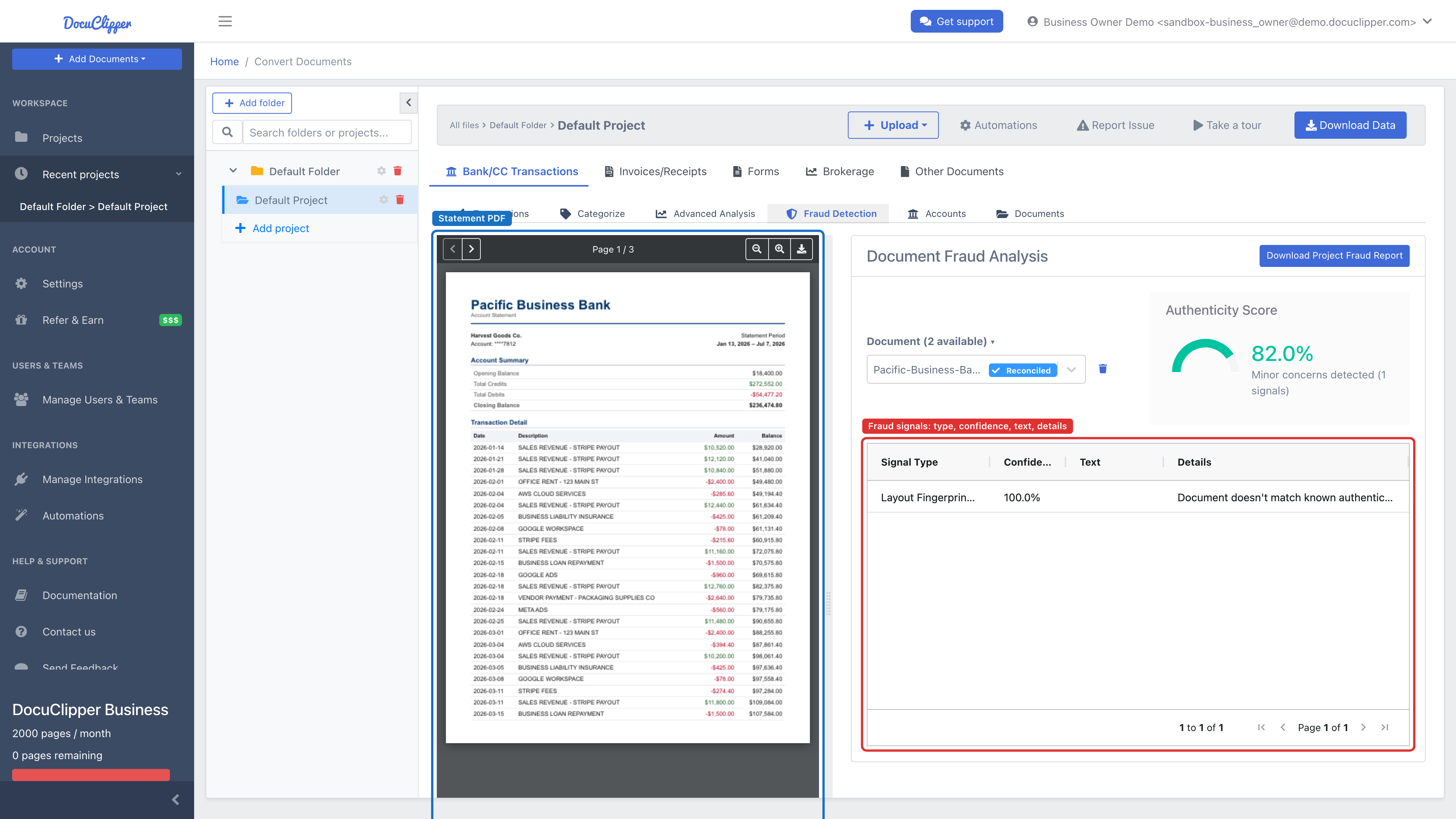
The Fraud Detection tab shows the authenticity score as a gauge, the plain-language interpretation, and a table of the signals found — each with its type, confidence, and supporting text — beside the PDF viewer. You can also Download Project Fraud Report as a CSV for the whole project.
Notes
- Each signal carries a confidence score. Page and location data are recorded internally to support investigation.
- The presence of any single signal is not proof of fraud. Use multiple signals plus context to make decisions.
FAQs
What does DocuClipper's authenticity score mean?
It is a 0 to 100 summary of multiple fraud signals weighted by confidence. 90 to 100 looks authentic, 70 to 89 has minor concerns, 50 to 69 is moderate risk, and 0 to 49 is high risk. The score is a guide, not a final decision.
What signals does DocuClipper check on a bank statement?
PDF metadata (creation-versus-modification gaps, suspicious producers, atypical PDF versions), document-fingerprint matching against known-authentic templates, and reconciliation against the printed opening and closing balances.
Can a legitimate statement get a low score?
Yes. Scans, print-to-PDF workflows, and corporate PDF tooling can produce benign anomalies. Always review the underlying signals and compare against another statement from the same institution before flagging the document.
What is document fingerprinting?
A stable fingerprint computed from metadata, embedded fonts, and page dimensions. It lets DocuClipper match a statement against known authentic templates and detect duplicates or modified versions across uploads.
Which signal carries the most weight?
RECONCILIATION_FAILED (25 points), because it means the opening balance, transactions, and closing balance do not add up. DOESNT_MATCH_KNOWN_FINGERPRINTS (18) and SUSPICIOUS_PDF_PRODUCER (15) come next, while MODIFIED_AFTER_CREATION (10) and SUSPICIOUS_PDF_VERSION (8) carry less weight on their own.
Is one fraud signal enough to reject a statement?
No. A single signal is not proof of tampering. Prioritize cases where multiple high-confidence signals stack up on the same document, and consider context before making a decision.