
What Is ERP Invoice Processing & How It Works
Invoices are categorized into two types: those linked to a purchase order and those without an associated request. Each type requires a different approval
Key takeaways:
- ERP invoice processing automates invoice management, integrating accounts payable workflows with other business functions to improve efficiency and accuracy.
- The process includes invoice receipt, data extraction, purchase order matching, approval, posting, and record-keeping, ensuring compliance and reducing manual effort.
- Automating invoice processing can cut costs by up to 80%, minimize errors, accelerate approvals, and enhance cash flow visibility.
- Manual invoice processing is slow, error-prone, and costly, leading to delays, compliance risks, and strained vendor relationships.
While you are here
Stop re-typing invoices into your accounting system
DocuClipper captures vendor name, invoice number, line items, totals, and tax from any PDF invoice (digital or scanned) and exports them ready for your ERP or approval workflow.
What is Invoice Processing
Invoice processing is the procedure of handling supplier invoices from receipt to payment. It includes data extraction, validation, approval, and payment.
Invoices are categorized into two types: those linked to a purchase order and those without an associated request. Each type requires a different approval workflow.
What is ERP Invoice Processing
ERP invoice processing involves handling invoices within an Enterprise Resource Planning (ERP) system and integrating accounts payable workflows with other business functions.
It automates invoice capture, validation, approval, and payment, ensuring efficiency, accuracy, and compliance across departments while recording transactions in the general ledger.
Before you customize an ERP module, it helps to see how a dedicated layer handles invoice data extraction, workflow, and handoff—full invoice processing software is a common complement to ERP invoice processing. Most ERP teams pair it with accounts payable automation on the AP side, then push approved bills to QuickBooks or Xero.
How ERP Invoice Processing Works?
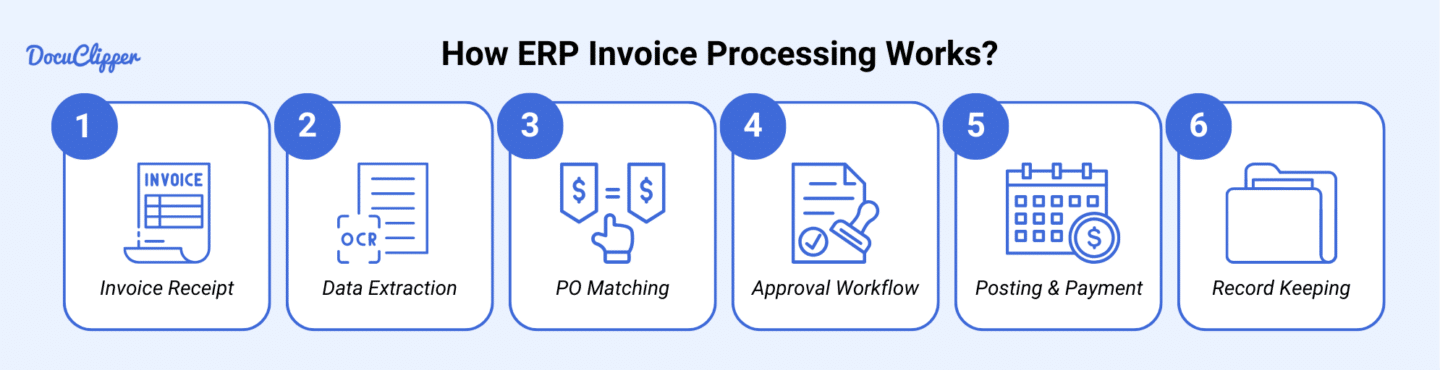
Here is how ERP invoice processing works:
Step 1: Invoice Receipt
Your ERP system captures invoices from scanning, email, or EDI, but they come in different formats. Before processing, you need to convert the paper invoices to PDF.
Some businesses still provide paper or image invoices, so standardizing them makes it easier to run through the ERP. With all invoices in one format, the system can extract document data more efficiently.
Step 2: Data Extraction
Once your invoices are in PDF format, the ERP system scans them using an invoice OCR. It extracts invoice data like invoice numbers, dates, and amounts, along with line-item specifics such as quantities, prices, and descriptions.
The system then maps this data to the correct ERP fields automatically. As you process more invoices, machine learning improves accuracy, reducing errors and manual corrections.
Step 3: Purchase Order Matching
If the invoice is linked to a purchase order, the system automatically matches it with the corresponding PO. It verifies quantities, prices, and other details to ensure everything aligns. Three-way matching checks the invoice against the PO and the goods receipt. If there’s a discrepancy, the system flags it and routes it for review.
Step 4: Approval Workflow
Once the invoice passes matching, it’s routed for approval based on your predefined rules. Approvers get notified and can review invoices directly in the ERP system. The system tracks the approval status in real time and escalates overdue invoices to prevent delays.
Step 5: Posting & Payment
After approval, the invoice gets posted to the general ledger. The system schedules the payment based on due dates and available cash flow. Once the transfer is initiated, the ERP updates records automatically, ensuring accurate financial reporting.
Step 6: Record Keeping
Once the payment is processed, the system archives the invoice and maintains a full audit trail. You can easily search for past invoices and generate reports for audits, compliance, or financial analysis. Everything stays organized and accessible when you need it
Benefits of ERP Invoice Processing
Here’s why AP teams rely on ERP systems for automated invoice processing:
- Cost Reduction: Cuts processing costs by 60-80% by automating manual data entry tasks, reducing paper handling, and minimizing errors that require rework.
- Faster Processing: Speeds up invoice processing from weeks to hours with automated invoice data extraction, validation, and routing, helping you capture early payment discounts.
- Error Prevention: Reduces human errors with automated validation, three-way matching, and duplicate invoice detection, improving accuracy to 99%.
- Enhanced Visibility: Gives real-time tracking of invoice status, cash flow forecasting, and spend analytics through a centralized dashboard.
- Compliance & Control: Maintains regulatory compliance with consistent processing rules, automated audit trails, and secure document storage with role-based access.
- Vendor Relations: Strengthens supplier relationships by ensuring faster payments, transparent processing status, and fewer disputes.
Put it into practice
Bad line data stalls every approval
Wrong quantities or unit prices create exceptions that clog the queue. Structured extraction gives AP teams and procurement the exact numbers from the PDF, without re-keying.
Disadvantages of Manual Invoice Processing
Here are the disadvantages of using manual invoice processing:
- Time-Consuming: This takes 7 to 13 days per invoice, requiring hours of manual data entry, validation, and document filing.
- High Error Rates: This leads to a 4% error rate on average, causing payment delays, duplicate payments, and strained vendor relationships.
- Limited Visibility: Lacks real-time tracking, making it difficult to locate invoices, forecast cash flow, or analyze spending.
- Storage Problems: Requires physical storage, consuming a lot of vital space that can be useful for the business.
- Delayed Approvals: Slows down processing with physical routing, possibly losing invoices that can be out of reach and risk penalties from suppliers for late payments.
- Poor Compliance: Lacks audit trails and consistent controls, increasing fraud risks and regulatory non-compliance
Conclusion
Manual invoice processing is slow, error-prone, and expensive, leading to delays, compliance risks, and strained vendor relationships.
ERP invoice processing solves these issues by automating data capture, validation, and approvals, cutting costs and improving efficiency. By switching to an ERP system, you can streamline workflows and ensure accurate, timely payments.
How DocuClipper Can Help with ERP Invoice Processing
DocuClipper streamlines ERP invoice processing by extracting data from PDF invoices, making it easier to input information into your ERP system. It converts invoices into CSV or XLS formats and offers an OCR API for seamless integration with accounting software. It also processes bank statements, receipts, and tax forms.
Frequently Asked Questions About ERP Invoice Processing
What is ERP invoice processing?
ERP invoice processing is the workflow of capturing, validating, approving, and posting vendor invoices within an Enterprise Resource Planning system. The process typically involves extracting data from paper or PDF invoices (via OCR), matching against purchase orders and receipts (3-way matching), routing for approval, and posting to the general ledger.
How long does ERP invoice processing take?
Manual ERP invoice processing takes an average of 14–21 days per invoice. Automated processing with OCR extraction and workflow automation reduces this to 3–5 days. High-performing AP teams using full automation achieve same-day processing for matched invoices.
What is the cost to process an invoice through an ERP?
Manual processing costs an average of $40.70 per invoice according to industry benchmarks. Automated ERP invoice processing reduces this to $3–8 per invoice, depending on the level of automation and exception rate. The primary cost drivers are staff time for manual data entry, validation, and exception handling.
How does OCR integrate with ERP invoice processing?
OCR tools extract invoice data (vendor, invoice number, line items, totals, tax) from PDF or paper invoices and deliver structured data to the ERP via API, CSV import, or direct integration. DocuClipper integrates with QuickBooks, Xero, and Sage, and exports structured CSV for ERP import into NetSuite, SAP, and Microsoft Dynamics.
Related Articles
- Invoice Processing Software
- Automated Invoice Processing
- Invoice Capture: What It Is and How It Works
- Invoice Approval Workflow
- Accounts Payable Statistics 2026
- Accounting & Bookkeeping Statistics 2026
- ERP OCR: How OCR Integrates with ERP Systems
- ERP Statistics: Adoption Trends and Automation Insights
Next step
Close the gap between the PDF and the ERP
Route extracted invoices straight into your approval rules and accounting exports. Built for teams that process vendor bills every week, not one-off conversions.