
Child support income analysis
How to prove a self-employed parent's income for child support from bank statements
A step-by-step method to work out what a self-employed parent really earns: which statements to request, how to separate real income from transfers, loans and refunds, how to handle business expenses and add-backs, and how to compare the result with the tax return. Works in a spreadsheet; DocuClipper does the counting.
To prove a self-employed parent's income for child support, add up every deposit into every account the parent controls for 12 to 36 months, then take out the money that is not income: transfers between the parent's own accounts, loan proceeds, refunds and reversals. What remains is the parent's gross receipts. Subtract the business expenses your state's guideline allows, add back personal expenses the business paid, and compare the result with the tax return. A parent who reports $62,000 on a return but deposits $90,000 of customer payments a year has some explaining to do.
This guide is the method, step by step. It works in a spreadsheet. Each step also says where DocuClipper does the work, and the limits section says what it does not do.
While you are here
Extract every transaction from any bank PDF
Upload a statement from any bank and DocuClipper returns a clean table with dates, amounts, descriptions, and running balance intact. No reformatting before you can reconcile or import.
What counts as income for child support when a parent is self-employed?
Every state has a child support guideline, and federal rules (45 CFR 302.56) require those guidelines to take into account the parent's earnings and income. The definitions differ by state, but most follow the same pattern for a self-employed parent: gross income from self-employment is gross receipts minus ordinary and necessary expenses of running the business. Many guidelines exclude some deductions that are allowed on a tax return, such as accelerated depreciation, and many let the court count personal expenses the business pays.
Read your state's guideline for the exact definition. The federal Office of Child Support Services (acf.gov/css) links to each state's program, and most state court websites publish the guideline and worksheets.
Why use bank statements, not just the tax return?
A tax return is a report the parent prepared. Bank statements are a record of what the parent received. For a self-employed parent the gap between the two can be large:
- Business owners decide what they report, and some customers pay in ways that never generate a 1099.
- Personal expenses (a car, a phone, family travel, meals) paid by the business reduce reported profit but are a benefit to the parent.
- Income can be moved between personal and business accounts, or to an account nobody has asked about.
Bank deposits do not prove income on their own: a deposit can be a loan, a refund, or the parent's own money moved from savings. That is why the method below is mostly about removing what is not income.
What statements should I request?
| Document | What it shows |
|---|---|
| Every personal checking and savings account | Wages, owner draws, transfers from the business |
| Every business bank account | Gross receipts and business expenses |
| Business and personal credit cards | Expenses, and personal spending run through the business |
| Payment processor statements (Stripe, Square, Shopify, PayPal) | Sales before fees, and payout timing |
| Payment app histories (Venmo, Cash App, Zelle) | Customer payments that bypass the processor |
| Last 2 to 3 tax returns, with Schedule C or business returns | What the parent reported |
| Forms 1099-K and 1099-NEC | Third-party reported receipts to compare against deposits |
Ask for 12 months at a minimum, and 24 to 36 months when income is seasonal, irregular or changed around the separation.
Step-by-step: income from bank statements
- Check the set is complete. List every account against every month. A missing month leaves income out of the total, and an account the statements mention but nobody produced (
TRANSFER TO ACCOUNT *4421) can be where income goes. - Put every transaction in one table. One row per transaction with date, description, amount, account and statement period. Check that each statement ties to its printed balances before relying on it.
- Remove transfers between the parent's own accounts. A $5,000 move from the business account to personal checking is one dollar counted, not two. Pair each withdrawal with its matching deposit in the other account.
- Remove loan proceeds, refunds and reversals. Loan and line-of-credit draws, merchant cash advance funding, refunds of earlier purchases, returned items and chargebacks are not income.
- Group deposits by payer. Every payment from the same customer, employer or processor is one source. Steady payers are recurring income. Large one-off deposits (a contract payment, an insurance payout, an asset sale) are listed separately and need an explanation.
- Average by month. Divide the income by the months covered, not by 12, if the statements cover more or less than a year.
- Deal with expenses and add-backs. Subtract business expenses your guideline allows. Add back personal expenses the business paid. Watch for payments to family members on payroll and rent paid to the parent's own entity.
- Compare and document. Put the result next to the tax return and the financial affidavit, and keep a schedule that shows every figure's source statement.
A worked example (illustrative)
| 12 months of deposits, all accounts | Amount |
|---|---|
| Total deposits into business and personal accounts | $148,200 |
| Less transfers between the parent's own accounts | -$36,000 |
| Less proceeds of a business line of credit | -$20,000 |
| Less refunds and reversals | -$1,450 |
| Gross receipts from the deposits | $90,750 |
| Gross receipts reported on Schedule C | $62,000 |
| Unexplained difference | $28,750 |
The difference is not automatically income. It is the list of deposits the parent should be asked to explain, and the numbers to put to the parent's accountant.
Put it into practice
Manual copy-paste is where errors begin
Split rows, drifting balances, missed transactions: they all trace back to re-keying. DocuClipper preserves the bank's layout so debits, credits, and totals tie out the first time.
Where DocuClipper does each step
Upload every statement for the parent into one project. DocuClipper converts them into transactions and checks each statement against its printed balances.
| Step | DocuClipper | Plan |
|---|---|---|
| Is the set complete? | Coverage shows each account by month, flags missing statements, and lists accounts the transactions name that were never produced | All plans |
| One table, tied out | Every statement converted and reconciled to its printed balances; export to Excel or CSV | All plans |
| Remove own-account transfers | Transfers pairs a withdrawal with the matching deposit in another account | All plans |
| Remove loans, refunds; group by payer; average by month | Income leaves out own-account transfers, loan proceeds, refunds and card credits, groups the rest by payer with its cadence, and lists large one-off deposits | All plans |
| Expenses and add-backs | Categorize applies keyword rules to every transaction; Transaction Tagging marks the expenses you want to add back | Categorize: all plans. Tagging: Business and Enterprise |
| Check the statements are genuine | Fraud Detection scores each PDF for signs of editing | Business and Enterprise |
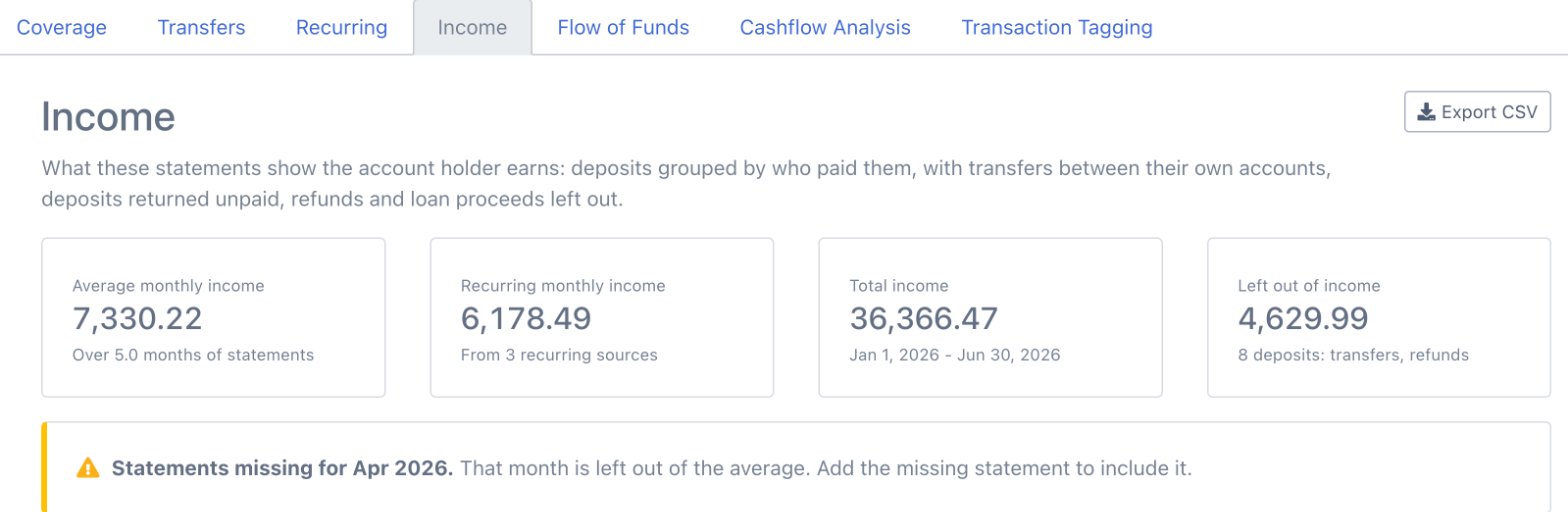
The Income view shows average monthly income, recurring monthly income from steady payers, total income and what was left out, with a notice when a statement is missing. A missing month is left out of the average instead of pulling it down.
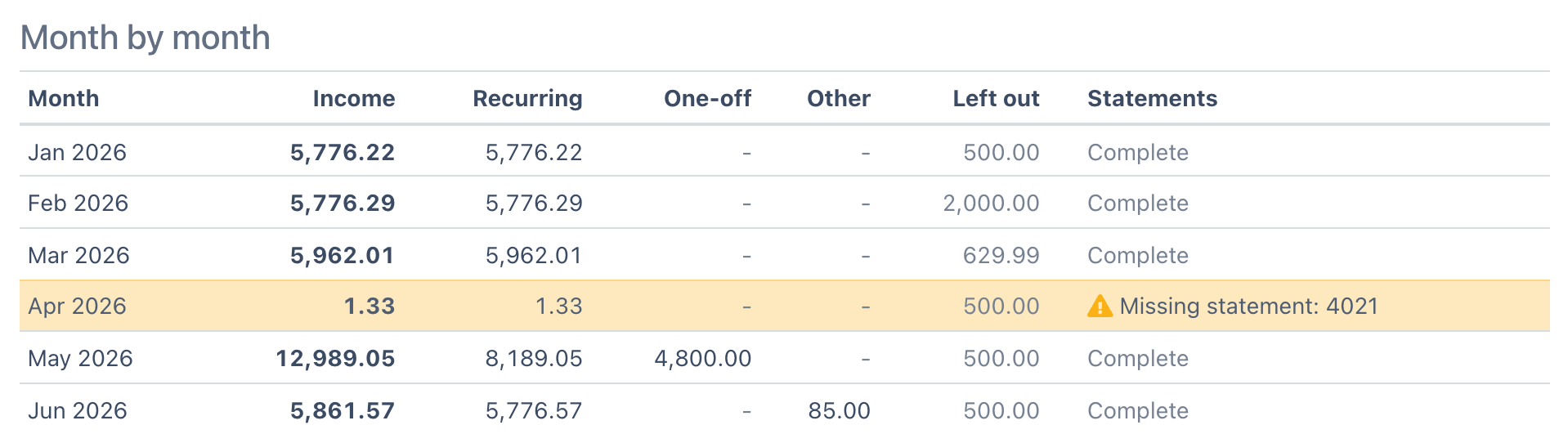
The month-by-month table splits each month into recurring, one-off and other income, and shows what was left out. Export CSV gives you every deposit and how it was counted, which is the schedule you hand to the other side.
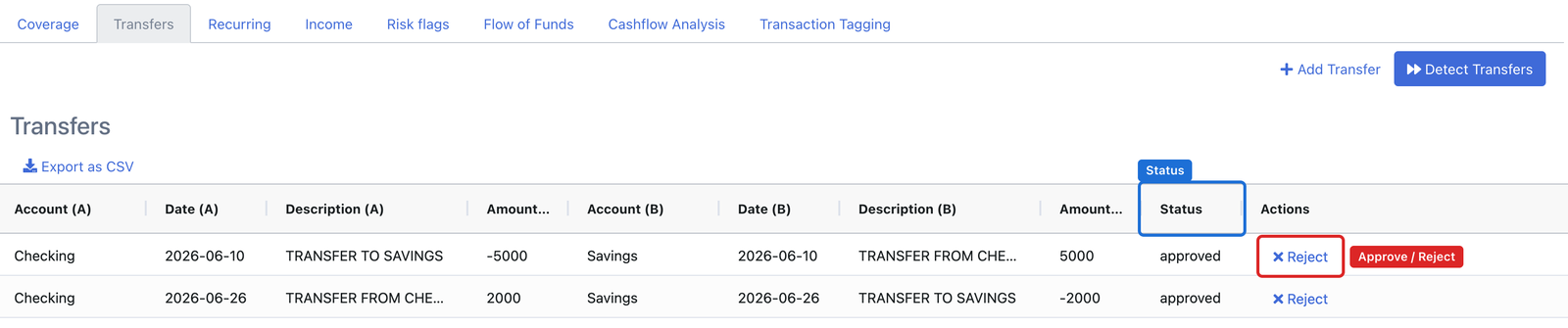
Transfers between the parent's accounts are paired so you can approve or reject each match:
See Income Analysis, Transfers Analysis and Date Gaps Analysis for the detail.
Can I do this without special software?
Yes. Every step above works in a spreadsheet. Export or convert each statement, add account and period columns, tie out each statement, then sort by description to group payers and mark transfers by hand by matching amounts and dates across accounts. Expect the transfer matching and the payer grouping to take most of the time: bank descriptions carry reference numbers and dates that make the same payer look different on every line.
Limits
- Cash that is never deposited is invisible. If the parent is paid in cash and spends it, no bank statement shows it. Spending well above deposits is the clue; a lifestyle analysis is the tool.
- Deposits are not the legal definition of income. DocuClipper measures what the statements show. Your state's guideline decides what counts, which expenses are allowed, and what is added back.
- DocuClipper does not calculate child support or apply a state worksheet.
- Check and cash deposits do not name a payer, so they are grouped together. Large ones are listed as one-off deposits for you to ask about.
- It can only see the accounts you upload. Income paid into an account nobody produced appears only as a transfer, if at all. Coverage lists the accounts the statements mention.
- A transfer match is a suggestion. Review each pair; a payment from another person through Zelle or a wire is never treated as a transfer on its description alone, because it can be real income.
FAQ
Can bank statements be used to prove income for child support?
Yes. Bank statements are commonly used to establish a self-employed parent's income, especially when the tax return looks low. Deposits must be adjusted first: transfers between the parent's own accounts, loan proceeds and refunds are removed. Courts weigh the evidence under the state's guideline, so present the bank analysis alongside the returns, not instead of them.
How is child support calculated for a self-employed parent?
Most state guidelines start from gross receipts minus ordinary and necessary business expenses, then apply the state's worksheet to both parents' incomes. Many guidelines exclude some tax deductions and let the court add back personal expenses the business pays. Check your state's guideline for the exact definition.
Do Venmo, Zelle and Cash App payments count as income?
They can. A payment from a customer or client is income no matter which app it came through. A payment from the parent's own account, a reimbursement from a friend, or a gift may not be. Group app deposits by sender and ask about the senders that pay regularly.
What if the parent is paid in cash?
Cash that is deposited shows up as a deposit with no payer. Cash that is never deposited does not show up at all. In that case compare what the parent spends with what they deposit: spending that consistently exceeds deposits suggests income the statements do not show.
How many months of bank statements do you need to prove income?
At least 12 months for every account. Use 24 to 36 months when income is seasonal or irregular, or when it changed around the separation, so a single good or bad month does not decide the average.
Does DocuClipper calculate child support?
No. DocuClipper converts the statements and works out the income they show: deposits grouped by payer, with own-account transfers, refunds and loan proceeds left out, and an average and month-by-month figure. The guideline calculation is done by you, your expert, or your state's worksheet.
Related guides
Next step
Upload your first statement free
No credit card required. See extracted transactions in seconds, then export to Excel, CSV, or QBO when you're ready to scale.