
Family law financial analysis
How to analyze bank statements for divorce: find hidden money, rebuild income and measure the lifestyle
A step-by-step method for family lawyers, paralegals and forensic accountants: what to request, how to find hidden money and unproduced accounts, how to do a lifestyle analysis, how to work out what a spouse really earns, and how to check a statement was not edited. Works in Excel; DocuClipper does each step faster.
To analyze bank statements in a divorce, first get every statement for every account for the whole look-back period. Then put all the transactions into one table, take out transfers between the spouse's own accounts, and look for four things: months that are missing, accounts the statements mention that nobody produced, income that does not match the financial affidavit, and spending that changed around the separation. Each step can be done by hand in Excel. DocuClipper does the conversion and runs the checks, so the time goes into the case instead of into retyping.
This guide is the method, step by step, in the order a family lawyer or forensic accountant would work a file. Each section ends with the part DocuClipper does, and what it does not do.
While you are here
Catch anomalies before you sign off
Manual PDF review misses things, especially at page 80. DocuClipper's analyzer flags edits, suspicious patterns, and anomalies so your team focuses on the right pages first.
What bank statements should I request in a divorce?
Request every account either spouse held, alone or jointly, for the whole period that matters. Most practitioners ask for at least 3 years, and 5 or more when concealment is suspected or a business is involved. Your state's disclosure rules and local practice set the minimum.
| Document | Why you need it |
|---|---|
| Checking and savings statements, every account | The core record of income and spending |
| Credit card statements | Where lifestyle spending usually lives |
| Brokerage and retirement statements | Assets, and transfers in and out of them |
| Business bank and card statements | Income a self-employed spouse controls, and personal spending run through the business |
| Loan and line-of-credit statements | Borrowed money that is not income, and debt paid from marital funds |
| Check images and wire details | Who a check was really paid to; where a wire went |
| Payment app histories (Venmo, PayPal, Cash App) | Transfers that appear on a bank statement only as one line |
Ask for statements as the bank issued them, not printouts or re-saved copies. When a statement looks wrong or the production is incomplete, subpoena the bank directly.
How do I find hidden money in my spouse's bank statements?
Hidden money rarely disappears without a trace. It leaves through a transaction you can see, on a statement you have, toward an account you do not have. Work through these checks in order:
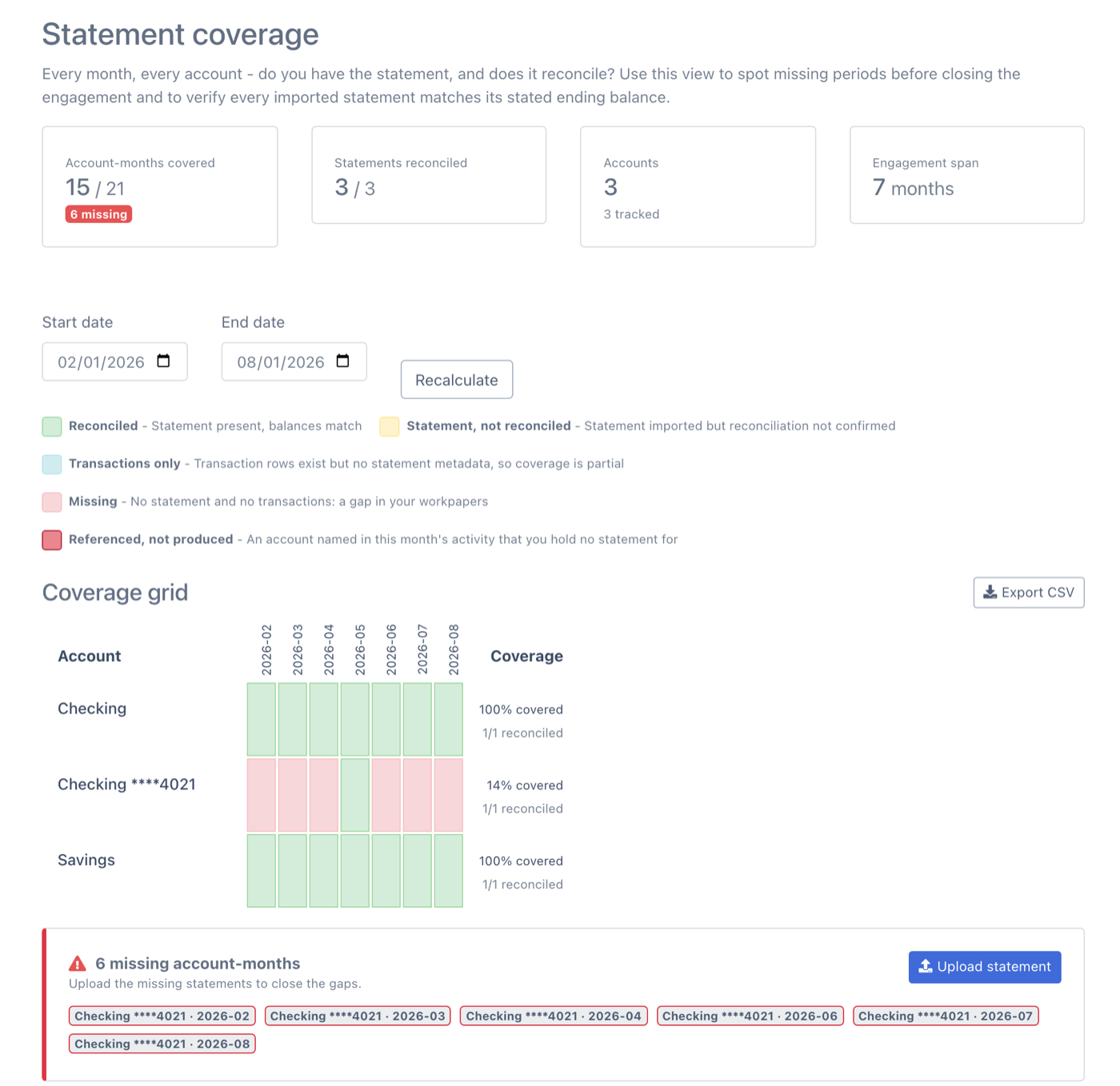
- Find the missing months. Lay out every account against every month. A month with no statement, especially one where a large event happened, is the first thing to request.
- Find accounts the statements mention but nobody produced. Read the descriptions for other account numbers:
TRANSFER TO ACCOUNT *4421,ONLINE TRANSFER TO CHK ...8833, a brokerage or crypto exchange name. Each one is an account to ask about. - Follow every transfer out. Pair each transfer with the matching deposit in another produced account. The transfers with no matching deposit went somewhere you cannot see.
- Look at cash. Large or frequent ATM and counter withdrawals, and checks made out to cash, are money that left the record.
- Look for new payees and round amounts. A new payee that receives regular round-dollar payments can be a loan to a friend, a payment to a third party, or a hidden obligation.
- Compare deposits with reported income. Deposits well above what the financial affidavit or tax return reports point to income that was not disclosed.
- Watch the timing. Changes in the months before filing (balances drained, new accounts opened, spending up) deserve a closer look.
Where DocuClipper does it. Upload every statement into one project. The Coverage view shows each account against each month, with missing months in red and whether each statement reconciled. Below it, under Referenced, not produced, are the accounts that transactions name but that you hold no statement for, with every transaction that names them and the totals that moved out and back in. The Transfers view pairs withdrawals with deposits across accounts, and Flow of Funds traces money between accounts and counterparties.
See Finding Undisclosed Accounts and Flow of Funds Analysis for how each check works.
How do I do a lifestyle analysis from bank statements?
A lifestyle (or marital standard of living) analysis shows what the household actually spent, by category, per month. It supports or tests a spousal support claim and the expense side of a financial affidavit.
- Use every spending account. Checking, savings and every credit card, because much of a household's spending runs through cards.
- Remove transfers and card payments. A payment from checking to a credit card is not spending; the card charges are. Count each dollar once.
- Categorize the spending. Housing, utilities, groceries, dining, travel, vehicles, children's expenses, healthcare, insurance, shopping, and so on. Decide your categories first and apply them the same way across every account.
- Average by month. Total each category for the period and divide by the number of months the statements cover.
- Compare periods. Put the 12 months before separation next to the months after. A category that jumps or disappears needs an explanation.
- Flag what is unusual. Gifts, luxury purchases, travel, and spending on a third party can also support a dissipation or waste claim.
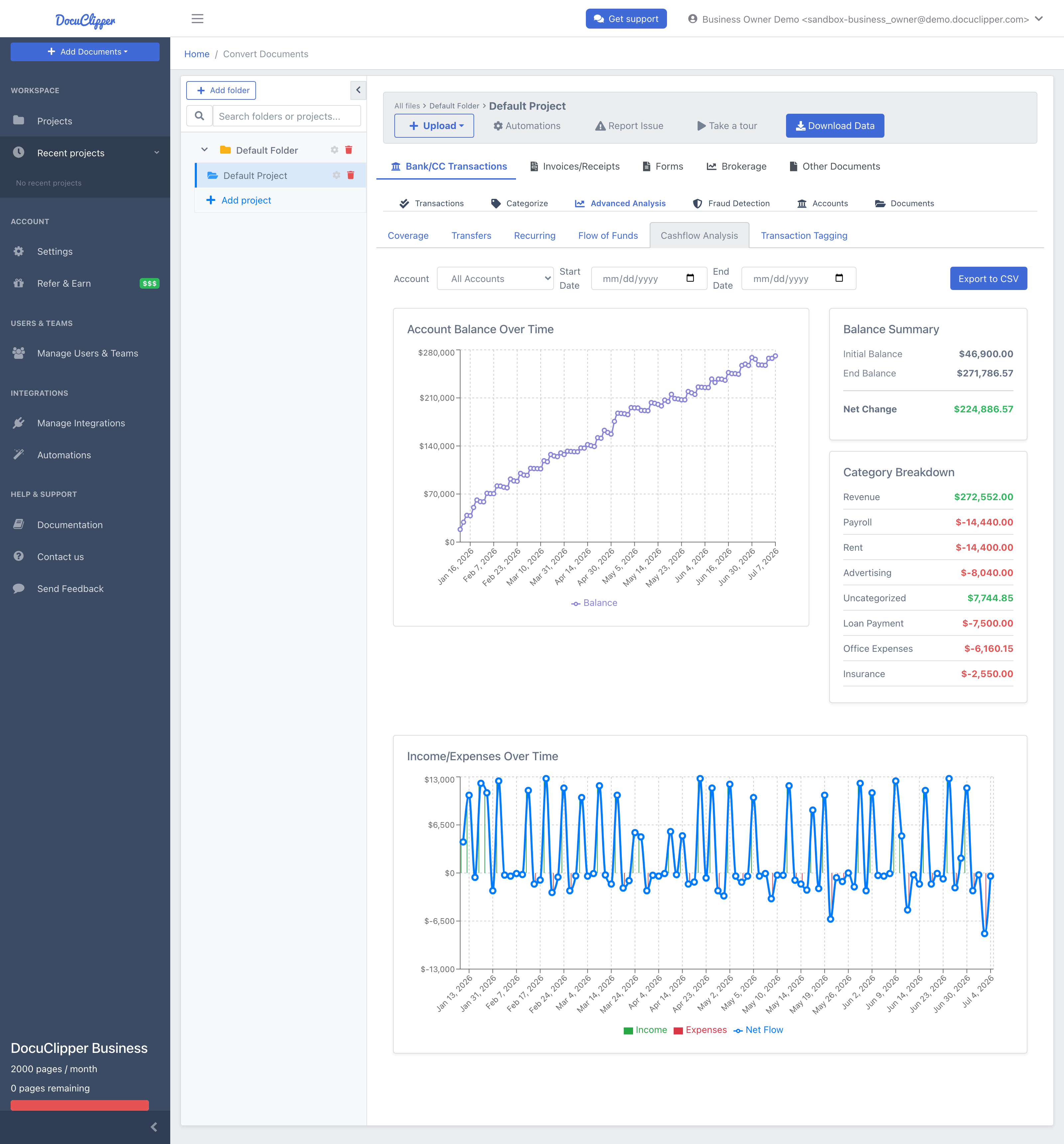
Where DocuClipper does it. Categorize applies keyword rules to every transaction in the project: start from the 15 default categories or build your own category set, then review the result. Transfers keeps own-account movements out of the totals, Recurring lists the payments that repeat on a schedule (rent, subscriptions, support, loans), and Cashflow Analysis charts income and expenses over time with a breakdown by category.
How do I work out what my spouse really earns from bank statements?
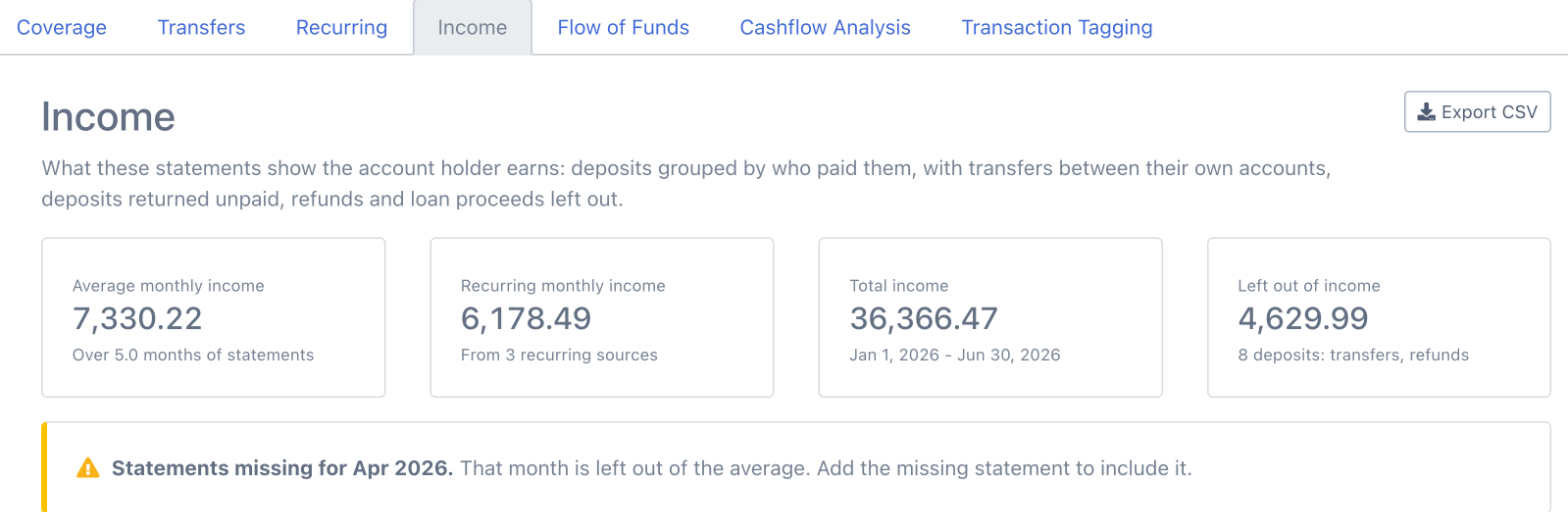
Add up the deposits, then take out everything that is not income: transfers between the spouse's own accounts, loan proceeds, refunds and reversals. Group what is left by who paid it. Steady payers (an employer, a client, a tenant) are recurring income; large one-off deposits need an explanation. Divide by the months covered to get average monthly income, and compare it with the financial affidavit and the tax return.
For a self-employed spouse this is most of the case, because the tax return is the number the spouse chose to report. The full method, including business expenses and add-backs, is in how to prove a self-employed parent's income for child support from bank statements.
Where DocuClipper does it. The Income view groups deposits by payer, leaves out own-account transfers, refunds and loan proceeds, and shows average and recurring monthly income with a month-by-month table that flags missing statements. Every deposit and the reason it was or was not counted are in the CSV export. See Income Analysis.
Put it into practice
A checklist only works when nobody's tired
Structured signals give managers a repeatable first pass. Reviewers get consistent results whether they're looking at page 3 or page 300.
How do I check whether a bank statement was edited?
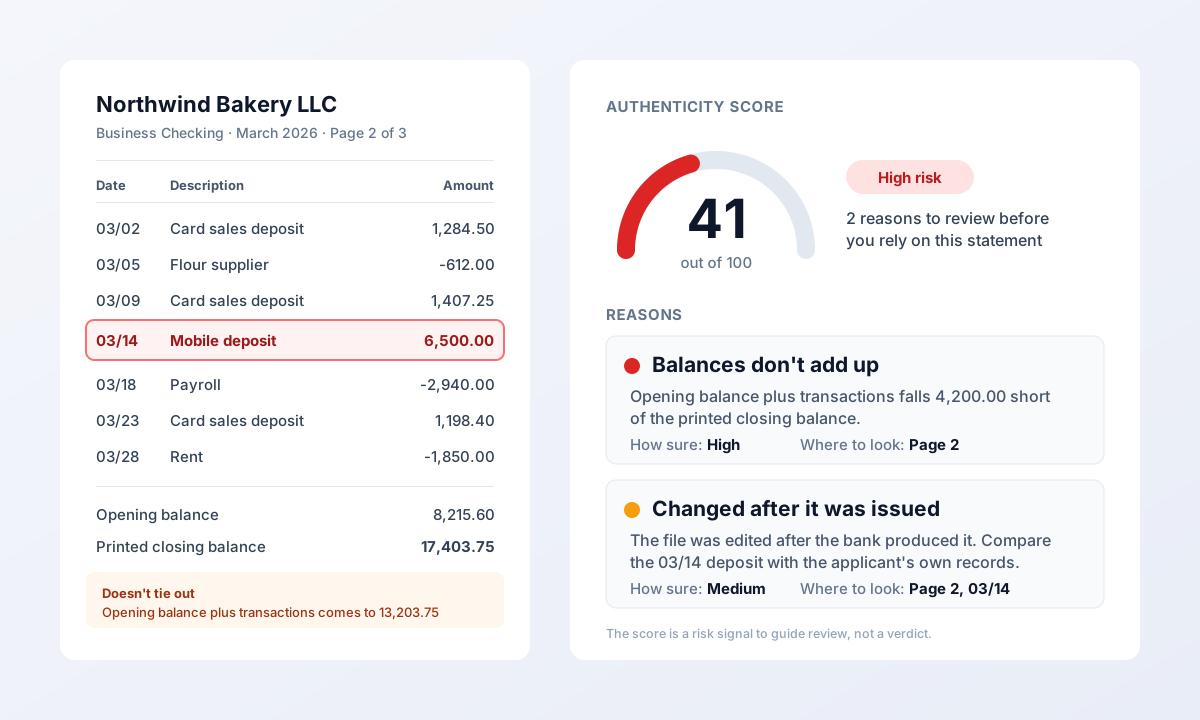
First do the math: the opening balance plus deposits minus withdrawals must equal the closing balance, and each closing balance must carry forward to the next statement's opening balance. Then look at the file. A statement exported by a bank's system does not normally show signs of being opened and re-saved in an editor. When anything looks wrong, get the same month directly from the bank and compare.
Where DocuClipper does it. Every statement is checked against its own printed balances when it is converted. Fraud Detection gives each PDF an authenticity score from 0 to 100 based on its metadata and edit history, amounts whose text size differs from the rest of their row, a fingerprint compared with known-authentic layouts, and that reconciliation check. A low score is a reason to get the statement from the bank, not proof of anything. See Understanding Bank Statement Fraud Detection and how to spot a fake bank statement.
Can I do this in Excel without special software?
Yes. The method above is the same with or without a tool:
- Get the transactions into Excel. Excel's Get Data > From PDF (Power Query) works on some digital PDFs; scans need OCR first, and every bank's layout comes out differently.
- Add columns for account, institution and statement period to every row, and keep them in one table.
- Tie out each statement to its printed opening and closing balances before you rely on it. A statement that does not tie out has a missing page or a misread row.
- Use a pivot table for monthly totals by category and by payer, and filter for transfers, cash and round amounts.
The cost is time. Three years of statements for two spouses with a few accounts each is often several thousand rows, and every one has to be checked before an expert relies on it.
What DocuClipper does not do
- It reads only what you give it. An account that is never mentioned in any produced statement cannot be found from the statements. Cash that never touched a bank account is invisible.
- It flags; you decide. A referenced account can be closed, already disclosed, or a counterparty's. A low authenticity score can come from a scan or a re-saved file. Every flag comes with the transactions behind it so you can judge it.
- It does not decide admissibility. Whether bank records, or a schedule built from them, are admitted is up to the court and the rules of evidence. DocuClipper gives you the data and the source statement for every figure; the foundation is laid by your witness.
- Categories are rules you control. Categorization matches keywords in descriptions; review it before you rely on a category total.
- Some tools need a Business plan. Flow of Funds, multi-account tracing and Fraud Detection are on Business and Enterprise plans (from $159/month) and in the 14-day free trial.
FAQ
How many months of bank statements do you need for a divorce?
Most family lawyers request at least 3 years of statements for every account, and 5 or more years when they suspect hidden assets, when a business is involved, or when the marriage had a major financial event earlier. Your state's mandatory disclosure rules set the minimum, so check local rules first.
How do you find hidden money in a spouse's bank statements?
Look for missing months, accounts that transactions mention but nobody produced, transfers with no matching deposit in another produced account, large cash withdrawals and checks to cash, new payees with regular round-dollar payments, and deposits that do not match reported income. Start with the gaps, because they tell you what to request next.
What is a lifestyle analysis in a divorce?
A lifestyle analysis shows what the household spent per month, by category, during the marriage. It is built from bank and credit card statements: remove transfers and card payments, categorize the spending, and average each category by month. It is used to support or test spousal support claims and financial affidavits.
Are bank statements admissible in divorce court?
Bank records obtained from the bank, usually by subpoena with a records custodian's certification, are commonly admitted as business records. Statements a spouse printed or downloaded may need more foundation. Admissibility is always the court's decision under the applicable rules of evidence, so confirm the requirements with counsel.
Can software find hidden accounts in bank statements?
Software can find accounts the statements refer to. DocuClipper reads every transaction description for account numbers and institution names and lists the accounts you hold no statement for, with the transactions that name them. No software can find an account that never appears anywhere in the produced records.
Does DocuClipper work on scanned bank statements?
Yes. DocuClipper converts digital PDFs and scanned statements, and checks each one against its printed opening and closing balances so you can see which statements tie out and which need a second look. Scans of poor quality can need more review than digital PDFs.
Related guides
- How to prove a self-employed parent's income for child support from bank statements
- How to organize bank statements produced in discovery
- How to detect embezzlement in business bank statements
- DocuClipper for family law
- Forensic accounting software
- Flow of funds analysis
- Forensic accounting software compared
- Certified bank statements: what they are and when you need one
Next step
Data-backed verification before you approve
Whether you're onboarding a borrower or reviewing submitted statements, start with signals, not intuition.