
Invoice and Pay Stub Fraud Detection
Check invoices, receipts and pay stubs for tampering: PDF edit history, conflicting metadata, unusual producing software, and invoice or pay stub math that doesn't add up, scored 0 to 100.
Last updated
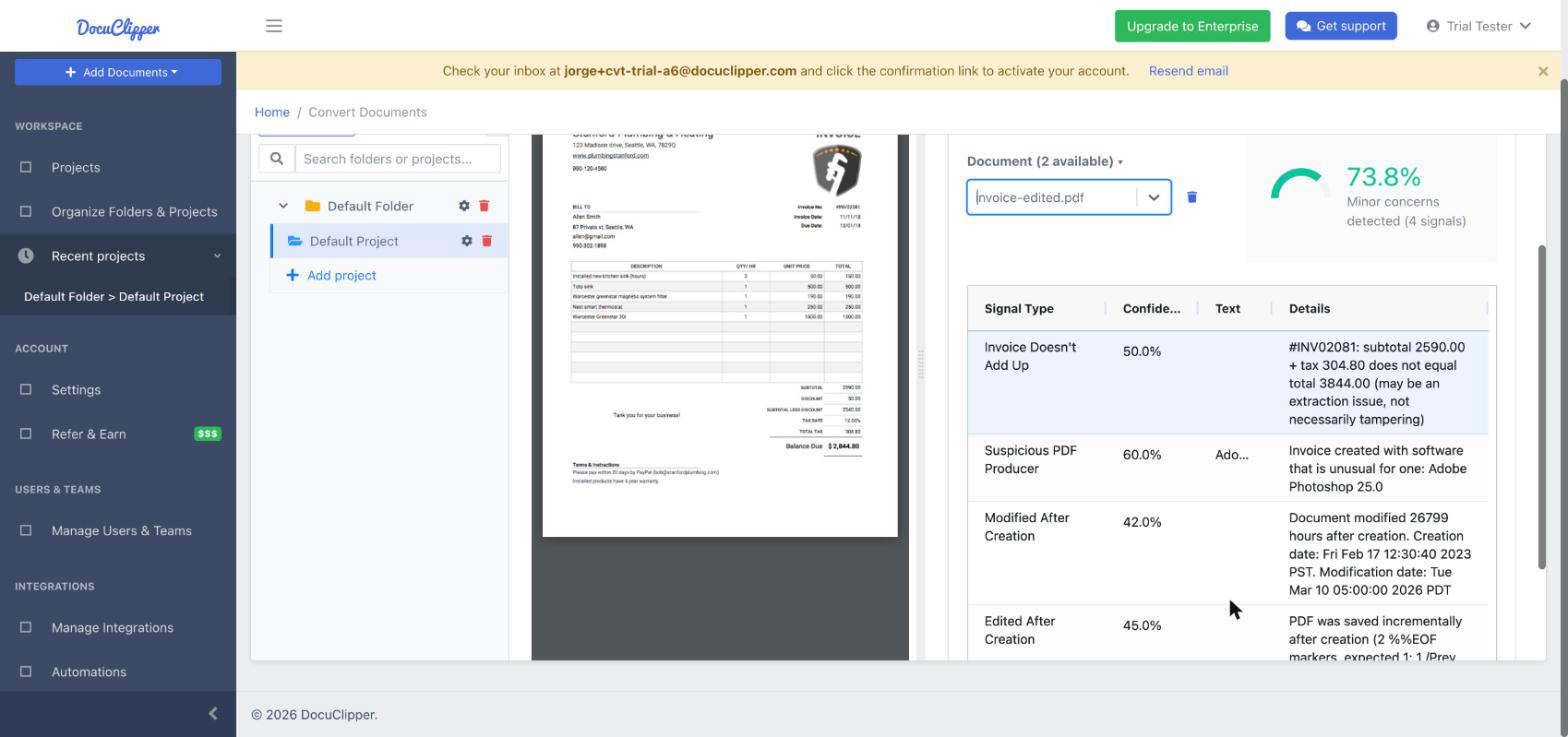
DocuClipper checks invoices, receipts and pay stubs for authenticity, the same way it checks bank statements. Open the Fraud Detection tab on the Invoices/Receipts or Forms tab of a project to see each document's 0 to 100 authenticity score and the signals behind it.
The checks fit the document type. A vendor can legitimately make an invoice in Word, Excel or QuickBooks, so those tools are normal on an invoice; a pay stub normally comes out of payroll software, so a word-processor pay stub is worth a second look. Each document type also gets its own math check.
Fraud detection is included on the Business and Enterprise plans, and on every plan during the free trial. On a Starter plan you can use it for 14 days from the first time you open a document in a Fraud Detection tab; after that, it is available by upgrading to Business. On a plan without it, the tab shows the upgrade prompt, even in a project with no documents yet.
A document is scored the first time you open it in the Fraud Detection tab (or ask for its fraud report through the AI assistant connection), and scored again after its extracted data is edited.
Where to find it
- Open a project and choose the Invoices/Receipts tab (invoices and receipts) or the Forms tab (pay stubs, W-2s, 1099s and other tax forms).
- Click Fraud Detection, next to Invoices and Analytics, or next to View forms.
- Pick a document in the Document list. The PDF opens on the left, and the score and the signals table on the right.
Download Project Fraud Report exports the score and signals of every document on that tab as a CSV.
What is checked on each document type
| Check | Invoices and receipts | Pay stubs | Tax forms (W-2, 1099, ...) |
|---|---|---|---|
| Edited after it was first saved | Yes, at lower confidence | Yes | Yes |
| Conflicting metadata | Yes | Yes | Yes |
| Producing software | Image editors only | Word processors (moderate) and image editors | Word processors (moderate) and image editors |
| Modified long after creation | Yes, at lower confidence | Yes | Yes |
| Unusual PDF version | Yes | Yes | Yes |
| Pasted-in amounts | Yes | Yes | Yes |
| Math | Invoice arithmetic | Pay stub arithmetic | None |
Edit history counts for less on invoices because invoices are often signed, stamped or annotated before they are sent, and those tools save their changes the same way an editor does.
The bank layout fingerprint (matching a statement against known-authentic bank templates) applies to bank statements only. See Understanding Bank Statement Fraud Detection.
Photos, screenshots and other non-PDF uploads get the math checks only, and the tab says so instead of reporting the document as authentic.
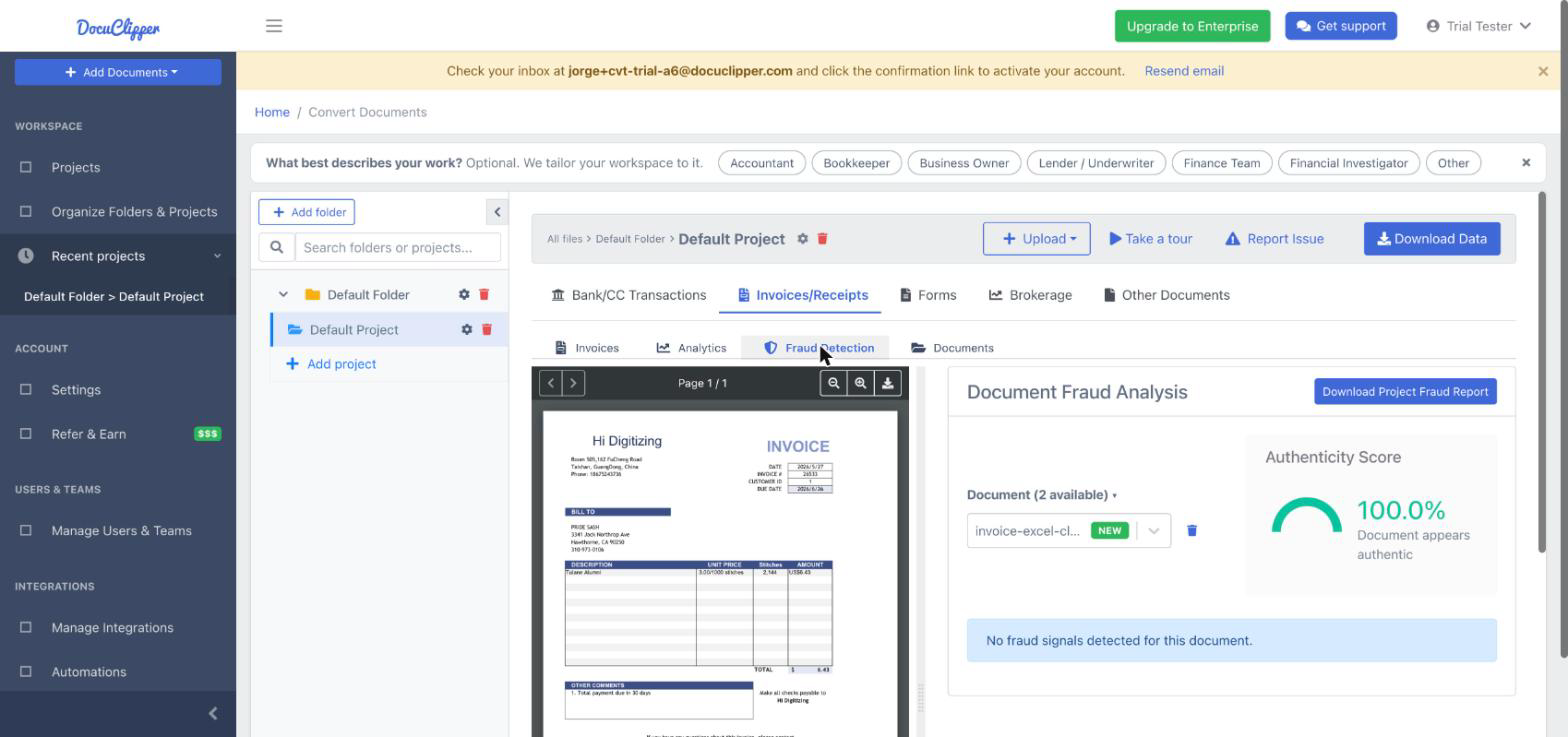
Invoice math
INVOICE_MATH_MISMATCH: the invoice doesn't add up
What we check: whether the subtotal, tax, charges and line items account for the printed total. It is the same check as the "Totals match" badge in the invoice editor, so the signal appears exactly when the editor says the numbers don't add up.
How it is reported: one signal per file, however many invoices the file holds, naming up to three invoices that don't add up, for example "2 of 12 invoices don't add up".
Legitimate causes: a line, tax or total read wrong, or a charge printed somewhere unusual. Correct the invoice in the editor and the score updates the next time you open the tab.
Statements of account, ledgers and other documents that are not bills are not judged.
Pay stub math
Pay stubs are read as key and value pairs ("Gross Pay", "Net Pay", "Total Deductions", the tax lines), each with its current and year-to-date amounts. Three checks run on what was read:
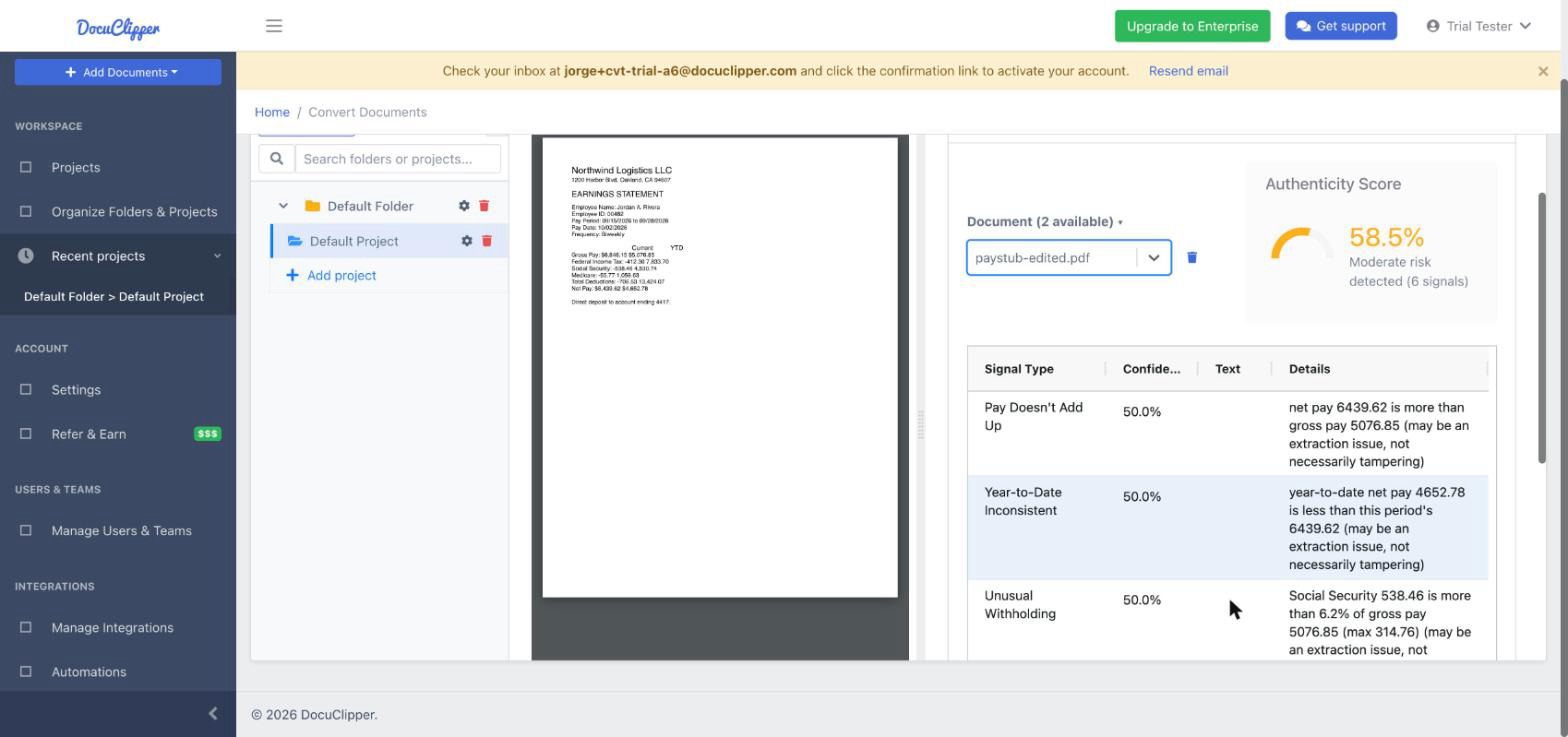
PAYSTUB_MATH_MISMATCH: the pay doesn't add up
What we check: net pay is not more than gross pay, net pay plus the printed deductions total is not more than gross pay, and year-to-date net pay is not more than year-to-date gross pay.
Why not "gross minus deductions equals net": many pay stubs print taxes and deductions as separate totals, so the "Total Deductions" line is often only part of what comes off gross pay.
PAYSTUB_YTD_INCONSISTENT: year to date below this period
What we check: the year-to-date gross and net pay are at least this period's amounts.
PAYSTUB_WITHHOLDING_ANOMALY: unusual withholding
What we check: Social Security is at most 6.2% of gross pay, Medicare at most 2.35% (1.45% plus the 0.9% additional Medicare tax), and federal income tax at most gross pay.
Legitimate causes for all three: a figure read wrong, or a current and year-to-date amount read in the wrong order. Open View forms and compare the extracted fields with the PDF.
How the score is calculated
The score starts at 100, and each signal subtracts its confidence times its weight. The PDF signals keep the weights listed in the bank statement article. The math signals are weak on purpose, because a misread figure causes them more often than tampering does:
| Signal | Points (at full confidence) | Usual confidence |
|---|---|---|
PAYSTUB_MATH_MISMATCH | 10 | 50% |
INVOICE_MATH_MISMATCH | 8 | 50% |
PAYSTUB_YTD_INCONSISTENT | 8 | 50% |
PAYSTUB_WITHHOLDING_ANOMALY | 6 | 50% |
The bands are the same for every document type: 90 to 100 appears authentic, 70 to 89 has minor concerns, 50 to 69 is moderate risk, and 0 to 49 is high risk.
Best practices for review
- Look for signals that stack up: an edited PDF whose numbers also don't add up deserves more attention than either alone.
- For an invoice with a high-risk score, confirm the invoice and the vendor's bank details with the vendor through a contact you already have on file, not one printed on the invoice.
- For a pay stub, compare it with the applicant's W-2 and with the matching deposits on their bank statements.
- A single signal is not proof of fraud.
FAQs
Does DocuClipper check invoices for fraud?
Yes. Invoices and receipts are checked for edits saved after they were created, conflicting metadata, image-editor producers, and totals that don't match the subtotal, tax and line items. Word, Excel and accounting software are normal for invoices and are not flagged.
Can DocuClipper detect a fake pay stub?
It flags the signs of one: a pay stub edited after it was created, made in a word processor or image editor, whose net pay is more than its gross pay, whose year-to-date figures are below the current period, or whose Social Security or Medicare is above the statutory rate.
Why did a genuine invoice get a lower score?
Signing, stamping or annotating a PDF saves it the same way an editor does, and a misread total triggers the invoice math signal. Review the signals: a single low-weight signal on its own is common on genuine invoices.
Are W-2s and 1099s checked?
Yes, with the PDF checks (edit history, metadata, producing software, pasted-in amounts). They have no math check yet.
Can I ask ChatGPT or Claude about a document's score?
Yes. If you connect DocuClipper to ChatGPT or Claude, you can ask whether a statement, invoice or pay stub looks edited. The assistant gets the same score, risk band and signals shown in the tab.