
For property managers and leasing teams 4.7/5(124 reviews)Trusted by 10,000+ finance teams
Catch edited bank statements before you approve the lease
Upload the statements applicants send you. Fraud Detection gives each one a 0 to 100 authenticity score with the evidence behind every flag, from edits saved after the bank issued it to balances that don't add up. Then verify income from the same statements, rent-to-income included. Any bank, no per-applicant fee.
4.7/5(124 reviews)Trusted by 10,000+ finance teams14-day free trialNo credit card required
Last updated:
What software can I use to check renters' bank statements?
DocuClipper checks the bank statement PDFs rental applicants send you, from any bank, and gives each one a 0 to 100 authenticity score. It looks for edits saved after the bank issued the file, editing software such as Word, Photoshop or Canva, metadata that contradicts itself, pasted-in amounts, an unfamiliar layout and balances that don't add up, then verifies income from the same statements: average monthly income without own-account transfers, recurring sources and the rent-to-income ratio.
- Checks per statement
- Edit history, metadata, producer, pasted-in amounts, layout fingerprint, balance math
- Statements scored
- 1.49 million since April 2025
- Pricing
- Per page, from $159/month for 640 pages. No per-applicant fee, unlimited users
- Try it
- Included in the 14-day free trial, no credit card
Source: DocuClipper production data. Authenticity scores April 6, 2025 to October 11, 2026.
How can you tell if a tenant's bank statement is fake?
An edited statement usually gives itself away in the file, not on the page. A real statement is generated by the bank once, and its balances tie out. These are the seven things DocuClipper checks on every PDF, and the innocent explanations to rule out before you decide.
The PDF was edited after the bank issued it
Edits saved on top of the original file (an incremental update). Banks generate a statement in one pass, so appended changes mean someone opened and re-saved it.
Innocent causes: Some e-signature and annotation tools append changes the same way.
The file's metadata disagrees with itself
A PDF carries two metadata records. When they name different software, one was usually updated by an editor and the other left behind.
Innocent causes: Some document-management systems rewrite one record on import.
It was made in Word, Photoshop, Canva or a PDF editor
The producer field names the software that wrote the file. A bank statement produced by a word processor, image editor or online PDF editor deserves a closer look.
Innocent causes: The applicant scanned or re-saved the statement before sending it.
It was modified long after it was created
A large gap between the PDF's creation and last-modification time points to changes after issue.
Innocent causes: Archiving and batch-stamping systems.
An amount looks pasted in
Each amount's text height is compared with the rest of its row. A deposit typed over the original often comes out slightly larger or smaller, and the page and position are recorded.
Innocent causes: Bold totals and statements that mix font sizes by design.
The layout doesn't match the bank's real statements
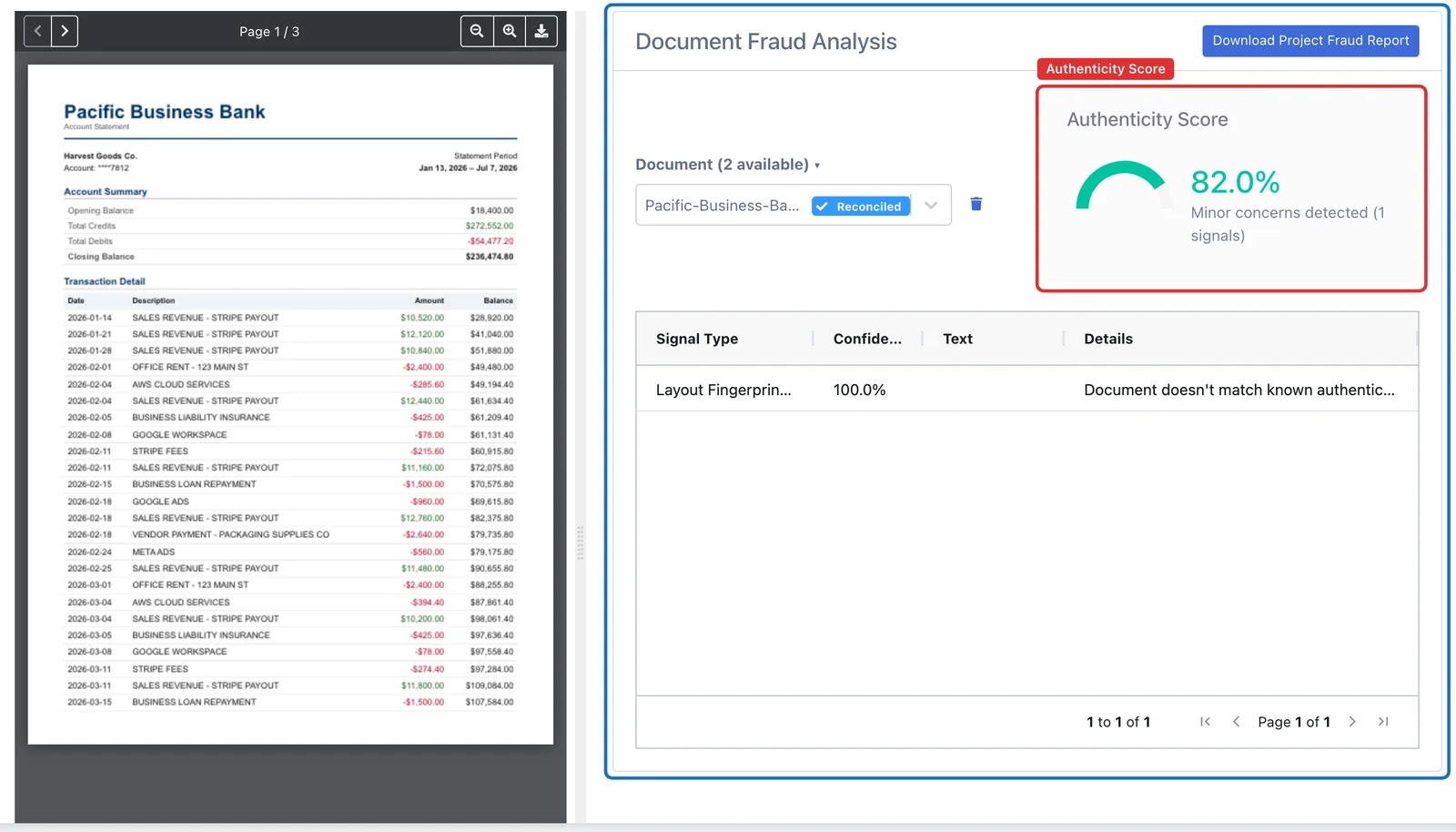
A fingerprint of the metadata, embedded fonts and page size is compared with a library of known-authentic statements.
Innocent causes: A new bank, a redesigned statement or a regional format the library hasn't seen yet. This is the most common flag and the weakest on its own.
The numbers don't add up
Opening balance plus deposits minus withdrawals must equal the closing balance. An inflated or inserted paycheck usually breaks this unless the balances were edited too.
Innocent causes: Missing pages, partial exports and statements cut off mid-period.
For the checks you can run by hand, read how to spot a fake bank statement. For the exact weight of each signal, see how the authenticity score is calculated.
How to check a renter's bank statement
The same seven steps for every application, whether you review ten a month or a few hundred.
- 1
Ask for the original PDF
Request each statement exactly as downloaded from online banking. Screenshots, phone photos and re-saved copies lose the file evidence, so they only get the balance check.
- 2
Upload the applicant's statements
Put each applicant's statements in their own project. Several months and several accounts can go in at once, from any bank.
- 3
Read the authenticity score and signals
Open the Fraud Detection tab to see the 0-100 score for each statement and every signal behind it, with its confidence.
- 4
Confirm the statements are complete
Check that every statement balances from its printed opening to its printed closing balance and that the months you asked for are all there.
- 5
Verify income from the bank statements
Open Advanced Analysis > Income for the average monthly income without transfers between the applicant's own accounts, the recurring income sources, a month-by-month table that marks missing statements, and the rent-to-income ratio for the unit's rent.
- 6
Verify flagged files at the source
For a low score, ask for a fresh download or verify with the bank using a phone number you found yourself and the applicant's written authorization. Never use contact details printed on the statement.
- 7
Apply the same process to every applicant
Run every applicant's statements through the same checks and record what you found and why you accepted or escalated the file.
What does the authenticity score mean?
Every statement starts at 100. Each signal found takes points off, weighted by how heavy the signal is and how confident the check is, so one weak flag barely moves the score while several strong ones pull it down fast. The score tells your team which files to look at first; the signals tell them what to look at.
- 1.49 million statements have been scored since April 2025, and 122,000+ bank and card statements were processed in the last 30 days.
- Each signal is listed with its type, confidence and details, beside the statement it came from.
- Download the project fraud report as a CSV to keep with the application file.
- Edit history is the strongest evidence: genuine bank PDFs rarely carry editor traces.
| Score | Interpretation |
|---|---|
| 90 to 100 | Appears authentic |
| 70 to 89 | Minor concerns detected |
| 50 to 69 | Moderate risk detected |
| 0 to 49 | High risk of fraud detected |
A guide, not a verdict. Review the signals before deciding on any applicant.
Can I see an applicant's deposits too?
Yes, and you can verify income from the bank statements in the same project. The same upload turns each statement into transactions, from any bank, and checks them against the statement's printed balances. Then Advanced Analysis > Income shows:
- Average monthly income, leaving out transfers between the applicant's own accounts, deposits the bank returned unpaid, refunds and loan proceeds.
- Recurring income sources, such as payroll every two weeks or a monthly Zelle from the same person, with the typical amount and when each was first and last seen.
- Income month by month, with months that are missing a statement marked, so a gap is visible rather than averaged away.
- The rent-to-income ratio once you enter the unit's monthly rent, next to the lowest authenticity score among the statements checked in Fraud Detection, all in one CSV for the application file.
Know the limits before you rely on it. It covers only the accounts the applicant uploaded, so income paid into another account is not seen. Zelle, Venmo and wire deposits count as income, so a friend sending money looks like a payer. Check and cash deposits carry no payer name, so ask what they were. It reads the statements; it does not contact employers or banks. For the underlying deposits, the Recurring and Transfers tabs and Cashflow Analysis are one click away. Lenders doing the same work should see income verification.
DocuClipper vs Snappt, Docuverus and Payscore
They solve the same problem in different places. Tenant-screening tools such as Snappt and Docuverus are built into the rental application. Bank-linked tools such as Payscore skip the PDF entirely. DocuClipper checks the statements you already receive.
Swipe the table sideways to compare all three.
| DocuClipper | Tenant-screening document toolse.g. Snappt, Docuverus | Bank-linked income verificatione.g. Payscore | |
|---|---|---|---|
| How the applicant provides evidence | Sends the bank statement PDFs you already ask for, by email, portal or upload | Uploads documents inside the rental application or screening flow | Connects a bank or payroll account; documents are a fallback |
| Where your team works | A separate web app; no rental application or property management integration | Inside your application or property management software, through their integrations | Report delivered to the reviewer after the applicant connects |
| What is checked | Bank and credit card statements: edit history, metadata, producer, pasted-in amounts, layout fingerprint, balance math. Pay stub PDFs: edit history, metadata and the pay math | Applicant documents such as pay stubs and bank statements; some also verify ID | Data comes from the bank, so there is no document to forge |
| Banks covered | Any bank's PDF statement, with no per-bank setup | Varies by vendor | Banks the connection service supports; some applicants can't connect |
| Pricing model | Per page on a monthly plan, from $159/month for 640 pages, unlimited users, no per-applicant fee | Usually per applicant or per screening; ask the vendor | Usually per verification or per unit; ask the vendor |
| Income | Calculated from the uploaded statements: average monthly income without own-account transfers, recurring sources, month by month with gaps marked, rent-to-income | Varies by vendor | Calculated from the connected bank or payroll account |
| What you get back | Authenticity score with every signal, a CSV fraud report, an income report in CSV, and every transaction in Excel or CSV | A verification result inside the screening workflow | An income report built from bank or payroll data |
| Best fit | Teams that already collect statement PDFs and want to check them in bulk, from any bank | Teams that want verification built into the application | Teams that can require applicants to connect an account |
Competitor descriptions are based on their public materials as of October 2026; check pricing and coverage with each vendor. If you want verification inside your application flow, or can require applicants to connect their bank, those tools fit better. If statements arrive as PDFs and your team reviews them anyway, DocuClipper checks every one from any bank without changing your application.
Apply the same verification to every applicant
Fair housing rules apply to how you screen, not only to who you approve. Ask every applicant for the same documents, run every file through the same checks, and treat a low score as a reason to verify, not to decline. Keep the fraud report with the file so you can show what was checked and why you decided. This is general information, not legal advice; local rules on screening and source of income vary.
What Customers Say
Real reviews from finance teams who review statements every day.
“DocuClipper has helped us eliminate several manual data entry processes, saving us a lot of time.”
KR
Kristin Mitchell
Accounting, United States
“It's a complete game-changer. Instead of spending hours combing through statements, we get the data we need almost instantly.”
MA
Matt
Lending, United Kingdom
“DocuClipper allowed us to enhance our advisory services, directly impacting our bottom line.”
SA
Sarah Winship
Accounting, United Kingdom
Try it on the statement you were unsure about. 14-day free trial, no credit card required.
Check a statement freeTenant Bank Statement Verification FAQs
Three kinds of tool do this. Tenant-screening document tools such as Snappt and Docuverus run inside the rental application. Bank-linked tools such as Payscore have the applicant connect their account instead of sending a PDF. DocuClipper checks the statement PDFs you already receive, from any bank: each gets a 0 to 100 authenticity score from its edit history, metadata, pasted-in amounts, layout and balance math, and the Income view verifies income from the same statements, including the rent-to-income ratio.
Check that the opening balance plus deposits minus withdrawals equals the closing balance, then look at the file itself: was it edited after the bank issued it, was it made in Word, Photoshop, Canva or a PDF editor, do its two metadata records disagree, and does any amount sit in a different font size from the rest of its row? DocuClipper runs all of these checks on each statement you open in its Fraud Detection tab and lists every signal it finds.
Only partly. A screenshot or photo gets the balance check, because the PDF edit history and metadata don't exist in an image, and the Fraud Detection tab says so instead of reporting the image as authentic. Ask applicants for the original PDF from online banking.
Pay stubs, yes: a pay stub PDF gets its own authenticity score from its edit history, metadata and pay math (gross, net, year-to-date and withholding). DocuClipper does not check IDs, does not verify employment with the employer, and does not connect to applicants' bank accounts. Use your screening provider for those checks.
Yes. The Income view verifies income from the bank statements in the project: the average monthly income, leaving out transfers between the applicant's own accounts, deposits the bank returned unpaid, refunds and loan proceeds; the recurring income sources such as payroll; a month-by-month table that marks months with a missing statement; and, when you enter the monthly rent, the rent-to-income ratio. It covers only the accounts the applicant uploaded, it counts Zelle, Venmo and wire deposits as income, and check and cash deposits show no payer, so ask about those. It does not contact employers.
No. The score is a signal to look closer, not a decision. Re-saved PDFs, scans, print-to-PDF and new bank templates can all lower it. Review the signals, ask for a fresh download, and verify with the bank before declining anyone.
No. DocuClipper is a separate web app. Leasing teams upload statements by drag and drop, and can also forward them by email or pull them from a watched Google Drive, Dropbox, OneDrive or Box folder. If you need verification inside the application itself, a tenant-screening tool fits better.
Fraud detection is included in the Business plan, from $159/month for 640 pages, and in Enterprise. Pricing is per page, not per applicant, with unlimited users, so a three-page statement uses three pages. Every plan includes it during the 14-day free trial, with no credit card.
Checking that documents are genuine is a normal part of tenant screening, but fair housing rules apply to how you use the result. Request the same documents from every applicant, run every file through the same checks, and base decisions on verified facts rather than the score alone. This is general information, not legal advice; check the rules in your state and city.