
Auto-Fill Payee and Memo From Check Images
DocuClipper detects check images on bank statements and automatically fills the payee and memo for each Check #N transaction. Checks are matched to ledger rows by check number and amount within the same job, and each project can turn auto-fill off.
Last updated
When a bank statement includes images of cleared checks (common on Bank of America small-business statements, TD Bank, and a handful of community banks), DocuClipper reads those check images during the normal statement extraction and uses them to auto-fill the payee and memo on the matching Check #1234 rows. No extra upload, no second job, no manual lookup. It's on by default, and you can turn it off for any project.
This page explains what enrichment does, how to spot it in the project view, and what to do when a row you expected to be enriched comes back blank.
Check-image pages are excluded from the ledger
Some statements print full-page or half-page images of the cleared checks alongside the transaction list. Left alone, those pages would look like extra transactions and inflate your ledger.
DocuClipper handles this automatically: when it detects check-image pages inside a bank-statement PDF, it excludes them from the transaction ledger so they don't create duplicate or overstated transactions. You don't need to deselect pages, split the PDF, or delete anything by hand.
The check details on those pages aren't thrown away - they're extracted separately and matched back to the corresponding Check #N row in the ledger, which is what powers the payee/memo auto-fill described below. So a statement with check images produces one clean transaction per check (from the ledger), enriched with the payee and memo (from the image), instead of one ledger row plus a stray page-image "transaction."
Item-image pages often mix other bank items in with the checks: deposit tickets, withdrawal slips and teller tickets. Those are not checks. DocuClipper recognizes them and skips them, so a deposit ticket never shows up as a check; the deposit itself is already on the ledger as a credit.
What gets enriched automatically
During a bank-statement conversion, DocuClipper:
- Scans every page for signs of check images: MICR text (the magnetic line at the bottom of a check), a "Check images" header, or a check-image layout DocuClipper recognizes for a specific bank. This is a cheap pass and runs on every job.
- Runs the check-image extractor on just the pages that pass, every one of them, however long the statement is. A 120-page statement with 50 pages of check images gets all 50 pages read.
- Matches each extracted check to a transaction row by check number + amount (exact). When check number + amount uniquely identify a single ledger row, the check matches that row - even if the date written on the check differs from the bank's clearing date by weeks. Written dates and clearing dates rarely line up, so DocuClipper does not require them to.
- Rewrites the row's description to
Payee - Memo (Check #1234), and when the row's memo field is empty copies the memo there too. The payee also fills the row's payee column.
Enrichment only fills a row whose description still looks like a default check placeholder (Check #1234, a bare check number, Image of Check #1234). If you've already edited a row's description, DocuClipper leaves it alone, so nothing is silently overwritten.
How the date is used: the date is not a matching window. It only comes into play as a tiebreaker. If several rows share the same check number and amount (for example, a recurring same-amount check with a repeated number across periods), DocuClipper uses the statement date to decide which row the check belongs to. When check number + amount are already unique, the date is ignored.
When a single job contains statements from more than one account, DocuClipper also uses the account label's last 4 digits as a tiebreaker so a check doesn't match a row in the wrong account. This is a secondary signal - the primary match is always check number + amount.
Turn auto-fill on or off for a project
Auto-fill is on for every project by default. If you'd rather keep check rows exactly as the statement prints them, for example because you assign payees in another tool or with your own rules, turn it off for that project:
- Open Project Settings: click the gear icon next to the project, or right-click the project and choose Edit settings.
- On the General tab, under Check Images, switch off Auto-fill payee and memo from check images.
The change saves as soon as you flip the switch. Projects inside the same folder keep their own setting.
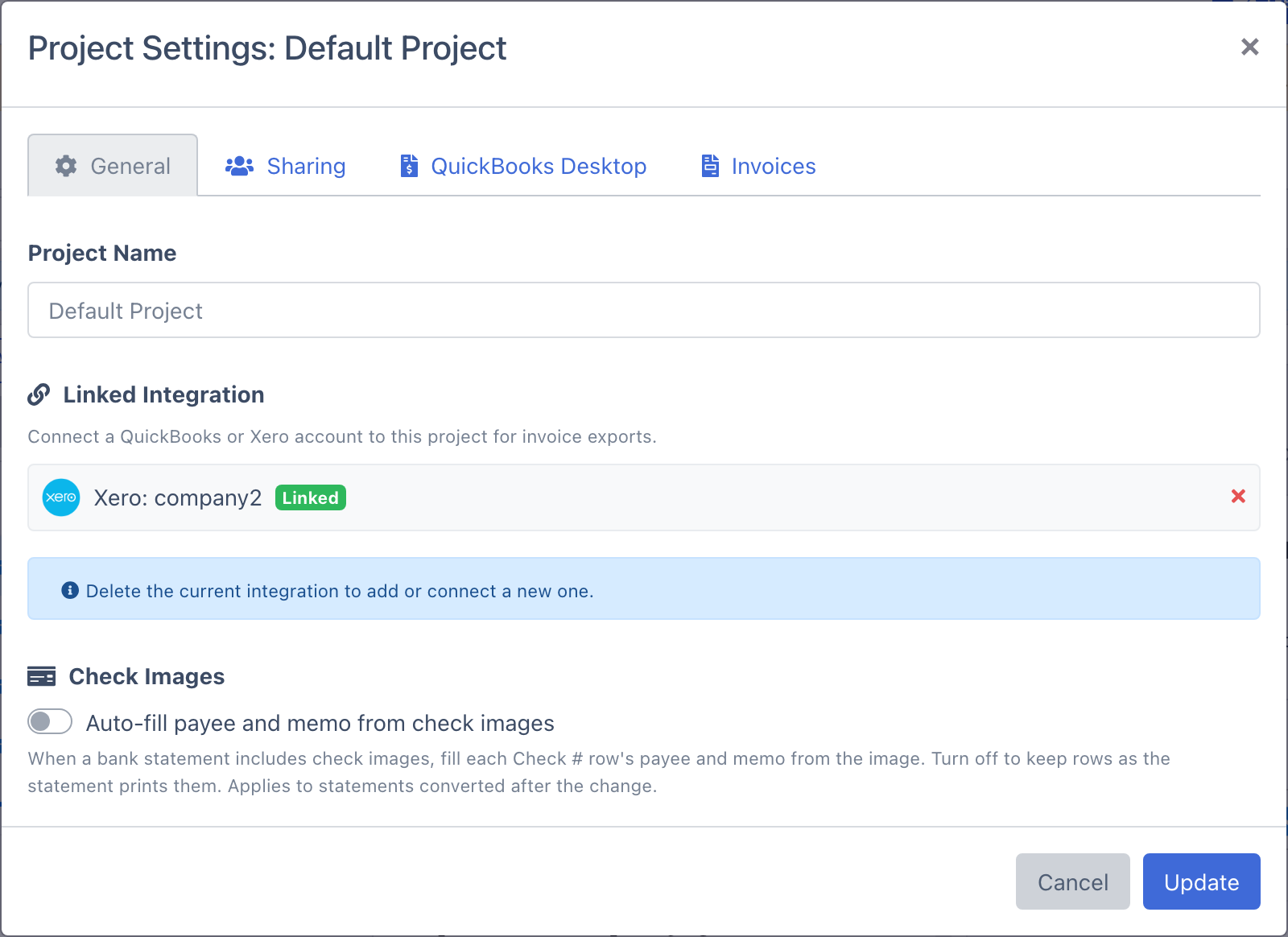
With auto-fill off, statements converted in that project:
- Keep each check row's description as printed, such as
Check #278, with the payee and memo columns left for you to fill. - Still leave the check-image pages out of the transaction list, so they never turn into extra transactions.
- Don't have their check images read at all, so conversions with many check-image pages finish a little faster.
A Check Images upload in that project still converts the checks themselves, one row per check. Those checks just aren't copied onto the project's statement rows. In a project with auto-fill off, upload a PDF that holds only check images (no statement pages) through Check Images to get one row per check.
The setting applies to statements converted after you change it. Statements converted earlier keep the payee and memo already filled in; edit those rows if you want them back to Check #N.
Seeing enrichment in the project view
Open a converted statement that had check images. In the transactions table, enriched Check #N rows read as Payee - Memo (Check #1234) in the Description column instead of a bare Check #1234, and the memo also appears in the row's memo field when it was empty. There's no separate badge - the payee and memo land in the normal columns, so they carry straight through to review, filtering, and every export format.
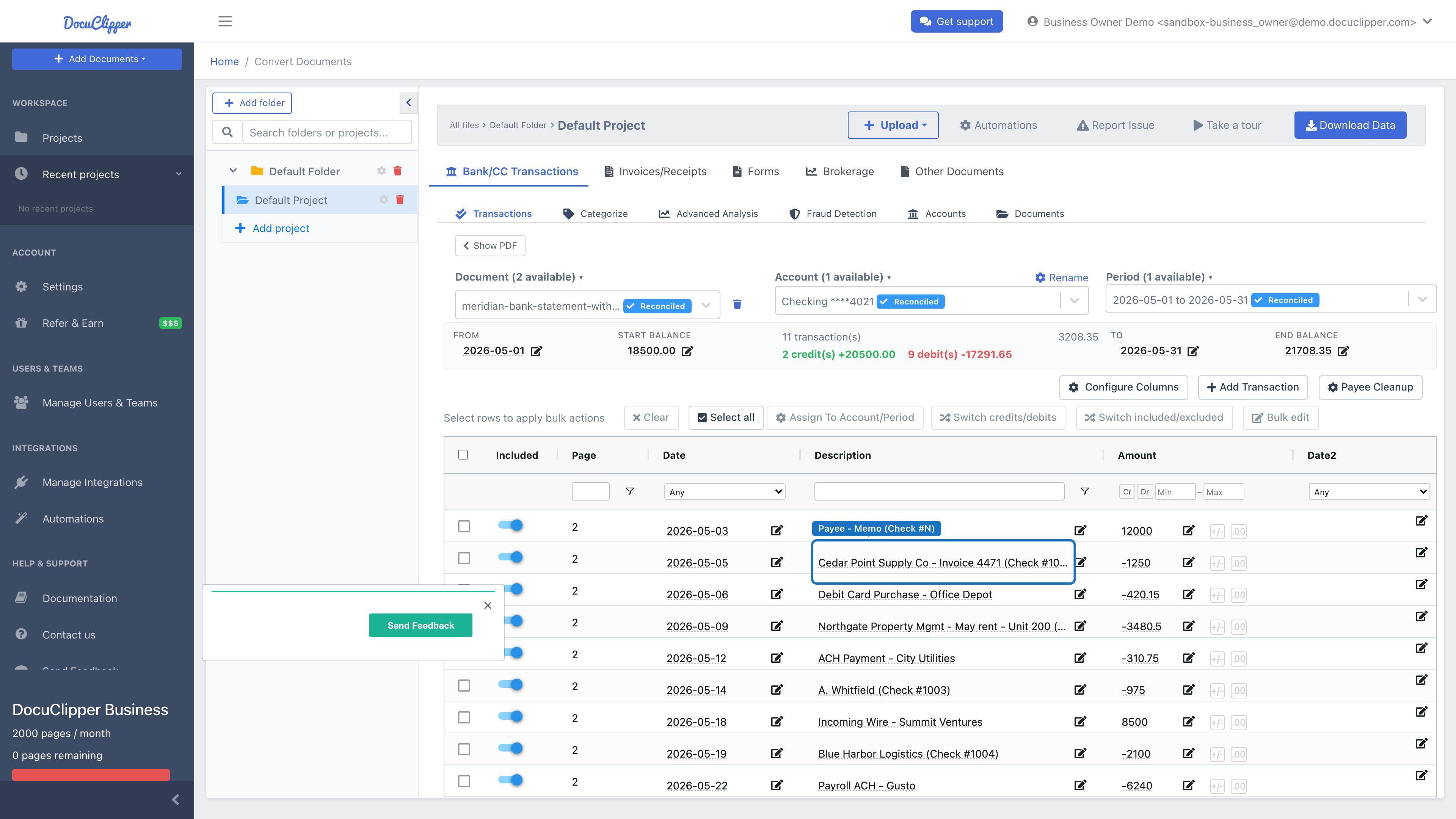
To confirm a row was enriched, compare its description to the check number: any Check #N row that now carries a payee name was filled from a check image.
Uploading check images together with the statement
Auto-fill works when the check images and the statement are processed together - either the check images are printed on the statement PDF itself, or you add the scanned check pages alongside the statement so they run in the same job. The matcher pairs checks to ledger rows within that batch using the (check number, amount, account last 4) rule described above.
If you scan a stack of paper checks and want them to enrich a statement, upload them with that statement so they're extracted in the same run. You can still run a standalone Check Images job (Add Documents → Check Images) to digitize checks on their own, but automatically linking a separately-processed check batch back to a statement that was converted in an earlier, separate job is on the roadmap - it isn't matched cross-batch today.
This matters when:
- Your bank stopped printing check images on statements but you keep paper copies - add those scans to the same job as the statement.
- You're reconstructing several months of history - group each statement with its checks.
- You're working on behalf of a client and have the statement and the checks as separate scans - upload them together.
For details on the standalone check flow, see Converting Check Images.
Statements uploaded through Check Images
If you upload a bank statement through Check Images instead of Bank Statements, DocuClipper recognizes it. When most pages of a PDF are statement pages rather than checks, it is converted as a bank statement: you get the full transaction list with its opening and closing balances and reconciliation, and the check-image pages auto-fill the payee and memo on the Check #N rows exactly as described above. Either upload type gives the same result for a statement, so there's no need to run it twice.
A PDF that is mostly checks (for example, a stack of scanned checks with a cover page, or just the check-image pages cut out of a statement) is converted as checks, one row per check.
When a row stays blank
Most large banks no longer print cleared check images on statements. Chase, for example, points users to chase.com to view check images. On those statements DocuClipper finds nothing to enrich, and that's expected behavior - not a missed extraction. The Check #1234 row will keep whatever description came from the OCR pass on the statement itself.
A row can also stay blank when:
- The check number on the statement and the check number on the image disagree (rare, usually an OCR slip).
- The check number on the image can't be read. Without a number the check can't be tied to a row, so the row keeps its statement description. The check isn't listed a second time, because the statement already has it.
- The amount was edited on either side after extraction. The matcher uses the current value, so editing breaks the link.
- The check number and amount aren't unique across the statement and DocuClipper couldn't disambiguate which row the check belongs to.
- The check images were processed in a separate job from the statement, rather than together (see "Uploading check images together with the statement").
- The statement and the check images are from different accounts, so the account tiebreaker kept them apart.
- The row's description was already edited by hand, so DocuClipper skipped it to avoid overwriting your change.
- Auto-fill is turned off for the project (see "Turn auto-fill on or off for a project").
If you think a row should have been enriched and wasn't, check the check images themselves first - open the source PDF and confirm the check number and amount match the row exactly.
Keeping or overriding an enriched description
Because enrichment only fills default Check #N placeholders and never touches a description you've edited, you're always in control:
- To revert an enriched row, edit the description (and memo) back to whatever you want. Your edit sticks, and re-running the conversion won't overwrite it.
- To re-link a row that didn't match, correct the check number or amount so it lines up with the check, then re-run the conversion (re-uploading the same files works).
FAQ
Does enrichment cost extra credits? No. The detection pass runs on every bank statement at no extra cost. The check-image extractor only runs on pages that already passed it, so you're not paying for a second job.
My Chase statement didn't get any payees auto-filled. Is this broken? No. Chase statements no longer include check images; they direct customers to view checks online instead. There's nothing for DocuClipper to extract. Most large U.S. banks behave the same way. Banks that still print cleared check thumbnails on the statement (Bank of America small-business, TD Bank, several regional banks) get auto-fill out of the box.
Auto-fill didn't run on a statement that I know has check images. Why? Auto-detection looks for a valid MICR line (the routing/account line at the bottom of a check), a "Check images" header in the OCR, or one of the check-image layouts DocuClipper recognizes for specific banks. If the check section scanned badly, the detector may miss it. Re-scan or photograph the check pages and add them to the same job as the statement (see "Uploading check images together with the statement") so they're extracted and matched in one run.
What if I edit the amount on a transaction row after enrichment? The link is exact on amount, so editing either side breaks the match. On the next reprocess the row simply won't be re-enriched. If you need the link back, restore the original amount so it matches the check again.
Can I turn auto-fill off? Yes, per project: Project Settings → General → Check Images, then switch off Auto-fill payee and memo from check images (see "Turn auto-fill on or off for a project"). To opt out a single row instead, edit its description; your version is always kept.
Does this work for personal checks I'm scanning myself? Yes - add the scanned checks to the same job as the statement you want enriched. As long as the check number and amount match a transaction row in that batch (and the accounts agree), DocuClipper will link them and fill in the payee and memo.