
Upload a Mix of Documents: Statements, Tax Forms, Invoices and Receipts
Drop a client's whole folder into the bank statement uploader. DocuClipper reads every file before converting it, converts W-2s, 1099s and pay stubs as tax forms and invoices and receipts as invoices in the same project, and points out copies, another person's statements and files dated far from the rest.
Last updated
Clients rarely send a tidy folder of bank statements. A year-end packet usually mixes statements with a W-2, a few invoices, a photographed receipt, the same statement downloaded twice, and sometimes a statement that belongs to someone else.
You don't have to sort it first. Upload everything on the Bank/CC Statements page and DocuClipper reads each file before it converts anything.
What you see after uploading
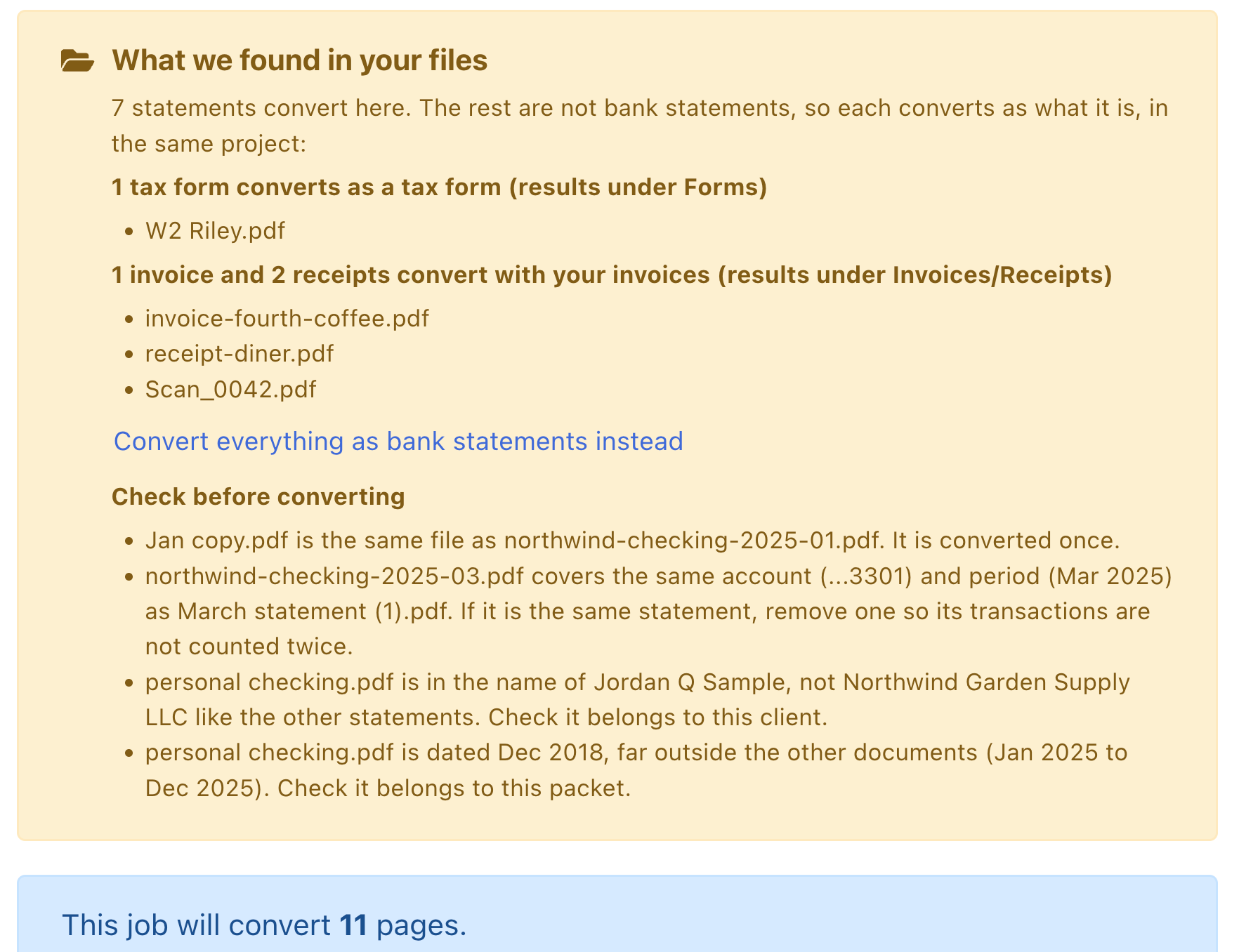
As soon as your files finish uploading, a What we found in your files notice appears above the page counter. It tells you:
- How many statements convert here. Bank, credit card and brokerage statements stay in this conversion.
- Which files are not statements, and where they go. Tax forms (W-2, 1099, 1098, K-1 and similar) and pay stubs convert as tax forms, with results under Forms. Invoices and receipts, including scanned or photographed receipts, convert as invoices, with results under Invoices/Receipts. Both stay in the project you are uploading into.
- What to check before converting, one line per file.
What DocuClipper checks for
| Check | What it means | What to do |
|---|---|---|
| Same file | Two uploaded files are byte-for-byte identical (for example Jan copy.pdf and the original). | Nothing. The file converts once and uses pages once. |
| Same account and period | Two different files cover the same account and statement period, for example a statement downloaded twice from online banking. | If they are the same statement, remove one before converting so its transactions are not counted twice. A statement already in the project counts too. |
| Another person's statement | A statement is in a different name than the other statements in the upload and the project. | Check it belongs to this client. Remove it, or upload it into that person's own project. |
| Dated far from the rest | A statement or tax form is dated more than about a year away from the other documents, for example a 2018 statement in a 2025 tax-year packet. | Check it belongs to this packet. |
These checks never block Convert. They are there so you can remove a file before it ends up in your totals, your coverage and your exports.
Keep everything as bank statements
If you want every file converted as a bank statement, click Convert everything as bank statements instead. The notice still lists what to check. Click Convert each file as what it is to go back.
After you click Convert
The statements convert as usual and you land on their results. A message tells you how many files are converting as tax forms or invoices and where to find them, and names any file that was converted once because it was uploaded twice.
Each file uses the same number of pages it would if you had uploaded it on its own page.
In the Report
The Packet summary in Reports repeats the same checks for the whole project: a second statement for the same account and period, a statement in someone else's name, and a document dated far from the others. Each line links to the rows behind it.
Good to know
- Checking happens in the background while you upload, and the notice shows Checking your files... until it is done. You never have to wait for it: a file still being checked when you click Convert converts as a bank statement. If it turns out to be a tax form, invoice or receipt, the Packet summary in Reports tells you and says where to upload it again.
- Scanned and photographed documents are read too. A scan takes a few seconds longer to sort than a PDF with text.
- A file DocuClipper is not sure about converts as a bank statement, the type of the page you uploaded on.
- To convert only tax forms or only invoices, you can still use their own upload pages: converting forms and invoices and receipts.
- Duplicate statements that are not identical files are also caught after conversion, at the transaction level: see detecting duplicate statements and transactions.