
Joining A Team With Your Trial Account
Accept an invitation to join your company's DocuClipper account using the free-trial login you already have, and what happens to your trial and your earlier conversions.
If you started a DocuClipper free trial and someone at your company invites you to their account, you can join it with the login you already have. You don't need a new email address or a new password.
How to accept the invitation
- Open the email "... invited you to join ... on DocuClipper" and click Review the invitation.
- Sign in with the email address the invitation was sent to, as you normally do.
- Read the summary of what joining changes, then click Join to accept, or No thanks to decline.
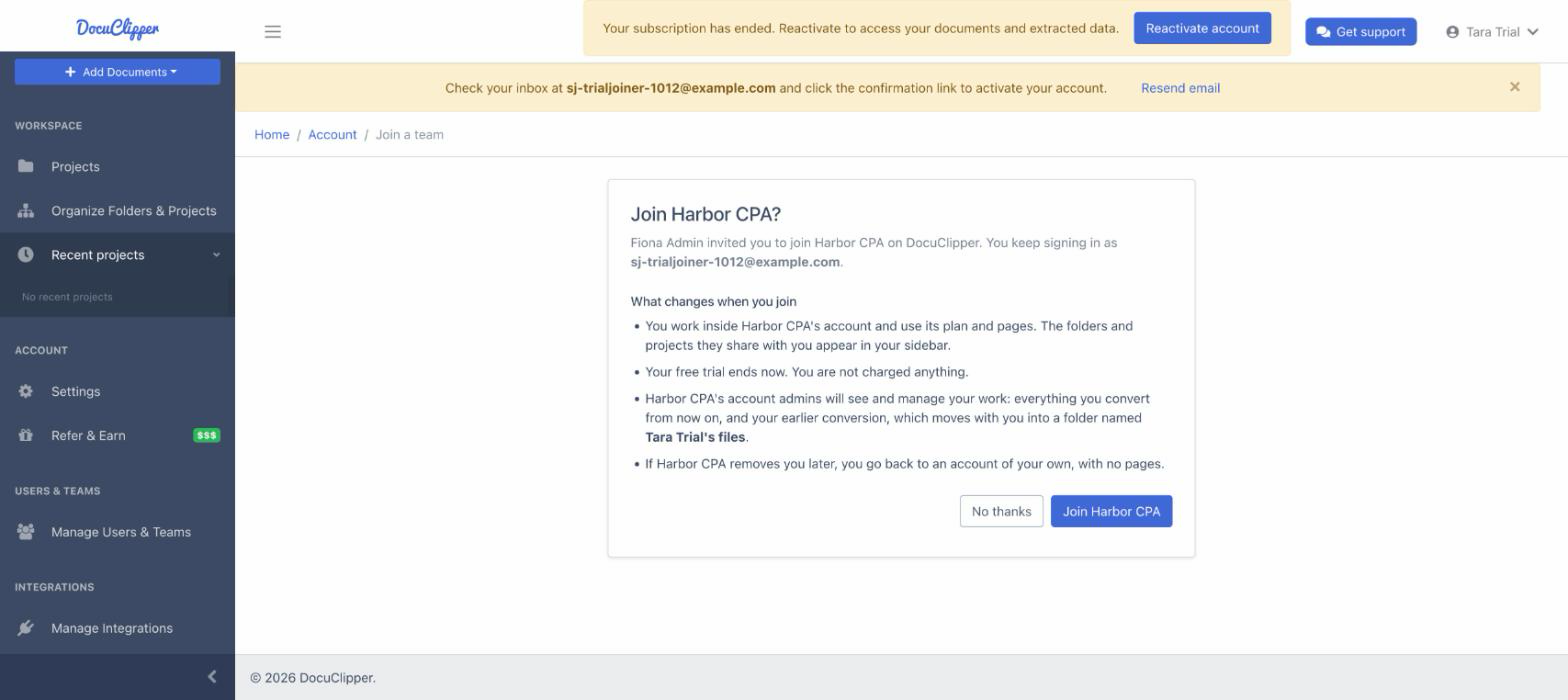
Nothing about your account changes until you click Join. After you join, DocuClipper opens your company's account, and you keep signing in with the same email and password.
What changes when you join
- You work in your company's account. You use its plan and pages, and you see the folders and projects your admins share with you.
- Your free trial ends, without a charge. Your trial subscription is closed and you are not billed anything. Pages left from your trial do not carry over; you use your company's pages instead.
- Your company's account admins see and manage your work. That covers everything you convert from now on and your earlier conversions, which move with you into a folder named after you, for example Sam Sole's files. Nothing is deleted. Other users of the account see that folder only if it is shared with them.
If your company removes you later
You go back to an account of your own and keep signing in with the same email and password. That account has no pages: your free trial does not restart. To keep converting, open Settings → Plan & Billing and choose a plan. The folders you brought into your company's account, and the conversions you made while you were on it, stay with your company.
If the invitation doesn't open
- "This invitation is for a different login": you are signed in with another email address. Click Sign out and switch account, then sign in with the address the invitation was sent to.
- "This invitation has expired": invitations are valid for 14 days. Ask the person who invited you to resend it.
- "This invitation is no longer valid": it was withdrawn, already used, or replaced by a newer one. Use the most recent invitation email, or ask for a new one.
- "You cannot join ... with this login": only free-trial accounts can join another account. If you have ever paid for DocuClipper with this login, ask your admin to invite a different email address. See Getting Error When Adding User.