
Understanding Charges After Trial Period In DocuClipper
What happens when your DocuClipper free trial ends: no automatic charge, how to start a paid plan, and what the refund policy covers.
Last updated
DocuClipper offers a free trial so you can test the software before paying. This article explains what happens when the trial ends and how billing begins.
You are not charged automatically
DocuClipper does not collect a credit card when you sign up, so nothing is billed automatically when your trial ends. The trial is preview-only: you can upload and process documents, but the free trial exports one sample per account (10 transactions, 3 invoices or receipts, 3 tax forms) until you subscribe. See the DocuClipper Free Trial article for what's included.
When the trial ends, your extracted data stays in your account - you simply can't export it in full until you start a paid plan.
Starting a paid plan
To unlock full exports, choose a plan and enter payment details:
- Log in to DocuClipper. If your trial has ended, you'll be prompted to select a plan.
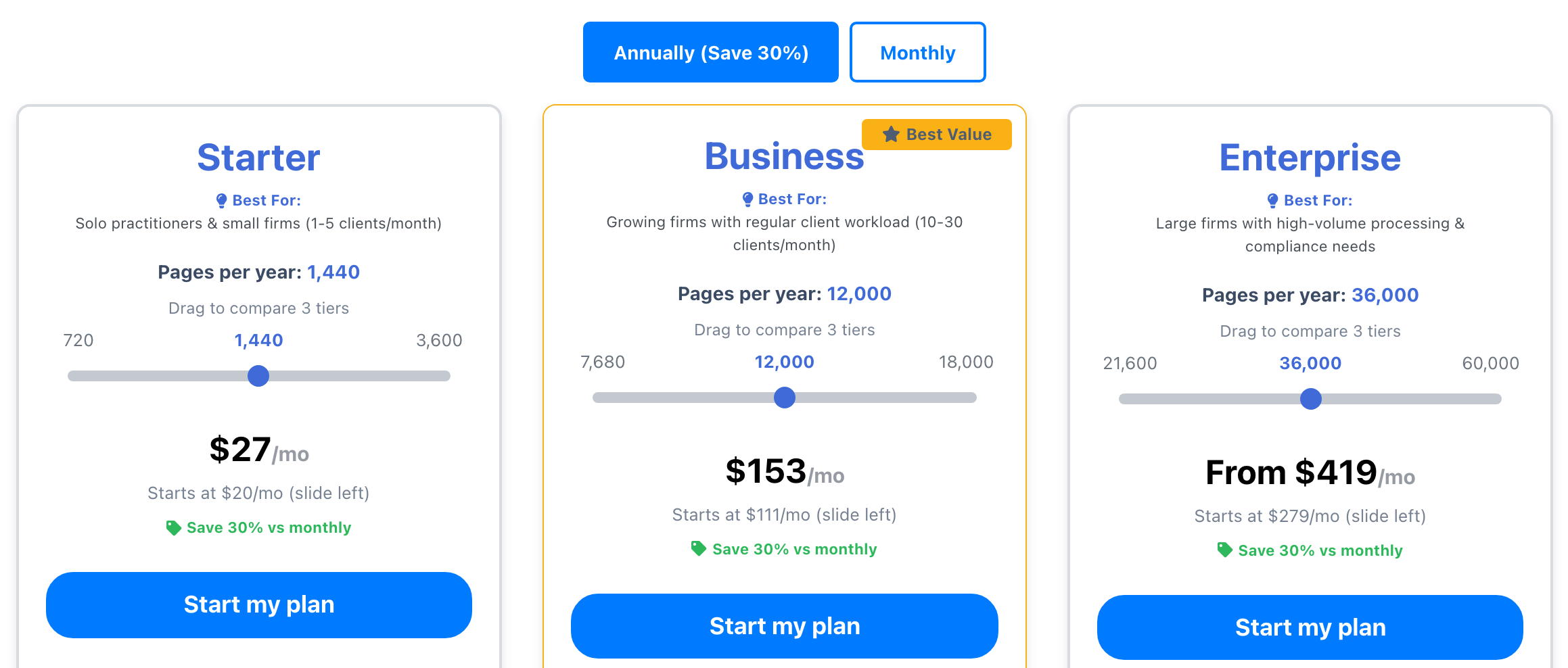
- Pick a billing cycle (annual or monthly) and a plan. On each plan card, choose how many pages you need: click one of the page counts above the slider, or drag the slider. The price updates as you go. Then click Start my plan and confirm.
- Enter your payment details at checkout. Billing begins when you subscribe, and your monthly page allowance is available immediately.
Refund Policy
We offer a free trial precisely so you can confirm DocuClipper meets your needs before paying. Once a paid period has started, subscription charges are not refunded or prorated, and cancelling stops the next renewal. Charges made in error are always corrected. Read the full Refund Policy.